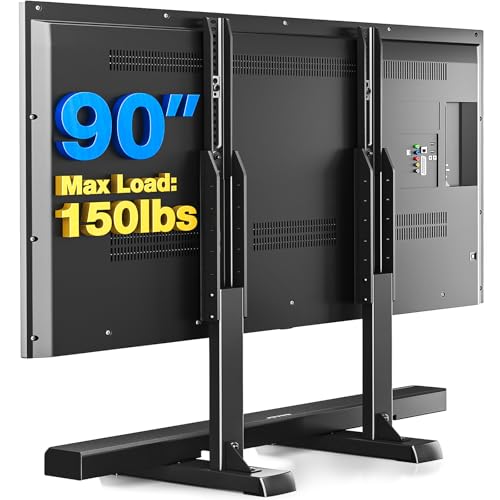
Mounting a 75-inch TV is a significant investment, and finding the right TV stand mount for 75 inch TV is critical for both safety and aesthetics. A television of this size typically weighs between 60 and 100 pounds, making it essential to choose a stand that offers robust support, a compatible VESA pattern, and a design that fits your living space. This guide will walk you through every consideration, from weight capacity and mounting mechanisms to styling and safety, so you can make a confident purchase.
Key Takeaways
- Weight Capacity: Choose a stand rated for at least 1.5 times the weight of your TV (typically 100–150 lbs).
- VESA Compatibility: Most 75-inch TVs use a VESA pattern of 400x400, 600x400, or 800x400. Verify yours.
- Mount Type: Integrated mounts offer stability, while separate stands with wall-mount compatibility provide flexibility.
- Safety First: Always anchor the stand to the wall and use anti-tip straps.
Why Your 75-Inch TV Needs a Specialized Stand Mount
A 75-inch TV is not just a larger version of a 55-inch model; it is a substantial piece of equipment that demands careful consideration. Standard TV stands often lack the weight capacity and stability required for a screen this size. A dedicated TV stand mount for 75 inch TV is engineered with a wider base, stronger materials (often metal or reinforced wood), and a mounting system that can securely hold the TV in place. Without these features, you risk the TV tipping over, which can cause injury and irreparable damage to the screen.
Moreover, the viewing experience is greatly enhanced when the TV is positioned at the correct height. A proper stand mount allows you to adjust the viewing angle and ensures the TV is stable, reducing glare and improving comfort. For those who prefer a minimalist look, a floating entertainment center can pair beautifully with a wall-mounted 75-inch TV, creating a clean and modern aesthetic.
Key Factors to Consider When Choosing a TV Stand Mount for a 75-Inch TV
1. Weight Capacity and Build Quality
The most important specification is the weight capacity. A 75-inch TV can weigh anywhere from 60 to over 100 pounds without the stand. You should choose a TV stand mount that supports at least 1.5 times the weight of your TV to ensure a safety margin. Look for stands made from heavy-duty materials such as powder-coated steel, solid wood, or engineered wood with metal reinforcements. Flimsy particle board is a recipe for disaster with a large TV.
If you are also considering a wall mount, ensure the mount itself is rated for the weight. For a secure installation, you might need a no-stud wall mount if your wall studs are not positioned ideally, though this is more common for smaller TVs. For a 75-inch TV, always aim to mount into studs whenever possible.
2. VESA Pattern Compatibility
VESA (Video Electronics Standards Association) defines the standard mounting hole patterns on the back of TVs. Most 75-inch TVs have a VESA pattern of 400x400 mm, 600x400 mm, or 800x400 mm. Before purchasing a stand, check your TV's manual or the manufacturer's website for its exact VESA pattern. The stand you choose must support this pattern. Many stands come with adjustable mounting brackets that can accommodate a range of VESA sizes, offering flexibility.
3. Integrated Mount vs. Separate Wall Mount
There are two main types of TV stand mounts for a 75-inch TV:
- Integrated Mount Stands: These stands have a built-in bracket or pole system that the TV attaches to directly. They are often more stable and easier to assemble, as everything is designed to work together. They are ideal if you want a single, cohesive furniture piece. You can find these in styles ranging from a rustic TV stand for 75 inch TV to a sleek metal TV stand for 75 inch TV.
- Stands with Wall-Mount Compatibility: These are essentially media consoles that are designed to sit below a wall-mounted TV. They provide storage and hide cables, but the TV is mounted separately on the wall. This setup offers a very clean look and is perfect for modern homes. If you go this route, you will need a separate wall mount, such as a heavy-duty TV wall mount (which can also handle 75-inch TVs).
4. Stability and Safety Features
A 75-inch TV is top-heavy and can easily tip over if the stand is not stable. Look for stands with a wide, low base to prevent tipping. Many quality stands include anti-tip hardware, such as straps or brackets that anchor the stand to the wall. Always use these features, especially in homes with children or pets. Additionally, consider a TV stand protector to keep the surface free from scratches and spills.
For a more permanent and secure solution, a TV stand for 75 inch TV wall mount combination allows you to mount the TV on the wall while using a console for equipment, offering both safety and style. If you are mounting on a wall, ensure you use a guide for mounting a 75-inch TV on the wall to get it right.
5. Size and Proportions
The stand should be wider than the TV to provide a stable base and a balanced look. As a rule of thumb, the stand should be at least as wide as the TV, and ideally a few inches wider. For a 75-inch TV, which is approximately 65-66 inches wide, look for a stand that is at least 70 inches wide. A tall TV stand for 75 inch TVs can elevate the screen for better viewing, while a low-profile stand creates a more modern, understated look. If you have a corner space, a corner TV mount for 75 inch TV can be a space-saving solution.
6. Storage and Cable Management
A large TV often comes with multiple devices: cable boxes, gaming consoles, soundbars, and streaming sticks. A good TV stand mount for a 75-inch TV should offer ample storage in the form of shelves, drawers, or cabinets. Open shelving provides easy access and ventilation for electronics, while closed cabinets hide clutter. Cable management cutouts are also essential to keep wires organized and out of sight. For a clutter-free look, consider a TV stand with storage for living room that complements your decor.
7. Style and Aesthetics
Your TV stand is a major piece of furniture in your living room, so it should match your personal style. Whether you prefer a modern TV cabinet design, a wooden TV cabinet design, or a white TV stand, there is a mount stand to suit your taste. For a cozy, farmhouse feel, a farmhouse TV stand and coffee table set can tie the room together. If you love a mid-century vibe, a mid-century modern TV stand (which can often accommodate larger TVs) is a stylish choice.
Top Recommendations: TV Stand Mounts for 75-Inch TVs
To help you narrow down your options, here is a comparison of some of the best types of TV stand mounts for a 75-inch TV. Prices are approximate and reflect current market rates.
| Type | Weight Capacity | VESA Compatibility | Key Features | Price Range |
|---|---|---|---|---|
| Integrated Mount TV Stand (Wood) | Up to 150 lbs | 400x400 to 800x400 | Storage shelves, cable management, rustic or modern finishes | $300 – $800 |
| Integrated Mount TV Stand (Metal/Glass) | Up to 200 lbs | 600x400 to 800x400 | Sleek design, tempered glass shelves, swivel functionality | $250 – $700 |
| Media Console + Wall Mount | Varies (Console: 100+ lbs; Mount: 150+ lbs) | Depends on mount | Clean look, ample storage, requires separate wall mount | $400 – $1,200+ |
| Corner TV Stand with Mount | Up to 120 lbs | 400x400 to 600x400 | Space-saving, triangular design, often includes storage | $200 – $600 |
| Mobile TV Stand with Mount | Up to 150 lbs | 400x400 to 800x400 | Wheels for mobility, sturdy frame, often adjustable height | $150 – $500 |
When shopping, you may also encounter specialized options like a highboy TV stand for 75 inch TV or a mobile TV stand for 75 inch TV for flexible room layouts. If you are looking for a statement piece, a tabletop TV stand for 75 inch TV can be a great alternative if you already have a large entertainment unit.
Installation Tips for Your TV Stand Mount
Once you have chosen your stand, proper installation is key to safety. Follow these steps:
- Read the Manual: Every stand is different. Follow the manufacturer's instructions carefully.
- Gather Tools: You will likely need a screwdriver, drill, level, and a helper. A 75-inch TV is a two-person job.
- Prepare the Stand: Assemble the stand on a soft, clean surface to avoid scratches.
- Attach the Mounting Brackets: Secure the VESA brackets to the back of your TV before lifting it.
- Lift with Care: With a helper, carefully lift the TV and align it with the stand's mounting plate.
- Secure and Level: Tighten all screws and use a level to ensure the TV is straight.
- Anchor to Wall: If your stand includes anti-tip hardware, install it now. This is non-negotiable for a TV of this size.
- Manage Cables: Use cable ties and routing channels to keep wires neat.
For wall-mounted setups, ensure you are mounting into studs. If you are unsure, consult a professional. You can also explore options like a TV mount for a 65-inch TV for a comparison, but always size up for a 75-inch TV.
Frequently Asked Questions (FAQ)
Can I use a standard TV stand for a 75-inch TV?
It is not recommended. Standard TV stands often lack the weight capacity and stability required for a 75-inch TV. Always choose a stand specifically rated for the size and weight of your television.
What is the best VESA pattern for a 75-inch TV?
Most 75-inch TVs use a VESA pattern of 400x400, 600x400, or 800x400. Check your TV's specifications to confirm. The stand you buy must support this pattern.
Do I need to anchor my TV stand to the wall?
Yes, absolutely. For a 75-inch TV, anchoring the stand to the wall is critical to prevent tipping. Most quality stands include anti-tip hardware. Use it.
How much should I expect to pay for a good TV stand mount for a 75-inch TV?
Prices vary widely based on material and features. You can find quality stands starting around $200 and going up to $1,200 or more for premium models with extensive storage and design features.
Is it better to mount a 75-inch TV on the wall or use a stand?
Both have advantages. A wall mount saves floor space and offers a clean look, but requires proper installation. A TV stand mount provides storage and flexibility. Your choice depends on your room layout and personal preference. For a combined solution, consider a TV stand for 75 inch TV wall mount setup.
Conclusion
Choosing the right TV stand mount for 75 inch TV is about balancing safety, functionality, and style. Prioritize weight capacity, VESA compatibility, and stability features. Consider your storage needs and the overall aesthetic of your room. With the right stand, your 75-inch TV will be a stunning and secure centerpiece for your entertainment space. For more inspiration, explore our guides on living room layouts with fireplace and TV and family room designs with fireplace and TV to seamlessly integrate your new setup.