
Corner TV Mount for 75 Inch TV: The Ultimate Buying Guide
Maximize your room's potential with the perfect corner TV mount for your 75-inch screen. Learn about full-motion arms, heavy-duty weight limits, VESA patterns, and expert installation tips to create a stunning, space-saving entertainment area.
View Recommended MountsWhy Choose a Corner TV Mount for a 75-Inch TV?
Placing a massive 75-inch TV in the corner of a room is a brilliant design choice. It frees up valuable wall space for windows, artwork, or shelving, and it can actually improve the viewing experience by angling the screen toward the center of the room. However, a standard flat wall mount won't work in a corner. You need a specialized corner TV mount for 75 inch TV that extends, swivels, and tilts to achieve the perfect viewing angle.
Unlike smaller TVs, a 75-inch screen is heavy (often weighing between 60 and 90 pounds) and has a wide footprint. A corner mount must be heavy-duty, engineered with robust steel arms, and designed to handle the substantial leverage of a large panel. This guide will walk you through everything you need to know to make a confident purchase.
Key Factors When Buying a Corner TV Mount for 75-Inch TVs
Before you buy, you must consider several critical factors to ensure safety, functionality, and compatibility. Here’s what to look for:
1. Weight Capacity
This is the most important specification. Your mount must be rated to hold at least double the weight of your TV. A typical 75-inch TV weighs between 60 and 90 lbs. Therefore, look for a mount with a weight capacity of at least 150 lbs, though 200 lbs is even better for peace of mind. Always check the exact weight of your specific TV model in its manual or on the manufacturer's website.
2. VESA Compatibility
VESA (Video Electronics Standards Association) defines the mounting hole pattern on the back of your TV. 75-inch TVs typically use a VESA pattern of 400x400, 600x400, or even 800x400. Ensure the corner mount you choose supports your TV's specific VESA pattern. Most heavy-duty mounts are designed to accommodate a wide range of patterns.
3. Full-Motion vs. Tilting
For a corner installation, a full-motion mount is almost always necessary. A full-motion mount allows you to extend the TV away from the wall, swivel it left or right, and tilt it up or down. This flexibility is crucial for aiming the screen toward your seating area. A simple tilting mount will not give you the articulation needed to clear the corner walls. Look for mounts with a long extension arm (often 20+ inches) and a wide swivel range (e.g., +/- 90 degrees or more).
4. Wall Type and Construction
Corner mounts are typically installed on a single wall near the corner, but they need to be anchored securely. You must identify whether you are mounting to a wood-stud wall, a concrete wall, or a metal-stud wall. For a 75-inch TV, you must anchor the mount into at least two studs or use heavy-duty concrete anchors. If you have a no-stud wall or are unsure, consider a no-stud wall mount solution or consult a professional.
5. Cable Management
A large TV in a corner can lead to a tangle of cables. Look for a mount with integrated cable management channels or covers. This keeps your setup looking clean and prevents cables from being pinched or stressed when the TV is moved.
Corner Mount vs. Other Mounting Options for 75-Inch TVs
To help you decide if a corner mount is right for you, here's a quick comparison with other popular options:
| Mount Type | Best For | Pros | Cons |
|---|---|---|---|
| Corner TV Mount | Unused corners, rooms with limited wall space, angled viewing. | Space-saving, excellent viewing angles, unique design focal point. | Can be complex to install, requires heavy-duty hardware, may protrude into the room. |
| Full-Motion Wall Mount | Flat walls where you want flexibility to angle the TV. | Great articulation, easy to adjust, widely available. | Not ideal for corners as the arm may hit the adjacent wall. |
| Fixed Wall Mount | Flat walls with a permanent, straight-on viewing position. | Low-profile, affordable, very secure. | No adjustability, poor choice for a corner. |
| TV Stand | Renters, those who don't want to drill into walls, or need storage. | No installation required, portable, offers storage. | Takes up floor space, may not fit a 75-inch TV in a corner easily. See our guide to TV stand mounts for 75-inch TVs. |
Expert Installation Tips for a Corner TV Mount
Installing a 75-inch TV on a corner mount is a two-person job. Here are some tips to make it safe and successful:
- Locate Your Studs: Use a high-quality stud finder to locate the center of the studs. Mark them clearly. For a 75-inch TV, you should aim to hit two studs. If you can only hit one, you may need to install a plywood backing board or use a specialized heavy-duty anchor.
- Pre-Drill Pilot Holes: Drill pilot holes into the studs to prevent the wood from splitting and to make driving the lag bolts easier.
- Use the Right Hardware: Always use the lag bolts provided with the mount. Do not substitute them with drywall screws. For concrete walls, use the appropriate concrete anchors.
- Check the Extension: Before mounting the TV, extend the arm fully to ensure it clears the corner and any adjacent walls. You need enough room to swivel the TV without it hitting the wall.
- Get Help: A 75-inch TV is large and awkward. Have a friend help you lift it onto the mount. Do not attempt this alone.
- Consider a TV stand protector: If you are placing a stand beneath the TV, protect your floors and furniture.
Pro Tip: If your heart is set on a corner setup but you also want the look of a traditional entertainment center, consider a corner TV stand with a fireplace. It provides a stylish base and often includes a mount, combining the best of both worlds.
Alternative Corner TV Solutions for 75-Inch Screens
If a wall-mounted corner solution isn't feasible for your space, consider these alternatives:
- Corner TV Stands: A dedicated corner TV stand is designed to fit snugly into a corner and can support a large TV. Look for a corner TV stand for 65 TV or larger models specifically rated for 75-inch screens. Some even come with built-in mounts.
- Mobile TV Stands: A mobile TV stand for 75-inch TV offers the ultimate flexibility. You can roll it into the corner for viewing and move it out of the way when not in use.
- Tall TV Stands: If you prefer a traditional furniture piece, a tall TV stand for 75-inch TVs can position your screen at the perfect height in a corner.
Recommended Corner TV Mounts for 75-Inch TVs
⚠️ AFFILIATE DISCLOSURE: This website contains affiliate links. As an affiliate Associate, we earn from qualifying purchases. If you make a purchase through these links, we may receive a small commission at no additional cost to you. Read our full affiliate policy.

Perlegear Corner TV Wall Mount Long Arm TV Mount Bracket for 37-75 Inch TVs | Full Motion Wall Mount with 32.37” Extension & Swivel Articulating Arm & Tilt, MAX VESA 600x400mm, Holds up to 100 lbs
Check price on Amazon
USX STAR Corner TV Wall Mount Long Arm Full Motion for 55 65 70 75 inch TVs | UL Listed, Fit 37-84" TV, Hold 100lbs, Swivel 180°, Tilt +5/-15°, Level +/-4°, 32" Arm Extension, VESA600x400mm, Single Stud
Check price on Amazon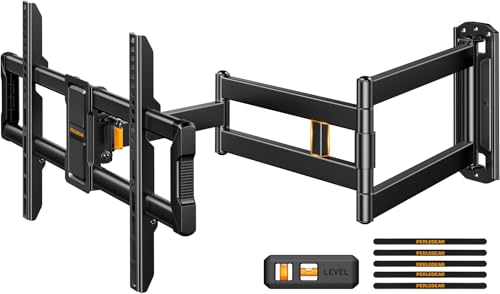
Perlegear Corner TV Wall Mount Long Arm TV Mount for 42-84 Inch TVs | Single Stud TV Mount with 37.2" Extension, Full Motion Wall Mount up to 150 lbs, Max VESA 600x400mm
Check price on Amazon
MOUNTUP 37.2" Long Arm TV Wall Mount for Most 42-75 Inch TVs, Full Motion Corner Wall Mount TV Bracket with Extension & Tilt & Swivel & Level Articulating Arm, Max VESA 600x400mm, Holds up to 99 lbs
Check price on Amazon
PERLESMITH Long Arm Full Motion TV Wall Mount for 42–90 inch TVs | 42.72″ extension, swivel, tilt, level, 150 lbs max load, fits 16″/18″/24″ wood studs, max VESA 800x400mm
Check price on Amazon
Perlegear TV Wall Mount Full Motion for 42–97 inch TVs up to 132 lbs | UL-Listed TV Mount Bracket with Tool-Free Tilt, Swivel, Extension, 12″/16″ Wood Studs, Max VESA 600 x 400mm, PGLF15
Check price on Amazon
MOUNTUP Full Motion TV Wall Mount with 30” Extension & Tilt & Swivel for Most 42-75 Inch TVs, Long Arm TV Mount Corner Bracket Articulating Arm Mount, Max VESA 600x400mm and Up to 77 lbs
Check price on Amazon
32" Long Arm TV Wall Mount for 32-75 Inch TV, Corner TV Bracket Single Stud | Long Extension Articulating Arms, Full Motion Swivel, Tilt, Level, Max VESA 600x400mm, Holds up to 99 lbs.
Check price on AmazonFinal Thoughts: Making the Right Choice
Investing in a high-quality corner TV mount for your 75-inch TV is the key to unlocking a functional and beautiful entertainment space in a room with limited wall space. Prioritize weight capacity, VESA compatibility, and full-motion articulation. By following the installation tips and considering the alternatives, you can create a setup that is both safe and stunning.
Remember to measure twice, check your studs, and get a friend to help. With the right mount, your large TV will become the perfect centerpiece for your corner, offering an immersive viewing experience from anywhere in the room.
Find Your Perfect Mount