
TV Mount for Studs 32 Inches Apart: The Complete Guide
Everything you need to know about mounting your TV when your wall studs are spaced 32 inches apart. Find the right mount, ensure safety, and get professional results.
SHOP RECOMMENDED MOUNTSQuick Answer: Standard TV wall mounts typically accommodate stud spacing of 16 to 24 inches. If your studs are 32 inches apart, you'll need a wide-span TV mount or a wall plate extender system designed for larger stud spacing. These specialized mounts distribute weight across the wider span, ensuring your TV stays safely on the wall.
Understanding 32-Inch Stud Spacing
Most homes in the United States are built with wall studs spaced either 16 inches or 24 inches apart on center. However, some older homes, custom builds, and certain commercial structures may have studs spaced 32 inches apart. This wider spacing can create a challenge when installing a standard TV wall mount, as the mounting plate may not align with both studs.
If you've discovered that your wall studs are 32 inches apart, don't worry — you have several excellent options. The key is choosing a mount that either spans the wider distance or uses a different mounting strategy altogether. For those who prefer a non-wall-mount solution, you might consider a TV mount that attaches to a TV stand or a table to put under a wall-mounted TV for a hybrid approach.
Why 32-Inch Stud Spacing Matters for TV Mounts
When you mount a TV on the wall, the mount must be securely fastened to the structural framing behind the drywall. Studs provide the necessary strength to support the weight of your television and mount. If the mount only attaches to one stud — or uses drywall anchors alone — it may not be safe, especially for larger TVs.
With 32-inch stud spacing, a standard mount designed for 16-inch or 24-inch spacing simply won't reach both studs. This is particularly important for heavier TVs. For example, if you're planning to mount a 75-inch TV on the wall or even a 55-inch TV, proper stud attachment is critical for safety.
Types of TV Mounts for 32-Inch Stud Spacing
There are several mount types specifically designed or adaptable for wider stud spacing. Here's a breakdown of your best options:
Wide-Span Wall Plates
These mounts feature extended horizontal wall plates that can span up to 32 inches or more, allowing you to drill into both studs securely. They're available in fixed, tilting, and full-motion designs.
Mounts with Adjustable Brackets
Some mounts come with sliding or adjustable brackets that can be positioned to align with wider stud spacing. This flexibility makes them ideal for non-standard wall configurations.
Multiple Stud Mounts
These heavy-duty mounts are designed to attach to three or more studs, distributing weight evenly. They're perfect for large TVs and walls with wider stud spacing.
Ceiling Mounts
If wall studs are problematic, a ceiling mount like a flip-down ceiling TV mount for 65-inch TV or a TV mount that folds up to ceiling can be an excellent alternative.
TV Mount Comparison for 32-Inch Stud Spacing
| Mount Type | Max Stud Spacing | Best For | Price Range |
|---|---|---|---|
| Wide-Span Fixed Mount | 32 inches | TVs 32–55 inches | $40–$80 |
| Wide-Span Tilt Mount | 32 inches | TVs 40–65 inches | $60–$120 |
| Wide-Span Full-Motion Mount | 32 inches | TVs 50–75 inches | $120–$250 |
| Multi-Stud Heavy Duty Mount | 32+ inches | TVs 65–85 inches | $150–$350 |
| Ceiling Mount | N/A | Any TV size | $100–$300 |
Recommended TV Mounts for 32-Inch Stud Spacing
⚠️ AFFILIATE DISCLOSURE: This website contains affiliate links. As an affiliate Associate, we earn from qualifying purchases. If you make a purchase through these links, we may receive a small commission at no additional cost to you. Read our full affiliate policy.

Pipishell Full Motion TV Wall Mount for Echo Show 21/15 and 13-43 Inch Flat Curved Screen TVs & Monitors, Max VESA 200x200mm up to 44lbs, TV Mount Wall Bracket with Rotation Swivel Tilt Extension
Check price on Amazon
USX Mount UL Listed TV Wall Mount for 42"-85" TVS, Fits 16" 18" or 24" Studs, Full Motion TV Mount Swivel Tilt Extension TV Bracket with Dual Articulating Arms, Max VESA 600x400mm, Load 110lbs
Check price on Amazon
Mounting Dream Full Motion TV Wall Mount for 32-70 Inch TVs up to 110lbs | Mount Bracket with Swivel and Tilt, TV Bracket with Articulating Dual Arms, Fits 16” Studs, Max VESA 400X400 mm, MD2380
Check price on Amazon
USX MOUNT TV Wall Mount for 32-74 inch Flat Screen/LED/4K up to 110lbs, Full Motion TV Mount Bracket with Swivel & Tilt Articulating Dual Arms, Max VESA 400x400mm, Fits 12/16" Wood Studs
Check price on Amazon
Auoace No Stud TV Wall Mount, Studless Drywall TV Hanger for 12-55 Inch TVs | No Drill, No Screws, No Damage, Dry Wall Flat Screen TVs Easy Install, VESA Bracket, up to 99 lbs, Include All Hardware Level
Check price on Amazon
USX MOUNT UL Listed TV Wall Mount for 42"-84" TVs up to 110lbs and 8"-24" Wood Studs, TV Mount with Tilt, Swivel & Extension, Wall Mounts Bracket with Dual Articulating Arms, Max VESA 600x400mm
Check price on Amazon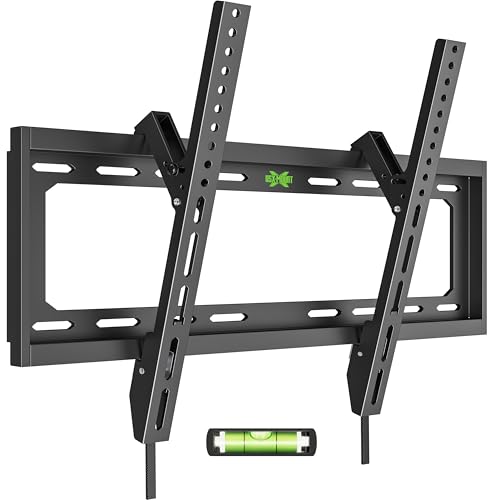
USX MOUNT Low Profile Tilt TV Wall Mount for 26-60 Inch TVs up to 99lbs | Quick lock design with 0°/-8° tilt adjustment; bracket supports VESA 400x400mm, fits 12"/16" wood studs/concrete/brick
Check price on Amazon
Antimbee No Stud TV Wall Mount, Studless 13 to 55" TVs Bracket, 100lbs Load | No Drill Install, All Hardware Include, Level, Max VESA 400x400mm, Drywall Hanger Fit LED LCD Flat, Curved Screen, Monitors
Check price on AmazonInstallation Tips for 32-Inch Stud Spacing
Installing a TV mount on walls with 32-inch stud spacing requires careful planning. Here are essential tips to ensure a safe and successful installation:
Pro Tip: Always use a stud finder to confirm stud locations before drilling. Mark the center of each stud with a pencil, then measure the exact distance between them. This ensures your mount aligns perfectly.
1. Verify Stud Locations: Use a high-quality stud finder to locate both studs. Mark their centers accurately. If you're unsure, a TV wall mount for 32-inch stud spacing guide can provide additional clarity.
2. Choose the Right Hardware: Use lag bolts that are at least 2.5 inches long to ensure they penetrate deep into the studs. Washers can help distribute the load more evenly.
3. Consider a Mounting Plate: If your mount doesn't span 32 inches, you can add a plywood backing board (painted to match your wall) that spans both studs. This creates a secure surface for your mount.
4. Check the Weight Rating: Ensure your mount is rated for at least twice the weight of your TV. This provides a safety margin. For larger TVs, consider a full-motion TV wall mount for 75-inch or a 85-inch TV wall mount full motion.
5. Level and Test: Before hanging the TV, ensure the mount is level. After installation, gently test the mount's stability before attaching the TV.
Pros and Cons of Mounting on 32-Inch Stud Spacing
Advantages
- Wider stud spacing can accommodate larger, heavier mounts
- More flexibility in positioning your TV horizontally
- Wide-span mounts distribute weight effectively
- Ideal for custom home theaters and media rooms
Challenges
- Standard mounts may not fit without adapters
- Fewer mount options compared to 16-inch spacing
- May require professional installation for heavy TVs
- Mounting hardware may need to be purchased separately
Alternative Solutions for 32-Inch Stud Spacing
If a traditional wall mount isn't feasible, consider these alternatives:
Ceiling Mounts: A TV mount that folds up to ceiling or a flip-down ceiling TV mount for 65-inch TV eliminates the need for wall studs entirely. These are excellent for rooms where wall mounting is impractical.
TV Stands with Mounts: A TV stand with swivel mount for 65-inch or a TV mount that attaches to a TV stand combines the stability of a stand with the flexibility of a mount. This is a great option for renters or those who prefer not to drill into walls.
Corner Mounts: A corner TV stand with mount for 75-inch can be an excellent solution for rooms with limited wall space. Corner mounts often have different stud requirements and can work well with wider spacing.
Floor Stands: A floor TV stand with mount for 65-inch provides a freestanding solution that doesn't require any wall attachment. This is ideal for rooms with problematic walls or for those who want flexibility in positioning.
Ready to Mount Your TV?
Browse our recommended wide-span TV mounts specifically designed for 32-inch stud spacing. Find the perfect mount for your TV size and wall configuration.
View Recommended MountsFrequently Asked Questions
Standard TV mounts are typically designed for 16-inch or 24-inch stud spacing. With 32-inch spacing, a standard mount won't reach both studs. You'll need a wide-span mount or a wall plate extender system. Alternatively, you can install a plywood backing board that spans both studs and attach the mount to that.
With a properly rated wide-span mount, you can safely mount TVs up to 85 inches or more on 32-inch stud spacing. The key is to choose a mount with an appropriate weight rating and to ensure both studs are securely engaged. For very large TVs, consider a multi-stud heavy-duty mount for added stability.
Use a high-quality stud finder with deep-scan capability. Mark the center of each stud, then measure the distance between them. If you're having trouble, a professional installer can help. You can also check your home's blueprints or building plans if available.
Wide-span TV mounts are generally priced similarly to standard mounts, though heavy-duty models for very large TVs may cost more. Expect to pay between $40 and $350 depending on the mount type, weight capacity, and features like full-motion articulation.
We strongly advise against mounting a TV using only drywall anchors, especially for larger TVs. Drywall alone cannot support the weight and leverage of a TV mount. If you cannot drill into studs, consider a ceiling mount, a floor stand, or a TV stand with a built-in mount instead.
Final Thoughts
Mounting a TV on a wall with 32-inch stud spacing is entirely possible with the right equipment. Wide-span mounts, adjustable brackets, and multi-stud mounts are all excellent solutions. For those who prefer alternatives, ceiling mounts and TV stands with mounts offer flexibility without compromising on safety or style.
Before you buy, always confirm your stud spacing, check the weight rating of your chosen mount, and follow the manufacturer's installation instructions carefully. If you're unsure, consult a professional installer. With the right approach, you can enjoy a secure, stylish TV setup regardless of your wall's stud configuration.
Related Guides: If you're still exploring your options, check out our guides on VESA 200x200 wall mount for 55-inch TV, full-motion TV wall mount for 55-inch, and TV wall mount with cable box holder. For those considering a stand instead, our TV stand that fits a 65-inch TV guide is a great resource.