
TV Wall Mount for 32 Inch Stud Spacing: The Complete Guide
Struggling to find a wall mount that fits your home's 32-inch stud spacing? You're not alone. Learn how to identify your stud layout, choose the right mount, and install it safely—even when your studs don't align with standard VESA patterns.
Find the Right Mount →Why 32-Inch Stud Spacing Matters for Your TV Mount
Most homes in North America are built with wall studs spaced either 16 inches or 24 inches on center. However, a significant number of homes—particularly older properties, mobile homes, and certain custom builds—feature 32-inch stud spacing. This wider spacing creates a unique challenge when mounting a TV, because most standard wall mounts are designed to attach to studs that are closer together.
If you've purchased a standard mount only to discover that your studs are 32 inches apart, you have several options. You can use a mount specifically designed for 32-inch stud spacing, install a plywood backing board, or use a full-motion mount with a wider wall plate. Each approach has trade-offs in terms of cost, installation complexity, and long-term security.
This guide will walk you through everything you need to know: how to verify your stud spacing, which mount types work best, step-by-step installation instructions, and safety considerations that ensure your TV stays on the wall for years to come.
How to Identify Your Stud Spacing
Before you buy anything, you need to confirm exactly how far apart your wall studs are. Here's how to do it accurately:
Method 1: Use a Stud Finder
An electronic stud finder is the most reliable tool for locating studs. Run it horizontally across the wall at the height where you plan to mount your TV. Mark each stud location with a pencil. Then, measure the distance between the center of one stud and the center of the next. If that distance is approximately 32 inches, you have 32-inch stud spacing.
For best results, use a stud finder that detects both wood and metal studs, and always verify your findings by drilling a small test hole or using a thin nail to confirm the stud location.
Method 2: Check for Visual Clues
Look for outlets, light switches, or baseboards. Often, these are attached to studs, and you can use them as reference points. If you find two outlets that are roughly 32 inches apart (center to center), that's a strong indicator of your stud spacing. However, this method is less precise than using a stud finder.
Method 3: Consult Your Home's Blueprints
If you have access to your home's original construction plans, they will specify stud spacing. This is the most accurate method, but many homeowners don't have these documents. If you're in a mobile home, the manufacturer may be able to provide this information.
Pro Tip: If you're mounting a TV in a mobile home or modular home, 32-inch stud spacing is particularly common. Always assume wider spacing until you've verified otherwise.
Best Mount Options for 32-Inch Stud Spacing
Not all TV mounts are created equal when it comes to wide stud spacing. Here are your best options, ranked by ease of installation and security.
1. Wide Wall Plate Mounts
These mounts feature a wall plate that spans 32 inches or more, allowing you to bolt directly into two studs that are 32 inches apart. They are the cleanest solution because they don't require any additional backing material. Look for mounts with a wall plate width of at least 34 inches to ensure you can hit both studs comfortably.
2. Full-Motion Mounts with Wide Bases
Many full-motion TV wall mounts designed for 32-inch studs have articulating arms and a wide base plate. These are ideal if you need to pull the TV out, swivel it, or tilt it. They tend to be heavier and more expensive, but they offer the greatest flexibility.
3. Plywood Backing Board
If you already own a standard mount or want to use a specific model that doesn't have a wide plate, you can install a 3/4-inch plywood backing board across the studs. The board spans the 32-inch gap, and you attach the mount to the board. This is a DIY-friendly solution but requires careful planning and painting to look good.
4. Toggle Bolts (Not Recommended for Heavy TVs)
Toggle bolts can be used in drywall, but they are not recommended for mounting TVs, especially heavier models. Drywall alone cannot support the weight and leverage of a TV. Always anchor into studs or use a proper backing board.
What About VESA Patterns?
Your TV's VESA pattern (the distance between the four mounting holes on the back of the TV) is separate from your stud spacing. A mount must match your TV's VESA pattern and also accommodate your stud spacing. For example, a TV with a VESA 200x200 pattern on a 43-inch TV might pair well with a wide-plate mount. Always check both specifications before purchasing.
Step-by-Step Installation Guide
Once you have the right mount, follow these steps to install it safely on 32-inch stud spacing.
Step 1: Gather Your Tools
- Stud finder
- Drill with drill bits
- Socket wrench set
- Level
- Pencil
- Measuring tape
- Lag bolts (usually included with the mount)
- Safety glasses and gloves
Step 2: Locate and Mark Your Studs
Use your stud finder to locate the two studs you'll be mounting into. Mark the center of each stud with a pencil. Verify that the distance between them is indeed 32 inches. If your studs are not perfectly vertical or if you're unsure, drill a small test hole to confirm.
Step 3: Position the Wall Plate
Hold the wall plate against the wall, aligning its mounting holes with your marked studs. Use a level to ensure the plate is perfectly horizontal. Mark the hole locations on the wall with your pencil.
⚠️ Important: Never assume your wall is perfectly level. Always use a level to verify. A TV mounted even slightly off-level will be noticeable and may cause strain on the mount.
Step 4: Drill Pilot Holes
Using a drill bit slightly smaller than your lag bolts, drill pilot holes into the marked locations. Drill straight into the studs, not at an angle. The depth should be slightly longer than the length of your lag bolts.
Step 5: Attach the Wall Plate
Position the wall plate over the pilot holes and insert the lag bolts. Use a socket wrench to tighten them securely. Do not overtighten, as this can strip the wood or damage the mount. The plate should be firmly attached with no wobble.
Step 6: Attach the TV Brackets
Attach the TV brackets to the back of your TV using the screws provided with the mount. Make sure the brackets are centered and secure. If your TV has a center stand that you're removing, set it aside in a safe place.
Step 7: Hang the TV
With a helper, lift the TV and hook the brackets onto the wall plate. Most mounts have a locking mechanism to secure the TV in place. Once the TV is hanging, double-check that it's level and secure. Tighten any locking screws.
Step 8: Cable Management
Route your cables neatly. If your mount has a cable box holder, use it to keep everything organized. Avoid putting stress on the cables or ports.
Safety Considerations for Wide Stud Spacing
Mounting a TV on 32-inch stud spacing requires extra attention to safety. Here are the most important factors to keep in mind:
Safety Checklist
- Always anchor into at least two studs. Never rely on drywall anchors alone.
- Use lag bolts that are at least 2.5 inches long to ensure deep penetration into the studs.
- Check the weight capacity of your mount. It should exceed the weight of your TV by at least 50%.
- If your studs are not perfectly vertical, consider using a mount with adjustable brackets.
- For heavy TVs (over 50 lbs), consider hiring a professional installer.
- Always use a level to ensure the TV is mounted straight.
- Test the mount's stability by gently pulling on it before hanging the TV.
If you're mounting a larger TV, such as a 75-inch TV with a full-motion mount, the leverage on the studs is significantly greater. In these cases, a wide wall plate or a plywood backing board is almost always necessary. For a 65-inch TV, a full-motion mount designed for 65-inch TVs with a wide base is a good choice.
Common Mistakes to Avoid
Even experienced DIYers can run into trouble when mounting a TV on 32-inch stud spacing. Here are the most common mistakes and how to avoid them:
- Assuming all studs are 16 inches apart: Always verify with a stud finder before drilling.
- Using the wrong anchors: Drywall anchors are not sufficient for TV mounts. Always use lag bolts into studs.
- Ignoring the VESA pattern: A mount that fits your studs but not your TV's VESA pattern is useless.
- Not using a level: A crooked TV is an eyesore and can indicate an unstable mount.
- Overlooking cable management: Cables hanging loose can be pulled accidentally, damaging ports or the TV itself.
- Skipping the pilot holes: Drilling directly into studs without pilot holes can split the wood.
If you're mounting a TV in a bedroom, consider a queen-size bed frame with a TV mount as an alternative to wall mounting. This can be a better solution if your walls have unusual stud spacing or if you want more flexibility.
Alternatives to Wall Mounting
If 32-inch stud spacing makes wall mounting too complicated, there are several excellent alternatives:
1. TV Stands with Mounts
A TV mount that attaches to a TV stand gives you the stability of a floor-standing unit with the adjustability of a wall mount. Many TV stands with swivel mounts are designed for this purpose. For a 55-inch TV, a 55-inch TV stand with a swivel mount is a great option.
2. Corner TV Stands
If your wall space is limited, a corner TV stand with a mount can be an ideal solution. These stands fit neatly into a corner and often include a mounting bracket.
3. Fireplace TV Stands
For a combined heating and entertainment solution, a TV stand for a 65-inch TV with a fireplace offers both functionality and style. These are available in a range of sizes, including fireplace TV stands for 75-inch TVs.
4. Floating Wall Units
A floating wall unit for an 85-inch TV can create a sleek, modern look while providing a secure mounting solution. These units are typically mounted directly to the wall and can accommodate wider stud spacing with proper planning.
Recommended TV Wall Mounts for 32-Inch Stud Spacing
⚠️ AFFILIATE DISCLOSURE: This website contains affiliate links. As an affiliate Associate, we earn from qualifying purchases. If you make a purchase through these links, we may receive a small commission at no additional cost to you. Read our full affiliate policy.
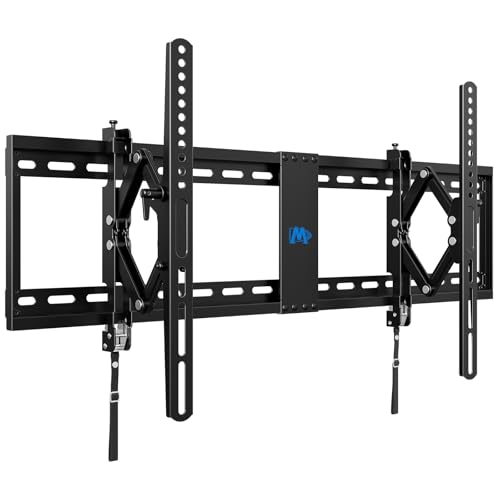
Mounting Dream Advanced Tilt TV Wall Mount for Most 42-90 Inch Flat TV | Universal TV Wall Mount Bracket with Full Extension up to 7 inch, Fits 16", 24", 32" Studs, Max VESA 800x400mm and 120LBS
Check price on Amazon
Mounting Dream Tilt TV Wall Mount for Most 42-90 inch TV up to 132 lbs | Universal Tilt TV Mount Bracket with Low Profile Design, Max VESA 800x400mm, Easy for Centering on 16", 18", 24", 32" Studs
Check price on Amazon
Perlegear Full Motion TV Wall Mount with Power Strip for 60–120 Inch TVs | Heavy Duty TV Mount Wall Bracket, Holds 255 lbs, Tilt, Swivel, Extension, Fits 16″/24″/32″ Wood Studs, Max VESA 900 x 600mm
Check price on Amazon
monTEK Heavy Duty Tilting TV Wall Mount for 43-95 Inch TVs, 200lbs Capacity | Anti-Glare Tilt, 1.65" Slim Low Profile TV Bracket, Fits 16"/18"/24"/32" Studs, Max VESA 800x400mm, 4X Load Tested
Check price on Amazon
Mounting Dream Fixed TV Wall Mount Low Profile TV Bracket for 42-90 Inch TV | Flush TVs Mount for Space Saving, Wall Mount TV Bracket Fits 16", 24", 32" Studs, Max VESA 800x400mm and 132lbs MD2361-32
Check price on Amazon
USX MOUNT Fixed TV Wall Mount for 65-120 inch Flat TVs up to 220 Lbs, Low Profile Wall Mount TV Bracket fits 16" 18" 24" 32" Stud Spacing, Max VESA 900x600mm for Most 100 98 90 85 86 inch TV
Check price on Amazon
USX MOUNT Heavy Duty Tilting TV Wall Mount for 60-120" up to 220lb, Low Profile TV Mount Ultra Slim Wall Bracket fit 16-32" Studs, Max VESA 900x600 for 65 75 85 86 90 98 100 110inch Large Television
Check price on Amazon
USX Mount UL Listed TV Wall Mount for 42"-85" TVS, Fits 16" 18" or 24" Studs, Full Motion TV Mount Swivel Tilt Extension TV Bracket with Dual Articulating Arms, Max VESA 600x400mm, Load 110lbs
Check price on AmazonFrequently Asked Questions
Can I mount a TV on 32-inch stud spacing?
Yes, absolutely. You just need a mount with a wide enough wall plate to span the distance, or you can install a plywood backing board. Many manufacturers make mounts specifically designed for 32-inch stud spacing.
What size TV can I mount on 32-inch stud spacing?
You can mount any size TV as long as you use the correct mount and anchor properly. For larger TVs (65 inches and above), we recommend a wide-plate mount or a plywood backing board for added security. A full-motion mount for a 65-inch TV with a wide base is a good choice.
Do I need a special mount for 32-inch stud spacing?
Not necessarily a "special" mount, but you do need one with a wall plate that is at least 34 inches wide to span the gap. Alternatively, you can use a standard mount with a plywood backing board.
How do I find studs that are 32 inches apart?
Use an electronic stud finder. Run it horizontally across the wall and mark each stud. Then measure the distance between the centers of adjacent studs. If it's approximately 32 inches, you have 32-inch spacing.
Is it safe to mount a TV on 32-inch stud spacing?
Yes, as long as you anchor into the studs properly using lag bolts and ensure the mount is rated for your TV's weight. If you're unsure, consult a professional installer.
What if my studs are not 32 inches apart but something else?
Stud spacing can vary. Common spacings include 16 inches, 24 inches, and 32 inches. Always measure your specific wall. If your spacing is unusual, a plywood backing board is the most versatile solution.
Final Thoughts
Mounting a TV on 32-inch stud spacing is entirely achievable with the right approach. The key is to verify your stud spacing first, then choose a mount that either spans the distance or use a plywood backing board to create a secure anchoring point. Always prioritize safety by using lag bolts into studs and checking weight ratings.
Whether you're mounting a 32-inch smart TV or a larger model, the principles remain the same. Take your time, use the right tools, and don't hesitate to call a professional if you're unsure. With proper installation, your TV will remain securely mounted for years to come.
If you're still exploring options, browse our recommended TV wall mounts for 32-inch stud spacing above, or check out our guides on TV mounts for 32-inch stud spacing and TV mounts for studs 32 inches apart for more detailed recommendations.