
Hanging a 75 Inch TV on the Wall: The Complete Guide
Everything you need to know to safely and securely mount your 75-inch television — from finding studs and choosing the right VESA mount to cable management and optimal viewing height.
Start Mounting GuideWhy This Guide Matters: A 75-inch TV is a significant investment, and hanging it correctly is critical for safety, performance, and aesthetics. This guide walks you through every step — from wall preparation to final adjustments — so you can enjoy a professional-quality installation with confidence.
Why Mount a 75-Inch TV on the Wall?
Mounting a 75-inch TV on the wall offers a range of benefits that go beyond simply saving floor space. A wall-mounted TV provides a cleaner, more modern look, reduces the risk of tipping (especially important in homes with children or pets), and allows you to position the screen at the ideal viewing height for your seating arrangement. For larger screens like a 75-inch model, wall mounting also eliminates the need for a bulky TV stand, freeing up valuable floor space for other furniture and decor.
If you're still deciding between a stand and a wall mount, consider that a 75-inch TV is quite heavy and requires a sturdy, wide stand if placed on furniture. Wall mounting distributes the weight safely across wall studs and gives you more flexibility in positioning. For those who prefer a traditional setup, a TV stand for 75-inch flat screen is a viable alternative, but wall mounting remains the preferred choice for a sleek, floating appearance.
Before you begin, it's helpful to understand the basics of the size of TV stand for 75-inch TV if you're considering a hybrid approach — some homeowners use a low-profile console beneath a wall-mounted TV for media components and decorative items.
What You'll Need Before You Start
Tools & Materials
- Stud finder — essential for locating wall studs accurately.
- Drill and drill bits — for pilot holes and mounting hardware.
- Level — to ensure your TV is perfectly horizontal.
- Measuring tape — for precise positioning.
- Pencil — for marking drill points.
- Wall mount kit — matching your TV's VESA pattern and weight.
- Lag bolts and washers — usually included with the mount.
- Stud helper or toggle bolts — if studs aren't centered where you need them.
- Cable management supplies — zip ties, cable raceways, or in-wall cable kits.
For a 75-inch TV, you'll need a heavy-duty mount. Look for one rated for at least 1.5 times the weight of your TV. Most 75-inch TVs weigh between 60 and 90 pounds, so a mount rated for 150 pounds or more is ideal. If you want the flexibility to adjust the angle, consider a 75-inch TV full motion wall mount or a full motion TV wall mount 75 inch.
Step 1: Finding and Preparing the Wall Studs
The single most important factor in safely hanging a 75-inch TV is anchoring the mount into wall studs. Drywall alone cannot support the weight of a large TV. Use a stud finder to locate the vertical wooden beams behind your drywall. Standard stud spacing is 16 inches on center, but it can be 24 inches in some homes. Mark the edges of each stud with a pencil.
For a 75-inch TV, you'll typically need to span at least two studs, but three is even better for weight distribution. If your studs are not positioned where you want the TV, you have a few options. You can use a mount with a wider backplate that spans the available studs, or you can install a plywood backer board painted to match your wall. Another option is to use heavy-duty toggle bolts, but these are generally not recommended for a TV of this size and weight.
If you're working with a wall that has a fireplace or built-in features, you may need to plan around them. For inspiration on integrating your TV with existing architecture, see our guide on a wall with TV and fireplace built-in.
Step 2: Understanding VESA Patterns and Mount Compatibility
VESA (Video Electronics Standards Association) defines the standard mounting hole patterns on the back of TVs. For a 75-inch TV, the most common VESA patterns are 400x400mm, 600x400mm, and occasionally 800x400mm. Check your TV's manual or measure the horizontal and vertical distance between the four mounting holes on the back of your TV.
Your wall mount must support the VESA pattern of your TV. Most full-motion and fixed mounts for large TVs support a range of patterns, but always double-check before purchasing. If you're also mounting a soundbar, look for a 75-inch TV wall mount with soundbar attachment or a separate soundbar mount that fits beneath the TV.
Weight capacity is equally important. A 75-inch TV can weigh anywhere from 60 to 90 pounds without the stand. Add the weight of the mount itself, and you're looking at 80 to 110 pounds hanging on your wall. Choose a mount rated for at least 150 pounds to have a safe margin.
Step 3: Choosing the Right Wall Mount for Your 75-Inch TV
Types of TV Wall Mounts
- Fixed mounts: The most affordable and low-profile option. They hold the TV flat against the wall with no movement. Best if you have a dedicated viewing position and want a clean, minimalist look.
- Tilting mounts: Allow you to tilt the TV up or down to reduce glare or improve viewing angles. Ideal for TVs mounted higher than eye level.
- Full-motion mounts: Offer the most flexibility — you can extend, swivel, and tilt the TV. Perfect for open floor plans, corner placements, or rooms with multiple seating areas. For a 75-inch TV, a TV wall mount 75 inch full motion is a popular choice.
For a 75-inch TV, full-motion mounts are heavier and require more robust wall anchoring, but they provide unmatched versatility. If you like to adjust your TV's angle frequently, a full motion TV wall mount 75 inch is worth the investment. For those who want a swivel option, a TV mount that pulls out and swivels can be a game-changer for large screens.
If you're mounting your TV in a corner, a corner TV stand with mount 75 inch might be a better solution than a wall mount, as it combines furniture and mounting in one. However, for a true wall-mounted look, a full-motion mount with a long extension arm can work in corners too.
Step 4: Determining the Optimal Viewing Height
The ideal height for a wall-mounted TV is one where your eyes, when seated in your primary viewing position, align with the center of the screen or slightly above the bottom third. For a 75-inch TV, the center of the screen should typically be 40 to 45 inches from the floor in a living room setting. This can vary based on your seating height and personal preference.
A common mistake is mounting the TV too high, which can cause neck strain over time. If you're mounting above a fireplace, you'll likely need a tilting or full-motion mount to angle the TV downward for comfortable viewing. For more tips on ergonomic viewing, see our guide on I need my TV mounted on the wall.
Before drilling, use painter's tape to mark the outline of your TV on the wall. Sit in your usual spot and check if the height feels comfortable. This simple step can save you from having to re-drill holes later.
Step 5: Installation — A Step-by-Step Overview
Mounting the Wall Plate
Hold the wall plate against the wall at your desired height, ensuring it's level. Mark the hole positions over your studs. Drill pilot holes using a drill bit slightly smaller than your lag bolts. Attach the wall plate using the lag bolts and washers provided, tightening them securely. For extra security, you can use a stud finder to confirm you're centered on each stud.
Attaching the TV Brackets
Attach the vertical brackets to the back of your TV using the screws and spacers provided with your mount. These brackets are designed to match your TV's VESA pattern. Make sure all screws are tight but not over-tightened, as you don't want to strip the threads in the TV's mounting holes.
Hanging the TV
With the help of a friend, carefully lift the TV and hook the brackets onto the wall plate. Most mounts have a locking mechanism or safety screws to prevent the TV from being accidentally knocked off. Once secured, check that the TV is level and make any necessary adjustments.
If you're using a full-motion mount, test the extension and swivel functions before finalizing the installation. Make sure cables are connected before pushing the TV back against the wall if you have a low-profile mount.
Step 6: Cable Management for a Clean Look
One of the biggest advantages of wall mounting is the ability to hide cables. For a truly clean installation, consider running cables through the wall using an in-wall cable management kit. These kits include a recessed outlet and low-voltage brackets that allow you to route HDMI, power, and other cables behind the drywall.
If you prefer not to cut into your wall, you can use cable raceways or conduit that can be painted to match your wall color. These are surface-mounted and can be a good solution for renters or those who want a less permanent option. For media components like DVD players or gaming consoles, you might want a DVD player shelf for wall mount TV to keep everything organized and accessible.
If you have a cable box or streaming device, a TV wall mount with cable box holder can be a convenient way to keep everything off the floor. Alternatively, a table to put under wall mounted TV or a stand to put under wall mounted TV can provide a place for components while maintaining a clean look.
Special Considerations: Mounting Above a Fireplace or in a Corner
Mounting a 75-inch TV above a fireplace is a popular choice but comes with challenges. Heat, viewing angle, and stud placement are all factors to consider. You'll need a tilting or full-motion mount to angle the TV down for comfortable viewing. Additionally, you must ensure the fireplace doesn't generate excessive heat that could damage the TV. Keep a safe distance and consider a mantel shelf to deflect heat.
For corner installations, a full-motion mount with a long extension arm is usually the best solution. It allows you to pull the TV out and angle it toward the seating area. If you're considering a furniture-based solution, a TV stand in corner of living room can be a good alternative, but a wall mount typically offers a cleaner look.
If you're mounting in a bedroom, you might also consider a pop-up TV cabinet for end of bed or a pop-up TV stand for foot of bed if you want the TV to disappear when not in use. However, for a permanent, space-saving solution, wall mounting remains the best option.
Safety Tips for Hanging a 75-Inch TV
- Always anchor into studs. Never rely on drywall anchors alone for a TV of this size.
- Use a helper. A 75-inch TV is heavy and awkward to lift alone. Enlist a friend or family member.
- Check weight ratings. Ensure your mount is rated for at least 1.5 times the weight of your TV.
- Tighten securely but don't over-tighten. Over-tightening can strip screws or crack the TV's mounting holes.
- Test before letting go. Once the TV is on the mount, gently tug it to ensure it's secure before releasing it.
- Keep cables organized. Loose cables can be a tripping hazard and can also pull on the TV if accidentally snagged.
For more general safety advice, see our guide on I need my TV mounted on the wall.
Quick Comparison: Popular 75-Inch TV Mount Types
| Mount Type | Best For | Price Range (USD) | Recommended Products |
|---|---|---|---|
| Fixed | Clean look, dedicated seating | $50–$150 | — |
| Tilting | Above eye level, glare reduction | $80–$250 | — |
| Full-Motion | Flexibility, corners, open plans | $150–$500 |
75-inch TV Full Motion Wall Mount TV Wall Mount 75 Inch Full Motion Full Motion TV Wall Mount 75 Inch |
| Swivel | Multi-angle viewing, large rooms | $200–$600 |
TV Mount That Pulls Out and Swivels TV Wall Mount with 90 Degree Swivel |
Frequently Asked Questions
Can I hang a 75-inch TV on drywall without studs?
No. A 75-inch TV is too heavy and valuable to risk mounting on drywall alone. Always anchor into wall studs. If studs aren't available in your desired location, consider installing a plywood backer board or using a furniture-based solution like a TV stand for up to 75-inch TV.
How high should I mount my 75-inch TV?
The center of the screen should ideally be 40–45 inches from the floor when seated. This can vary based on your seating height and room layout. Use painter's tape to test the position before drilling.
What VESA pattern does a 75-inch TV use?
Most 75-inch TVs use a 400x400mm, 600x400mm, or 800x400mm VESA pattern. Check your TV's manual or measure the mounting holes on the back of the TV to confirm.
Do I need a full-motion mount for a 75-inch TV?
Not necessarily, but a full-motion mount offers the most flexibility. If you have a dedicated viewing position, a fixed or tilting mount is sufficient. For open floor plans or corner placements, a full motion TV wall mount 75 inch is highly recommended.
Can I mount a 75-inch TV above a fireplace?
Yes, but you'll need a tilting or full-motion mount to angle the TV down. Also, ensure the fireplace doesn't generate excessive heat. Keep a safe distance and consider a mantel to deflect heat.
How much does a 75-inch TV weigh?
Most 75-inch TVs weigh between 60 and 90 pounds without the stand. Always check your specific model's weight and choose a mount rated for at least 1.5 times that weight.
Final Thoughts
Hanging a 75-inch TV on the wall is a rewarding DIY project that can transform your living room or home theater. With the right tools, a sturdy mount, and careful planning, you can achieve a professional-looking installation that enhances your viewing experience and frees up floor space. Remember to prioritize safety by anchoring into studs, choosing a mount rated for your TV's weight, and enlisting a helper for the heavy lifting.
If you're still exploring furniture options, our guides on size of TV stand for 75-inch TV and TV stands for 75-inch flat screen can help you find the perfect complementary piece. For those who prefer a wall-mounted setup with a place for components, consider a TV console cabinet for 75-inch TV or a table for under a wall-mounted TV.
For more specific mounting scenarios, explore our related guides: hanging a 55-inch TV on the wall, TV wall mount with cable box holder, and 75-inch TV wall mount with soundbar.
Recommended 75-Inch TV Wall Mounts & Accessories
⚠️ AFFILIATE DISCLOSURE: This website contains affiliate links. As an affiliate Associate, we earn from qualifying purchases. If you make a purchase through these links, we may receive a small commission at no additional cost to you. Read our full affiliate policy.

HangSmart TV® Wall Mount NO Stud - Original & Patented Easy Install, DIY for 19-100" TVs, Holds Up to 150LBS, Fits Most LED LCD Flat Screens & Monitors, Includes Hardware
Check price on Amazon
Full Motion TV Wall Mount for Most 37"-84" Flat Screen TV, Swivel or Tilt TV Wall Bracket with Dual Articulating Arms, for 12"-16" Wood Studs, Max VESA 600x400mm, Load 120 lbs by USX MOUNT
Check price on Amazon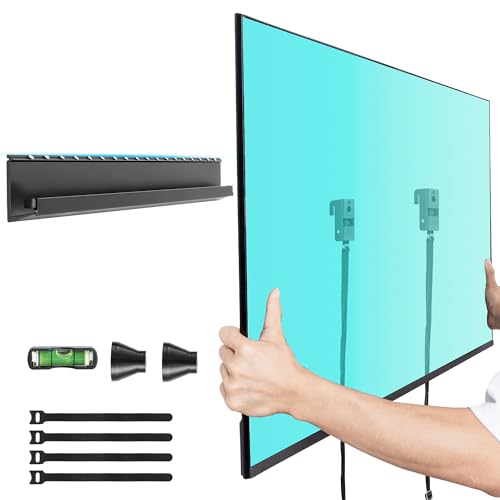
Aquzee No Stud TV Wall Mount for 32-70 TVs, No Drill TV Mount up to 130 lbs
Check price on Amazon
Perlegear Corner TV Wall Mount Long Arm TV Mount Bracket for 37-75 Inch TVs
Check price on Amazon
30" Long Arm TV Wall Mount for 42-75 Inch TVs, Full Motion Swivel and Tilt
Check price on Amazon
KAMIWI No Drill No Stud TV Wall Mount for 22-55 Inch TVs up to 100lbs
Check price on Amazon
AENTGIU Studless Drywall TV Wall Mount for 32-75 Inch TVs up to 150lbs
Check price on Amazon