
TV Stand Size for 75 Inch TV: Complete Dimension Guide
Find the exact width, depth, and height you need for a stable, balanced, and stylish 75-inch TV setup.
SEE EXACT DIMENSIONSQuick Answer: For a 75-inch TV (approximately 65–66 inches wide), look for a stand that is 72–85 inches wide. A depth of 15–20 inches and a height of 20–28 inches ensures stability and proper viewing. Always verify your TV's VESA pattern and stand width before purchasing.
What You Will Learn
- Sizing Chart by TV Size
- Width: The Critical Measurement
- Depth: Stability & Soundbar Space
- Height: Ergonomics & Viewing Angle
- VESA Patterns for 75-Inch TVs
- Weight Capacity & Safety
- Frequently Asked Questions
TV Stand Sizing Chart: 75-Inch TV and Nearby Sizes
The single most important factor is the actual width of your TV, not the diagonal screen size. A 75-inch TV typically measures 65 to 66 inches across, but this varies slightly by brand and bezel design. Here is a quick-reference table for common TV sizes so you can compare and understand where your 75-inch unit fits in the spectrum.
| TV Screen Size | Actual TV Width (Approx.) | Recommended Stand Width | Recommended Stand Height |
|---|---|---|---|
| 55 inches | 48–49 inches | 54–58 inches | 20–24 inches |
| 65 inches | 57–58 inches | 63–70 inches | 22–26 inches |
| 75 inches | 65–66 inches | 72–85 inches | 20–28 inches |
| 85 inches | 74–76 inches | 80–90 inches | 20–26 inches |
As the chart shows, a 75-inch TV needs a stand wider than the TV itself. Industry guidelines recommend allowing 3 to 6 inches of overhang on each side for visual balance and safety [citation:14]. This prevents the TV from looking top-heavy and reduces the risk of accidental tipping. If you are comparing options for a slightly smaller screen, you may find our guide on a TV stand that fits a 65-inch TV helpful for context.
Width: The Most Critical Measurement
Width determines whether your TV will sit safely and look proportionally correct. A 75-inch TV is roughly 66 inches wide, so a stand between 72 and 85 inches wide is ideal. This provides 3 to 6 inches of buffer on each side, which serves two purposes: it gives the setup a grounded, balanced appearance, and it ensures the TV's legs (if they are widely spaced) have full support [citation:14].
Some homeowners choose a "flush" fit, where the stand and TV are roughly the same width. This can work visually in tight spaces, but it is safer only if the TV is wall-mounted or the stand is anchored to wall studs. For a freestanding TV on a console, always prioritize a wider stand. If your room layout is narrow, consider a corner TV stand with mount for a 75-inch TV, which can maximize floor space while still accommodating the screen.
Also, check the span of your TV's legs. Some 75-inch models have legs positioned near the far edges of the panel. If your stand is only 72 inches wide and the legs are 64 inches apart, you will have just 4 inches of clearance per side—workable, but tight. A TV console cabinet for a 75-inch TV often provides a broader, more stable surface for these wider-leg designs.
Depth: Stability and Soundbar Space
Depth is often overlooked, but it is essential for both safety and functionality. A 75-inch TV is large and front-heavy, so the stand needs enough depth to prevent tipping. Look for a depth of 15 to 20 inches. Many modern TV stands fall within this range, such as a 68-inch wide console with a 15.8-inch depth that supports TVs up to 75 inches [citation:6].
Depth also matters if you plan to place a soundbar in front of the TV or on the same surface. A soundbar typically requires 3 to 5 inches of depth. If your stand is only 15 inches deep and your TV's base takes up 10 inches, you may not have enough room for the soundbar without overhanging. If you are mounting your TV on the wall instead, our article on a 75-inch TV wall mount with soundbar covers solutions for combining both.
Height: Ergonomics and Viewing Angle
The ideal height for a 75-inch TV stand is 20 to 28 inches. This range places the center of the screen at or slightly below eye level when you are seated on a standard sofa, which reduces neck strain and provides a comfortable viewing experience [citation:4].
If your stand is too low (under 18 inches), you may find yourself looking up at the screen, especially if your sofa is low-profile. If it is too high (over 30 inches), you will be tilting your head down, which can cause discomfort during long movies or gaming sessions. A TV stand for a 75-inch TV with a fireplace often sits at the higher end of this range because the fireplace insert adds height, so check the total dimensions carefully.
Some stands offer adjustable height or swivel features, which can help fine-tune the viewing angle. For example, certain floor stands allow height adjustment from 50 to 56 inches and swivel up to 60 degrees, accommodating different seating arrangements [citation:1].
VESA Patterns for 75-Inch TVs
If you plan to use a TV stand with a built-in mount or a separate wall mount, you must know your TV's VESA pattern. This is the measurement of the four mounting holes on the back of your TV, expressed in millimeters. For 75-inch TVs, the most common VESA patterns are:
- 600 x 400 mm — Common on LG, TCL, and Hisense 75-inch models [citation:2]
- 400 x 400 mm — Common on Samsung and Vizio 75-inch models [citation:2]
Always check your TV's manual or the sticker on the back panel before buying a mount. A mismatch will make installation impossible. If you are leaning toward a wall-mounted solution, our guide on hanging a 75-inch TV on the wall walks through the mounting process in detail, including VESA considerations.
Weight Capacity and Safety Considerations
A 75-inch TV typically weighs between 50 and 80 pounds without the stand. Your TV stand should have a weight capacity that exceeds this by a comfortable margin. Many quality stands support up to 110 pounds or more on the top surface [citation:1].
Safety is paramount with a large TV. If you have children or pets, consider anchoring the stand to the wall with a safety strap or bracket. Some stands include anti-tip hardware; if yours does not, it is a worthwhile investment. For households with pets, our article on pet-proof TV furniture offers additional strategies for keeping your setup secure.
Also, confirm the weight of your specific TV model. OLEDs tend to be lighter than LED models, but some high-end 75-inch TVs can approach 90 pounds with their stands attached. If you are unsure, a TV stand for a 75-inch flat screen with a reinforced top is a reliable choice.
Recommended TV Stands for 75-Inch TVs
⚠️ AFFILIATE DISCLOSURE: This website contains affiliate links. As an affiliate Associate, we earn from qualifying purchases. If you make a purchase through these links, we may receive a small commission at no additional cost to you. Read our full affiliate policy.

WLIVE Modern TV Stand for 75 Inch TV, 2 Tier Entertainment Center with RGB LED Lights & Storage Cabinets, Media TV Console Gaming Television Stands for Living Room, Bedroom, Black
Check price on Amazon
HOOBRO TV Stand with Power Outlets to 75 Inches, TV Console Table with Open Storage Shelves Cabinet, Industrial Media Entertainment Center for Living Room Bedroom, Rustic Brown and Black BF60DS01
Check price on Amazon
HOLMAXD Universal Swivel TV Stand Base for 32-75 Inch TVs Hold up to 110lbs | Height Adjustable Table Top TV Stand with Tilt Mount, Heavy Duty TV Stand with Temper Glass Base, Max VESA 400x400mm
Check price on Amazon
WLIVE LED TV Stand for 65/70/75 Inch TVs, Modern Entertainment Center with Storage Cabinets and Drawer, Gaming Media TV Console with RGB Lights for Living Room, Black
Check price on Amazon
WLIVE Farmhouse TV Stand for 75 inch TV, Entertainment Center with Storage Cabinets, Mid Century Modern TV Console for Living Room, Bedroom, Rustic Brown
Check price on Amazon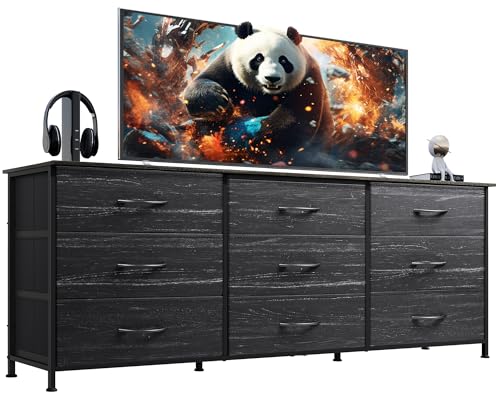
WLIVE Dresser TV Stand for 75 Inches TV, 9 Fabric Drawers, Black Wood Grain | Wide Dresser for Bedroom with Steel Frame, Chest of Drawers with Wood Top, Easy to Assemble, Charcoal Black Wood Grain Print
Check price on Amazon
HOOBRO LED TV Stand for 75 Inch TVs with Charging Station, Gaming Entertainment Center with 3-Tier Open Storage, Long 70.1” Media TV Console Table, TV Stand for Living Room, Bedroom, Black BB22UDDS01
Check price on Amazon
IRONCK Farmhouse TV Stand for 75 Inch TV, Light Oak & Walnut | 2 Storage Cabinets, Open Shelves, Grid Glass Doors
Check price on AmazonFrequently Asked Questions
Is a 70-inch TV stand wide enough for a 75-inch TV?
A 70-inch stand is the absolute minimum for a 75-inch TV, but it will leave almost no overhang. This can look top-heavy and may not accommodate TVs with widely spaced legs. A 72-inch or wider stand is safer and more visually balanced.
Can I use a TV stand meant for a 65-inch TV with a 75-inch TV?
Generally, no. A stand designed for a 65-inch TV is typically 58 to 65 inches wide. A 75-inch TV is about 66 inches wide, so it would overhang significantly, creating a tipping hazard and an unbalanced look. Always match the stand to the TV size.
What if my 75-inch TV has a central stand instead of wide legs?
Some 75-inch TVs use a central pedestal stand. In this case, the stand width requirement is slightly more forgiving because the weight is concentrated in the middle. However, you still want a console wide enough to visually support the screen—at least 70 inches is recommended, but 72–80 inches is ideal.
How do I measure my TV's width accurately?
Measure the TV from the left edge of the bezel to the right edge, not just the screen. Include any protruding elements if the frame is thick. The diagonal measurement (75 inches) is not useful for stand sizing; only the actual width matters.
Should I wall-mount instead of using a TV stand?
Wall-mounting eliminates the need for a wide stand and can save floor space. If you are considering this route, our guide on a full-motion TV wall mount for a 75-inch TV covers the benefits and installation requirements. If you still want a furniture piece below the TV for media components, a stand to put under a wall-mounted TV can complete the setup.