


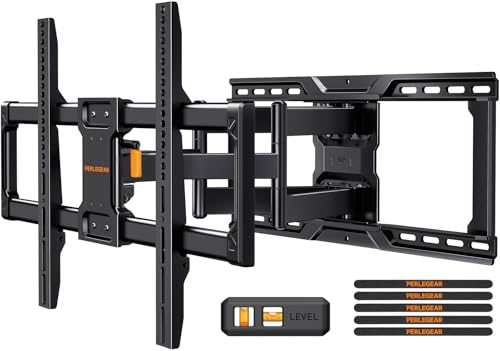


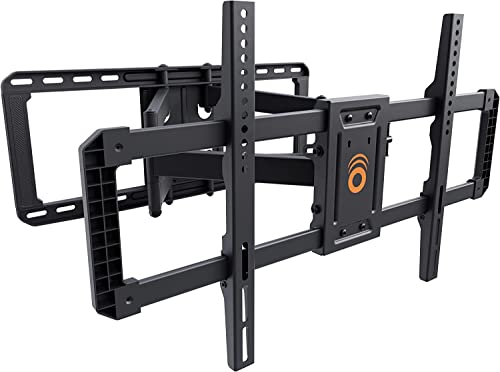
Key Factors When Choosing a Full Motion Mount for a 75-Inch TV
Not all TV mounts are created equal, and a 75-inch TV presents unique challenges due to its size and weight. A mount that works for a 55-inch TV will not be safe or effective for a larger model. When researching a 75 inch TV full motion wall mount, you must pay close attention to weight capacity, VESA compatibility, and the quality of the articulating arms. A heavy-duty mount is non-negotiable; it must be engineered to hold the weight securely while allowing for smooth, effortless movement. For a deeper dive into the technical aspects of mounting a large TV, you can read our guide on hanging a 75-inch TV on the wall.
Weight Capacity and VESA Pattern
The first step is to check your TV's specifications. Most 75-inch TVs weigh between 60 and 100 pounds. Your chosen full-motion mount should have a weight capacity that exceeds your TV's weight by at least 20-30% for a safe margin. Next, verify the VESA mounting pattern, which is the distance between the four mounting holes on the back of your TV (e.g., 600x400mm). A full-motion mount for a large TV must support the correct VESA pattern. You can compare this to the needs of a smaller setup, like a VESA 200x200 wall mount for a 55-inch TV, to understand how mounting standards differ.
Swivel, Tilt, and Extension Range
The main advantage of a full-motion mount is its flexibility. Look for a model that offers a generous swivel range (often up to 90 degrees left and right) and a good tilt range (e.g., +5° to -15°) to reduce glare and adjust for seating height. The extension range is also important; a mount that extends further from the wall gives you more flexibility to position the TV. If you need to pull the TV out significantly, perhaps to access a cable box or to angle it towards a different part of the room, a TV mount that pulls out and swivels is an excellent choice. This feature is also beneficial if you are considering a setup like a TV wall mount with a cable box holder, as it allows for easy access to your devices.
Wall Type and Installation
Full-motion mounts are heavier and exert more leverage on your wall than fixed mounts. It is critical to install them into solid wood studs, not just drywall. Most mounting kits include a template and lag bolts for this purpose. For a 75-inch TV, it is highly recommended to mount it into two studs for maximum stability. If your studs are spaced unusually, you may need a specialized mount or a stud bar. You can find more information on this in our article about TV mounts for studs 32 inches apart. While a full motion mount is a great choice, some may prefer the simplicity of a 65-inch flat screen TV wall mount for a different room.
Installation Tips for a 75-Inch Full Motion Mount
Installing a large TV on a full-motion mount is a two-person job. Before you begin, gather your tools: a stud finder, drill, level, socket set, and a pencil. Start by locating the studs and marking their centers. The mount's wall plate must be secured to these studs. Once the wall plate is installed, attach the TV brackets to the back of your TV. With the help of a friend, carefully lift the TV and hook it onto the wall plate. Tighten all safety screws and test the motion range gently before letting go. For a more detailed walkthrough, refer to our general guide on how to get your TV mounted on the wall.
Alternatives to a Full Motion Wall Mount
While a full-motion mount offers the most flexibility, it's not the only option. If your viewing position is fixed, a tilting or fixed mount can be more affordable and lower-profile. Another popular solution is a TV stand that fits a 65-inch TV or larger, which eliminates the need for wall drilling entirely. However, for the ultimate in adjustability and to achieve a truly custom viewing experience, a full-motion mount is hard to beat. It allows you to adapt your TV's position to any room layout, from a living room table set with a TV stand to a wall with a fireplace and built-in TV.