
VESA Mount Adapter for Non-VESA Monitor: The Complete Guide
Discover how to mount a monitor that lacks VESA holes. Learn about adapter plates, compatibility, installation, and safety so you can upgrade your setup without buying a new display.
VIEW RECOMMENDED ADAPTERSQuick Answer: A VESA mount adapter for a non-VESA monitor is a bracket or plate that attaches to your monitor's existing stand screws or chassis, creating a standard VESA hole pattern (typically 75x75mm or 100x100mm) so you can use a monitor arm, wall mount, or TV stand. Prices for quality adapters range from $20 to $60.
You have a perfectly good monitor, but it lacks VESA mounting holes. Maybe it's an all-in-one PC, an older display, or a slim-profile screen with a built-in stand. You want to attach it to a tabletop swivel TV stand, a wall mount, or an articulating arm. The solution is a VESA mount adapter for non-VESA monitor — a simple, affordable bracket that bridges the gap between your monitor and standard mounting hardware.
This guide walks you through everything you need to know: what these adapters are, how they work, how to choose the right one, and how to install it safely. By the end, you'll have the confidence to mount your non-VESA monitor without damaging it or wasting money on a replacement.
What Is a VESA Mount Adapter for a Non-VESA Monitor?
The Video Electronics Standards Association (VESA) defines a standard hole pattern for mounting flat-panel displays. The most common patterns are 75x75mm and 100x100mm. If your monitor has these four threaded holes on the back, it's VESA-compatible. If it doesn't, it's a non-VESA monitor.
A VESA mount adapter is a metal or heavy-duty plastic plate that attaches to your monitor using its existing screws or structural points — often the same screws that hold the original stand. The adapter then provides a standard VESA hole pattern on its surface. This lets you connect your monitor to any VESA-compatible mount, arm, or stand.
These adapters are sometimes called:
- VESA adapter plates
- Non-VESA to VESA conversion kits
- Monitor mounting brackets for non-VESA displays
- VESA conversion brackets
They are especially useful for all-in-one computers, older monitors, and displays with unusual chassis designs. If you're looking to create a clean, ergonomic workspace, combining a VESA adapter with a TV turntable swivel base or a TV wall mount with extra-long extension can transform your setup.
How Does a VESA Adapter Work?
The principle is straightforward: the adapter acts as an intermediary between your monitor's non-standard mounting points and the standard VESA interface on your mount.
Here's the typical process:
- Remove the original stand (if possible) or identify the screw holes it used.
- Attach the adapter plate to the monitor using the included screws. The plate is designed to align with your specific monitor model's screw locations.
- Verify the VESA pattern on the adapter — usually 75x75mm or 100x100mm.
- Mount the adapter to your monitor arm, wall mount, or TV stand using standard VESA screws.
Some adapters are universal, with slotted holes that fit a range of monitors. Others are custom-made for specific models (e.g., certain Dell, HP, or Apple displays). Custom adapters offer a more secure, precise fit, while universal ones provide flexibility.
⚠️ Important: Not all monitors can be adapted. Some ultra-slim monitors have no removable stand and no internal reinforcement points. Always check your monitor's manual or contact the manufacturer before purchasing an adapter.
Types of VESA Adapters for Non-VESA Monitors
There are several adapter designs on the market. The right one depends on your monitor's construction and your mounting goals.
1. Universal VESA Adapter Plates
These feature multiple slotted holes and often come with a variety of screws. They can fit many monitors with flat backs and accessible screw points. They're affordable (usually $20–$40) and widely available. However, they may not work for monitors with curved backs or recessed mounting areas.
2. Model-Specific VESA Adapters
Manufactured for particular monitor models or series, these adapters offer a perfect fit. They often replace the original stand base entirely. They're more expensive ($40–$80) but provide superior stability and aesthetics. Examples include adapters for Apple iMac, Dell UltraSharp, and HP Envy displays.
3. Clamp-Based Adapters
These use clamps or brackets that grip the monitor's chassis or stand neck. They are less common and generally not recommended for heavy monitors, as they can apply uneven pressure. Use only if no screw-based option exists.
4. Adapters for All-in-One PCs
All-in-one computers (like iMacs) often have unique mounting needs. Specialized VESA adapters for these machines are available from third-party brands. They typically attach to the stand's mounting point after removing the original foot.
If you're mounting your monitor above a fireplace or in a living room setting, you might also consider how it integrates with furniture like a console table for under wall mounted TV or a large entertainment center with shelves.
How to Choose the Right VESA Adapter
Selecting the correct adapter is critical for safety and performance. Follow these steps:
Step 1: Identify Your Monitor's Mounting Points
Look at the back of your monitor. Are there four screw holes? If not, examine how the stand attaches. Often, removing the stand reveals screws or a mounting plate. Measure the distance between these points. If they don't match 75x75mm or 100x100mm, you need an adapter.
Step 2: Check Weight and Size Limits
Adapters have weight capacities. A typical adapter supports monitors up to 22 lbs (10 kg), but some heavy-duty models handle up to 33 lbs (15 kg). Never exceed the limit. Also, consider the monitor's size — larger monitors exert more leverage on the adapter and mount.
Step 3: Determine the VESA Pattern You Need
Most monitor arms and wall mounts use either 75x75mm or 100x100mm. Check your mount's specification. Your adapter should provide the matching pattern. Some adapters offer both patterns via multiple holes.
Step 4: Consider the Adapter Material
Steel adapters are the most durable and secure. Aluminum is lighter but still strong. Avoid plastic adapters for anything but the lightest monitors — they can crack under stress.
Step 5: Read Reviews for Your Specific Monitor
Search for "[your monitor model] VESA adapter" and read user experiences. Forums like Reddit and tech review sites often have detailed threads. This is the best way to avoid fitment issues.
For those building a complete entertainment setup, pairing a properly adapted monitor with a matching media console and coffee table or a TV stand with bookshelves on each side can create a cohesive look.
Recommended VESA Mount Adapters for Non-VESA Monitors
⚠️ AFFILIATE DISCLOSURE: This website contains affiliate links. As an affiliate Associate, we earn from qualifying purchases. If you make a purchase through these links, we may receive a small commission at no additional cost to you. Read our full affiliate policy.

Universal Monitor VESA Mount Adapter for Non-VESA 13 - 27 inch Computer Monitors Tablets iPad VESA Mounting Arm Stand Bracket Kit 75X75mm…
Check price on Amazon
Mount-It! Non-VESA Monitor Mount Adapter Kit – Universal VESA Mount Adapter for 13–27 Inch LCD LED Screens, Converts to 75x75 & 100x100, Heavy Duty Steel Bracket for Desk
Check price on Amazon
Non VESA Monitor Mount Adapter - 2PCS/LOT 100x100 mm VESA Adaptor Mount for Monitor Without Holes for 24,27,32 inch Flat Panel Monitors Load Capacity 11-22lbs
Check price on Amazon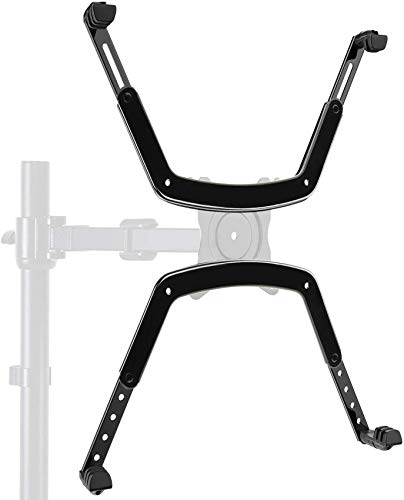
HUANUO Universal VESA Mount Adapter Kit, Non-VESA Adapter for 17 to 27 Inch Monitor Screens to 75x75 VESA Mount
Check price on Amazon
NOBER VESA Mount Adapter Bracket Kit Non-VESA Mounting Universal for 75 VESA Monitor Arm Compatible
Check price on Amazon
Pholiten VESA Mount Bracket Adapter Monitor Arm Mounting Kit | For 13 to 27 inch Screens, 75x75mm/100x100mm VESA
Check price on AmazonStep-by-Step Installation Guide
Installing a VESA adapter is a straightforward DIY project. You'll need a screwdriver (usually Phillips), the adapter kit, and possibly a second person for larger monitors.
What You'll Need:
- Your VESA adapter kit (includes plate and screws)
- Screwdriver set (Phillips and flathead)
- Soft cloth or towel (to protect the screen)
- Your monitor arm, wall mount, or stand
- Measuring tape (optional)
Installation Steps:
- Power down and unplug your monitor. Place it face-down on a soft, clean surface.
- Remove the original stand. Depending on the model, this may involve unscrewing a base plate, pressing a release button, or sliding the stand out.
- Identify the mounting points. Locate the screw holes left by the stand or other attachment points on the monitor's back.
- Attach the adapter plate. Align the adapter's holes with the monitor's mounting points. Insert the included screws and tighten them evenly. Do not over-tighten — snug is sufficient.
- Verify the VESA pattern. Ensure the adapter's exposed holes match your mount's pattern (75x75mm or 100x100mm).
- Attach the mount. With the adapter secured to the monitor, attach your monitor arm or wall mount using the appropriate VESA screws. Tighten securely.
- Test stability. Before fully releasing the monitor, gently test the connection. If it feels loose or unstable, re-check all screws.
- Mount and adjust. Once secure, mount the monitor in its final position and adjust the angle and height as desired.
Pro Tip: For heavy monitors, have a helper hold the monitor while you attach the adapter and mount. This prevents accidents and makes alignment easier.
Safety Considerations and Weight Limits
Safety is paramount when modifying how your monitor is supported. A falling monitor can cause injury and property damage.
| Monitor Size | Typical Weight | Recommended Adapter Capacity |
|---|---|---|
| Up to 24 inches | 5–10 lbs (2.3–4.5 kg) | At least 15 lbs (7 kg) |
| 27–32 inches | 10–18 lbs (4.5–8 kg) | At least 22 lbs (10 kg) |
| 34–43 inches (ultrawide) | 15–25 lbs (7–11 kg) | At least 33 lbs (15 kg) |
| All-in-One PCs | 15–30 lbs (7–14 kg) | Model-specific rating (check specs) |
Always follow the manufacturer's weight limits for both the adapter and the mount. If your monitor is near the limit, consider a sturdier mount or a different mounting solution. For very heavy displays, a mobile TV stand for 80-inch flat screen or a free-standing TV stand for flat screens may be a safer alternative.
Also, ensure the wall or desk you're mounting to can support the weight. Use appropriate anchors for drywall, and always screw into studs when possible. If you're mounting above a fireplace, be mindful of heat — check out our guide on living room with fireplace and TV ideas.
Common Mistakes to Avoid
- Using the wrong screws: Screws that are too long can damage internal components. Too short, and they won't hold. Always use the screws provided with the adapter or those specified by your monitor's manufacturer.
- Over-tightening: This can strip threads or crack the monitor's back panel. Tighten until snug, then stop.
- Ignoring weight limits: Exceeding the adapter's capacity risks failure. Always check the specs.
- Forcing a fit: If the adapter doesn't align, don't drill new holes or bend the plate. You may have the wrong adapter. Return it and get the correct one.
- Skipping the stability test: Always test the mount's security before letting go of the monitor.
If you're setting up a multi-monitor workspace or a home theater, consider how your adapted monitor fits with other furniture. For instance, a mid-century modern low profile TV stand or a white entertainment center with shelves can provide a stylish base for your setup.
Alternatives to VESA Adapters
If a VESA adapter isn't feasible for your monitor, consider these alternatives:
- Replace the monitor: If your monitor is old and lacks VESA, a new VESA-compatible model may be more cost-effective than a complex adapter solution.
- Use a desk stand: Instead of mounting, use a freestanding desk stand that supports your monitor's base. Some tabletop swivel TV stands can accommodate non-VESA monitors with a platform.
- Custom bracket: For unique monitors, a local metal fabricator can create a custom bracket. This is expensive but viable for high-end displays.
- Wall shelf: A simple wall shelf can hold a monitor if you don't need articulation. Pair it with a floating shelf under TV with fireplace for a clean look.
For large-screen setups, a TV stand for 70-inch TV with LED lights or an entertainment center with media storage can anchor your room while you decide on mounting solutions.
Frequently Asked Questions
Can I use a VESA adapter on any monitor?
No. The monitor must have accessible screw points or a removable stand that reveals mounting holes. Ultra-slim or sealed monitors may not be adaptable.
Will a VESA adapter void my monitor's warranty?
Possibly. Some manufacturers consider any modification as warranty-voiding. Check your warranty terms before proceeding.
How much weight can a VESA adapter hold?
It varies. Most adapters support 15–33 lbs (7–15 kg). Always check the specific product's rating.
Do I need a special mount for a non-VESA monitor?
No, once the adapter is attached, you can use any standard VESA mount, arm, or stand.
Can I mount a non-VESA monitor on a wall?
Yes, with an adapter. Ensure the wall can support the weight and use proper anchors.
What's the difference between 75x75 and 100x100 VESA patterns?
They refer to the distance in millimeters between the mounting holes. 75x75mm is common for smaller monitors; 100x100mm for larger ones. Some adapters support both.
Final Thoughts
A VESA mount adapter for non-VESA monitor is a practical, cost-effective solution for mounting displays that lack standard holes. With the right adapter, you can enjoy the ergonomic and aesthetic benefits of a monitor arm, wall mount, or TV stand without replacing your screen.
Remember to:
- Identify your monitor's mounting points and weight.
- Choose a high-quality, appropriately rated adapter.
- Follow installation instructions carefully.
- Test stability before fully relying on the mount.
Whether you're building a home office, a gaming setup, or a living room entertainment area, the right mounting solution makes all the difference. For more inspiration, explore our guides on small square living room layout with TV and entertainment wall unit for 75-inch TV.
Ready to mount your monitor? Check out our recommended adapters above and upgrade your setup today.