
The Ultimate Guide to TV Wall Mounts with Extra Long Extension
Are you struggling with a poor viewing angle or a TV that needs to reach across a corner? A wall mount with extra-long extension arms is the solution. Learn everything you need to know before you buy.
See Our Top PicksWhy choose an extra-long extension mount? Unlike standard fixed or tilting mounts, these articulating marvels extend far from the wall (often 20 to 30 inches or more). This provides unparalleled flexibility to swivel, tilt, and pull your TV out for the perfect view from anywhere in the room, making them ideal for tricky layouts.
What is a TV Wall Mount with Extra Long Extension?
A TV wall mount with extra long extension is a type of full-motion, articulating bracket designed to project your television significantly further from the wall than standard mounts. While a typical full-motion mount might extend 14 to 20 inches, an extra-long extension model can reach out 24, 30, or even over 36 inches. This extended reach is achieved through a robust, multi-jointed arm mechanism.
This extended range of motion is a game-changer for specific room layouts. If you have a small square living room layout with a TV, placing the TV in a corner is often the best use of space. A long-arm mount allows you to pull the TV out from the corner and angle it towards the main seating area, eliminating the awkward viewing angles that plague corner setups.
Who Needs an Extra-Long Extension TV Mount?
While any articulating mount offers flexibility, the extra-long extension models solve very specific problems. You should consider one if:
- Your TV is in a corner: This is the most common reason. You can pull the TV out and away from the corner walls, allowing you to sit directly in front of the screen. For a 50-inch TV, a mount like this offers a perfect solution compared to a standard corner TV stand for a 50-inch flat screen, as it saves floor space.
- You have an open-concept living space: If your living room, dining area, and kitchen share one large space, you can mount the TV on a central wall and extend it to face the living room, then swivel it towards the dining area when needed.
- You want to watch from multiple seating zones: If you have two distinct seating areas in one room, a long extension arm allows you to easily redirect the screen without moving furniture.
- Your wall is recessed or obstructed: If your TV wall is behind a column, a fireplace mantel, or a built-in shelf, a long-arm mount can pull the TV forward and past the obstruction.
Key Features to Look For
When shopping for an extra-long extension mount, not all are created equal. Here’s what to prioritize:
1. Extension Range and Articulation
The primary feature is the extension range. Look for a mount that extends at least 24 inches. Also, check the swivel and tilt capabilities. A good mount will offer 180 degrees of swivel (or more) and a useful tilt range (e.g., +5° to -15°) to reduce glare. For a 65-inch screen, you'll want a mount that can handle the weight and size, much like the heavy-duty 65-inch TV wall mount with 90-degree swivel options.
2. Weight Capacity and VESA Compatibility
Safety is paramount. Ensure the mount's weight capacity is significantly higher than your TV's weight. Also, verify the VESA pattern (the distance between the mounting holes on the back of your TV) is compatible. If your TV has an unusual pattern, you may need a VESA mount adapter for a non-VESA monitor.
3. Build Quality and Construction
Because the arm extends far, the leverage on the wall plate and joints is immense. Look for mounts made from heavy-gauge steel. The joints should be firm, not loose. A high-quality mount will not sag, even when fully extended. This is especially important for large TVs; a flimsy mount is a disaster waiting to happen with a 70-inch or larger screen.
4. Cable Management
With a long, articulated arm, cable management becomes crucial to prevent a messy look and to ensure cables don't get pinched. Look for mounts with integrated cable management channels or straps that run along the arms.
5. Installation and Wall Type
These mounts are heavy and require a very secure installation. They must be mounted into wall studs or a solid concrete wall. Drywall alone will not support the weight and leverage. If you're not confident in finding studs, it's best to hire a professional. Proper installation is just as important as choosing the right mount for your 55-inch TV wall mount height from the floor.
How Much Should You Expect to Pay?
The price of a TV wall mount with extra-long extension varies based on brand, build quality, and weight capacity. Here is a general price guide:
| Category | Typical Price Range | Best For |
|---|---|---|
| Budget | $40 – $80 | Smaller TVs (up to 55 inches) in light-duty applications. May have less extension and a lower weight capacity. |
| Mid-Range | $80 – $150 | Most standard TVs (up to 65 inches). A good balance of extension range, build quality, and features like cable management. |
| Heavy-Duty / Premium | $150 – $300+ | Large or heavy TVs (70 inches and up). These offer the longest extension, strongest steel construction, and the smoothest articulation. |
Remember that this is an investment in the safety and enjoyment of your TV. Don't skimp on a mount for an expensive television.
Recommended TV Wall Mounts with Extra Long Extension
⚠️ AFFILIATE DISCLOSURE: This website contains affiliate links. As an affiliate Associate, we earn from qualifying purchases. If you make a purchase through these links, we may receive a small commission at no additional cost to you. Read our full affiliate policy.

HCMOUNTING Extra Long Arm Full Motion TV Wall Mount For 42–80” TVs | 43” Extra Long Extension, Swivel ±90° & Tilt ±10°, Leveling ±3°, Holds Up To 110 Lbs, Max Vesa 600x400mm, Fits 16”,18” Studs
Check price on Amazon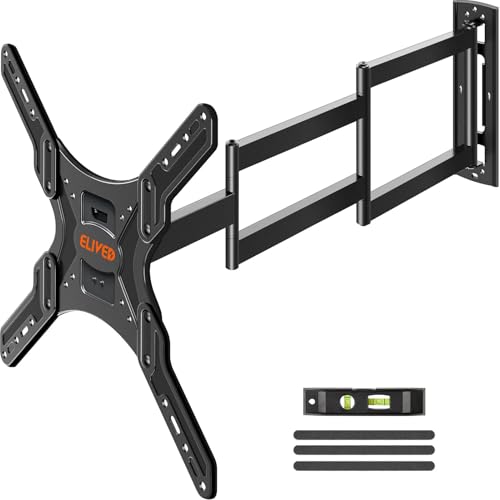
ELIVED Long Arm TV Mount for 26‑65" TVs, 37.4" Extension, Max VESA 400x400 | Full motion swivel & tilt, durable corner‑friendly TV mount bracket, holds up to 77 lbs for household flat‑screen TVs
Check price on Amazon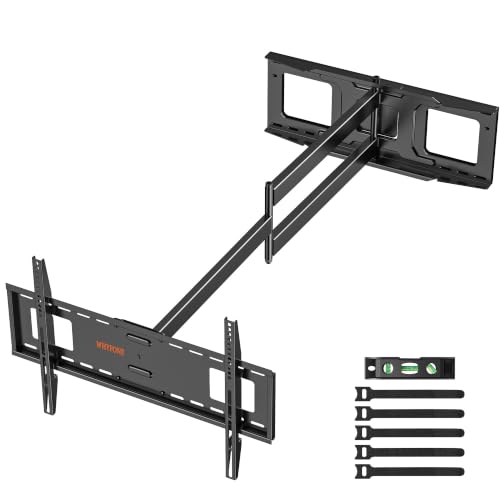
48" Extension Long Arm Full Motion TV Wall Mount 37-85” TV by WHYFONE | Extra Heavy Duty TV Wall Mount for 70,75,77,80,85'' Screens, Max VESA 600x400mm, Hold 110 lbs, 16''-24'' Wood Studs
Check price on Amazon
Perlegear Long Arm TV Wall Mount for 32-65″ TVs, 37.4” Long Extension | Max VESA 400x400mm, Corner TV Mount with Articulating Arms, Full Motion Wall Bracket with Swivel and Tilt, Holds to 110 lbs
Check price on Amazon
PERLESMITH Long Arm Full Motion TV Wall Mount for 42–90 inch TVs | 42.72″ extension, swivel, tilt, level, 150 lbs max load, fits 16″/18″/24″ wood studs, max VESA 800x400mm
Check price on Amazon
FORGING MOUNT Heavy Duty XXL Full Motion TV Wall Mount for 55-120 inch Extra Large TVs 98" 100",Holds 275 lbs, Max VESA 900x600, 42.9" Extension Long Arm TV Mount Swivel,Tilt,Preassembled,16-24” Studs
Check price on Amazon
Perlegear Long Arm Full Motion TV Wall Mount for 42–97 Inch TVs up to 150 lbs, Pre-Assembled TV Mount with Full Swivel, Tilt and Extension, Fits 8″/12″/16″/24″ Wood Studs, Max VESA 800x400mm, PGXLF02
Check price on Amazon
37.9" Long Arm TV Wall Mount for 42-75 Inch TV, Full Motion Swivel and Tilt | Single Stud Corner TV Bracket, Long Extension, Heavy Duty Articulating Arms, Max VESA 600x400mm, Holds up to 99 lbs.
Check price on AmazonInstallation Tips for a Long-Arm TV Mount
Installing a long-extension mount is more complex than a simple fixed mount. Here are a few critical tips:
- Find the Studs: Use a high-quality stud finder. A long-arm mount absolutely must be bolted into at least two wall studs. If you have metal studs, you'll need special toggle bolts or a professional install.
- Use the Right Hardware: Use the heavy-duty lag bolts provided with the mount. Do not substitute them with drywall anchors or screws.
- Two-Person Job: Mounting the wall plate is a two-person job, and attaching the TV to the arm is another. Never try to lift a large TV onto a mount by yourself.
- Test the Movement: Before hanging the TV, move the mount through its full range of motion to ensure it moves smoothly and doesn't hit any obstructions.
- Check the Viewing Height: Determine the ideal height for your TV before you drill any holes. A common guideline is to have the center of the TV at eye level when seated, but this can vary. For more details, see our guide on 55-inch TV wall mount height from floor.
Alternatives to a Wall Mount
If your walls can't support a heavy mount, or you're renting, you might consider a freestanding option. A mobile TV stand for an 80-inch flat screen offers similar flexibility to move the TV around a room, though it doesn't save floor space like a wall mount. For a more permanent look without wall mounting, a console table for under a wall-mounted TV is a great way to house your electronics while keeping the sleek wall-mounted look.