
Full Motion TV Wall Mount 32 Inch: The Ultimate Guide to Flexibility and Style
Unlock the perfect viewing angle for your smaller screen. Learn how to choose, install, and benefit from a full motion mount designed specifically for 32-inch TVs.
Explore the GuideIf you own a 32-inch TV, you might think a simple fixed wall mount is your only option. Think again. A full motion TV wall mount for a 32-inch TV transforms your viewing experience, offering the freedom to tilt, swivel, and extend your screen exactly where you need it. Whether you're watching from the kitchen, the sofa, or your favorite armchair, a full motion mount eliminates glare and awkward angles. This comprehensive guide will walk you through everything you need to know—from understanding VESA patterns and weight limits to installation tips and the best features to look for—so you can make a confident, informed purchase.
Why a Full Motion Mount is a Game-Changer for Your 32-Inch TV
A full motion mount, also known as an articulating or swivel mount, is the most versatile type of TV bracket available. Unlike fixed or tilting mounts, a full motion mount allows you to:
- Swivel Left and Right: Perfect for rooms with multiple seating areas. You can angle the TV towards the dining table for a dinner-party game, then swivel it back towards the sofa for movie night.
- Tilt Up and Down: Reduce glare from windows or overhead lights by tilting the screen. This is especially useful if your TV is mounted slightly higher than eye level.
- Extend and Retract: Pull the TV away from the wall for easy access to cables and ports, or push it back flush for a clean, minimalist look.
For a 32-inch TV, these benefits are amplified. Smaller screens are often placed in secondary rooms like kitchens, bedrooms, or home offices, where viewing angles change frequently. A full motion mount ensures you always have the best seat in the house. If you're looking for ultimate flexibility, you might also consider a TV mount that pulls out and swivels, which offers similar functionality with a focus on extension.
Key Considerations Before You Buy
1. VESA Pattern: The Critical Compatibility Check
The Video Electronics Standards Association (VESA) pattern is the set of holes on the back of your TV. For most 32-inch TVs, the VESA pattern is typically 100x100mm or 200x200mm. Before purchasing any mount, check your TV's manual or measure the horizontal and vertical distance between the mounting holes. A full motion mount for a 32-inch TV will almost always support these standard patterns. If you have a larger TV, like a 43-inch model, you'd need to check for a VESA 200x200 wall mount for a 43-inch TV. For 32-inch screens, the requirements are much more forgiving.
2. Weight Capacity: Safety First
Even though a 32-inch TV is relatively light (usually between 8 and 15 pounds), you should always choose a mount with a weight capacity well above your TV's weight. A good rule of thumb is to select a mount that supports at least 1.5 to 2 times the weight of your TV. Most full motion mounts for this size range support 33 to 55 pounds, providing a generous safety margin.
3. Swivel and Tilt Range
The beauty of a full motion mount lies in its range of motion. Look for a mount with a swivel range of at least 90 degrees (45 degrees left and right) and a tilt range of +5 to -15 degrees. Some premium mounts offer up to 180 degrees of swivel, which is ideal for open-concept living spaces. If you need a mount that can handle a larger screen with similar movement, you might look at a TV mount that pulls out and swivels as a point of comparison.
4. Wall Type and Stud Spacing
Most full motion mounts are designed for wood studs or concrete walls. For drywall without studs, you'll need toggle bolts or a specialty mount. A common challenge is stud spacing. If your studs are 32 inches apart, you'll need a mount specifically designed for that, such as a TV mount for 32-inch stud spacing. Always use a stud finder and ensure the mount is securely fastened to the wall structure.
Installation Tips for a Perfect Setup
Installing a full motion mount is a manageable DIY project. Here’s a quick overview:
- Gather Your Tools: You'll need a drill, stud finder, level, measuring tape, pencil, and a socket set.
- Locate the Studs: Use a stud finder to locate the center of your wall studs. Mark them clearly.
- Mount the Wall Plate: Hold the wall plate against the wall, ensuring it's level. Pre-drill pilot holes into the studs, then secure the plate with lag bolts.
- Attach the TV Brackets: Screw the mounting brackets to the back of your TV using the appropriate M4, M5, or M6 screws (usually included with the mount).
- Hang the TV: With a helper, lift the TV and hook the brackets onto the wall plate. Tighten the safety screws.
For a cleaner look, consider a TV wall mount with a cable box holder to keep your streaming device or cable box hidden and organized. If you're mounting your TV in a corner, a dedicated TV wall mount with 90-degree swivel can be a lifesaver. And for those who want a truly custom setup, a TV mount that attaches to a TV stand can be a great alternative if wall mounting isn't an option.
Best Full Motion TV Wall Mounts for 32-Inch TVs
⚠️ AFFILIATE DISCLOSURE: This website contains affiliate links. As an affiliate Associate, we earn from qualifying purchases. If you make a purchase through these links, we may receive a small commission at no additional cost to you. Read our full affiliate policy.

Pipishell Full Motion TV Wall Mount for Echo Show 21/15 and 13-43 Inch Flat Curved Screen TVs & Monitors, Max VESA 200x200mm up to 44lbs, TV Mount Wall Bracket with Rotation Swivel Tilt Extension
Check price on Amazon
Amazon Basics Full Motion Articulating TV Wall Mount, with Swivel and Tilt, for 26" to 55" TVs and Flat Panels up to 80 Lbs, VESA Compatible, Single Stud, Black
Check price on Amazon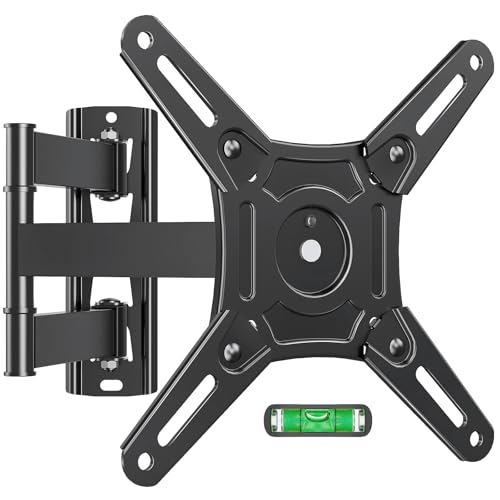
ELIVED Full Motion TV Wall Mount, 14-42" TV Monitor, VESA 200x200, 44 Lbs | Supports swivel, tilt, extension & rotation, sturdy bracket for LED LCD televisions and desktop monitors
Check price on Amazon
IWORKBOARD 32+ 40 inch Full Motion TV Wall Mount for 13-43" TVs & Monitor, 360° Rotating Small TV Mount Bracket,Articulating Swivel Tilting Extension, Max VESA 200x200mm, Single Studs, 55 lbs
Check price on Amazon
monTEK Full Motion Small TV Wall Mount for 13-43 Inch TVs up to 44 lb | ±90° Swivel, +5°/-15° Tilt, Landscape/Portrait Rotation, Extends 14.6 in, 4X Load Tested, VESA 200x200 mm, Single-Stud Mount
Check price on Amazon
Amazon Basics Full Motion Articulating TV Wall Mount with Tilt Swivel, Extends 16 inches, VESA 200x200, for 12" to 40" TVs, 40 lbs, Black
Check price on Amazon
Mounting Dream TV Wall Mount Swivel and Tilt for 26-55 Inch TV up to 60 lbs | TV Mount Perfect Center Design, Full Motion TV Mount Bracket with Articulation, Max VESA 400x400mm, MD2377
Check price on Amazon
USX MOUNT TV Wall Mount for 32-74 inch Flat Screen/LED/4K up to 110lbs, Full Motion TV Mount Bracket with Swivel & Tilt Articulating Dual Arms, Max VESA 400x400mm, Fits 12/16" Wood Studs
Check price on AmazonFinal Thoughts: Elevate Your 32-Inch TV Experience
A full motion TV wall mount for your 32-inch TV is a small investment that yields a massive upgrade in viewing comfort and room aesthetics. By understanding VESA patterns, weight limits, and the right features for your space, you can select a mount that fits your TV perfectly and enhances your viewing experience for years to come. Whether you're working with a standard wall, a tricky corner, or a unique stud layout, there's a full motion solution designed for you. If you're ever planning to upgrade to a larger screen, remember that a full motion TV wall mount for a 55-inch TV or even a 75-inch full motion mount will have different requirements. For now, enjoy the freedom and flexibility that a full motion mount brings to your 32-inch entertainment setup.