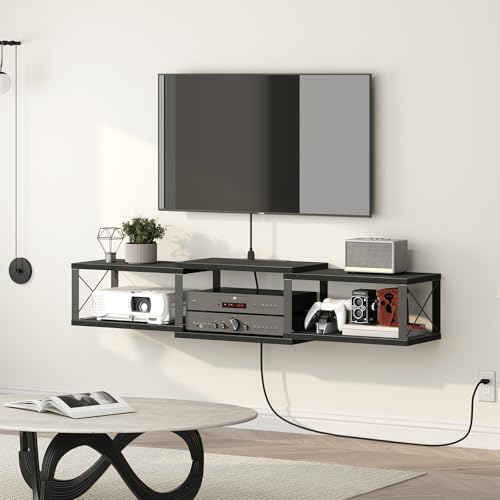
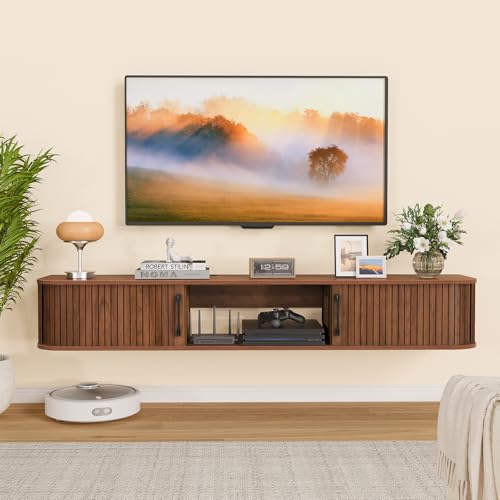
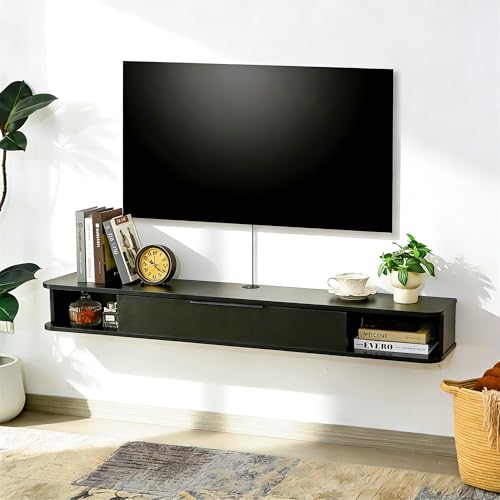
A hanging entertainment center, also known as a wall-mounted or floating entertainment center, is a stylish and practical solution for modern living rooms. By eliminating bulky legs and freeing up floor space, it instantly makes your room feel larger and more open.
If you're looking to achieve a clean, contemporary aesthetic while keeping your TV, gaming consoles, and media accessories organized, a wall-mounted unit is an excellent choice. These versatile pieces work well in apartments, small living rooms, or any space where you want to maximize every square foot.
💡 Key Insight: A hanging entertainment center isn't just about style—it's a functional upgrade that improves sightlines, simplifies cleaning, and creates a seamless look that integrates beautifully with your existing decor.
What Is a Hanging Entertainment Center?
A hanging entertainment center is a wall-mounted media unit designed to hold your television, audio equipment, gaming consoles, and decorative items. Unlike traditional floor-standing TV stands, these units are securely attached to the wall, providing a floating appearance that looks modern and streamlined.
These systems come in a variety of sizes and configurations, from slim floating TV mounts that hold just your screen, to expansive multi-tiered units with shelves and cabinets for full media storage. Many modern designs even integrate features like cable management, LED lighting, and adjustable shelving.
For homeowners seeking a polished, professional look, wall-mounted entertainment centers are an ideal choice. They align perfectly with modern TV stands trends, offering a clean aesthetic that pairs well with minimalist, Scandinavian, and contemporary interior styles.
Benefits of a Hanging Entertainment Center
🪄 Space-Saving Design
Frees up valuable floor space, making your room feel larger and more open—perfect for apartments and small living areas.
🧹 Easier Cleaning
Without legs or a base, you can easily sweep or mop underneath, reducing dust buildup and simplifying maintenance.
📺 Ergonomic Viewing
Mount your TV at eye level for optimal comfort, reducing neck strain and improving your overall viewing experience.
🔌 Cable Management
Many models include built-in channels to hide unsightly wires, creating a clean, clutter-free look.
🎨 Modern Aesthetic
A sleek floating design instantly elevates your living room's style, offering a contemporary vibe that feels custom-built.
🛡️ Safety & Durability
Wall-mounted units are anchored securely to studs, making them safe for homes with children or pets.
Key Considerations Before Buying
Wall Type & Structural Support
Before purchasing a hanging entertainment center, you must ensure your wall can support the weight. These units should always be mounted into wall studs or use heavy-duty anchors designed for your specific wall type (drywall, concrete, or brick).
Always check the manufacturer's weight capacity guidelines and use appropriate mounting hardware. If you're unsure, consult a professional installer to ensure safety and reliability.
Size & Compatibility
Measure your TV, media devices, and available wall space carefully. Consider the depth of the unit—it should accommodate your devices while maintaining a low profile. Many units are designed to hold TVs up to 65 inches or larger.
For larger screens, you may want to explore options like 78-inch TV stands or 100-inch long TV stands that offer similar floating styles in wider dimensions.
Weight Capacity
Check the maximum weight capacity of the entertainment center. It must support not only your TV but also soundbars, gaming consoles, cable boxes, and other accessories. Opt for models with robust mounting systems if you have heavy equipment.
Storage Needs
Think about how much storage you require. Some hanging entertainment centers feature open shelves, closed cabinets, or a mix of both. Consider your media collection, decorative items, and devices to choose the right configuration.
Hanging Entertainment Center vs. Traditional TV Stands
Understanding the differences between wall-mounted units and traditional stands will help you make an informed choice.
| Feature | Hanging Entertainment Center | Traditional TV Stand |
|---|---|---|
| Floor Space | Frees up floor space, ideal for small rooms | Takes up floor area, can feel bulky |
| Installation | Requires mounting into wall studs | Simple setup, no drilling required |
| Cleaning | Easy to clean underneath | Can be difficult to move for cleaning |
| Viewing Angle | Adjustable to eye level | May require additional risers |
| Aesthetic | Modern, sleek, minimal | Traditional, varied styles available |
| Mobility | Fixed to wall, not easily moved | Can be relocated easily |
Popular Hanging Entertainment Center Configurations
Single-Tier Floating Shelves
This minimalist approach features a single long shelf mounted to the wall, holding your TV and a few essential items. It's a great option for floating TV stands enthusiasts who want a clean, uncluttered look.
Multi-Tier Wall Units
These provide additional shelving above or below the TV, offering more storage and display space. Perfect for larger media collections or adding decorative accents, and they're comparable to full-wall entertainment centers in smaller packages.
Corner Wall Mounts
For rooms with limited wall space, corner-mounted entertainment centers are an innovative solution. They utilize dead corners and create a distinct focal point. This style works well with corner TV stands concepts but with a floating twist.
Integrated Fireplace Units
Some modern designs incorporate an electric fireplace into the entertainment center, offering both warmth and style. Explore entertainment fireplace options for a cozy, statement-making addition to your living room.
Installation Guide
- Choose the right location: Select a wall that provides adequate viewing angles and easy access to power outlets and cable connections.
- Mark the studs: Use a stud finder to locate wall studs. Mark their positions with a pencil.
- Level and measure: Use a level and measuring tape to ensure your unit will hang perfectly straight and at your desired height.
- Pre-drill holes: Drill pilot holes into the studs where the mounting bracket will attach.
- Attach the bracket: Securely fasten the mounting bracket to the wall using lag bolts or heavy-duty screws.
- Hang the unit: Carefully lift and hang the entertainment center onto the bracket. Ensure it locks into place securely.
- Test stability: Before adding equipment, gently tug on the unit to ensure it is securely attached.
- Organize cables: Route wires through integrated cable management channels or use zip ties and conduit to keep them hidden.
- Place your equipment: Carefully place your TV, soundbar, and other devices onto the unit.
⚠️ Installation Safety Tip: Always attach the unit directly to wall studs or use toggle bolts rated for the weight of your setup. Never rely on drywall anchors alone.
Styling Your Hanging Entertainment Center
A well-styled entertainment center enhances your living room's aesthetic. Here are some tips to make your wall-mounted unit look beautiful:
- Add greenery: Place small plants or succulents on the shelves for a pop of color and life. This softens the modern look and adds warmth to the space.
- Incorporate books and decor: Mix media with decorative items like coffee table books, framed photos, and small sculptures for visual interest.
- Use symmetry: For a balanced look, place matching items on both sides of your TV, such as identical speakers or lamps.
- Consider lighting: Add LED strip lighting behind the unit for a modern, backlit glow that creates a luxurious ambiance.
- Keep it clean: Avoid overcrowding. Leave some negative space to maintain a minimalist, open feel.
For more inspiration, explore our guide on living room styles to discover how a floating unit fits into various design aesthetics.
Final Buying Tips
- Measure twice, buy once: Carefully measure your wall space, TV size, and the unit's dimensions to ensure a perfect fit.
- Check weight limits: Always purchase a unit with a weight capacity that exceeds your total equipment weight.
- Look for VESA compatibility: Ensure the unit supports VESA mounting patterns if you plan to mount the TV directly to the entertainment center.
- Consider material quality: Choose high-quality materials like solid wood, premium MDF, or durable metal for longevity.
- Read customer reviews: Understand real-world performance and installation ease from other buyers before purchasing.