
Wall Mounted TV Bracket Swivel 55 Inch: The Complete Full-Motion Guide
Everything you need to know about choosing, installing, and enjoying a full-motion articulating TV mount for your 55-inch screen. Expert tips, VESA standards, and top recommendations.
START READINGWhy a Swivel Mount Transforms Your 55-Inch TV Experience: A wall mounted TV bracket with swivel capability for a 55-inch TV is not just about saving space—it is about unlocking viewing freedom. Unlike fixed mounts, a full-motion articulating bracket lets you angle the screen toward your sofa, kitchen, or dining area, reduce glare from windows, and access ports with ease. This guide walks you through every consideration, from VESA patterns to weight limits, so you can buy with total confidence.
What Is a Wall Mounted TV Bracket with Swivel?
A wall mounted TV bracket with swivel—often called a full-motion or articulating mount—is a hardware system that attaches your television to the wall while allowing it to extend, tilt, and pivot. For a 55-inch TV, swivel functionality typically ranges from 45 to 90 degrees in each direction, depending on the model. This means you can pull the screen away from the wall, rotate it toward different seating positions, and push it back flush when not in use.
The core components include a wall plate that anchors to studs, one or two articulating arms, and a TV bracket that connects to the back of your television. The swivel joint is the critical pivot point that enables horizontal rotation. When shopping for a 55 inch TV wall mount 90 degree swivel, pay attention to the extension range and the swivel degrees, as these determine how much flexibility you gain.
Unlike a floor-to-ceiling tension pole TV mount, which relies on vertical pressure, a swivel bracket is permanently anchored to your wall, offering superior stability and a cleaner look. It is also distinct from a full motion articulating TV wall mount in name only—both terms describe the same category of product, and the best models combine smooth swivel with tilt and extension.
Why Choose a Swivel Bracket for a 55-Inch TV?
55-inch TVs are the sweet spot for most living rooms and bedrooms—large enough for immersive viewing, yet manageable in size. A swivel mount maximizes this size advantage by letting you reposition the screen without moving furniture. Here are the primary benefits:
- Eliminate Glare: Rotate the TV away from windows or overhead lights to enjoy a clear picture any time of day.
- Multi-Room Viewing: Angle the screen toward the kitchen, dining area, or hallway without relocating the TV.
- Easy Cable Access: Extend the mount to reach HDMI ports, USB inputs, or power connections behind the TV.
- Better Ergonomics: Adjust the viewing angle to match your seated eye level, reducing neck strain.
- Space Optimization: Push the TV flush against the wall when not in use, freeing up floor space.
For homeowners who want a cinema-like experience, pairing a swivel bracket with a fireplace TV stand with surround sound or a floating wall TV panel with LED lights can create a truly premium entertainment zone. The swivel mount becomes the functional backbone, while the furniture and lighting add ambiance.
Key Specifications to Check Before Buying
Not all swivel brackets are created equal. Before you add a mount to your cart, verify these critical specifications to ensure compatibility with your 55-inch TV:
| Specification | What to Look For | Why It Matters |
|---|---|---|
| VESA Pattern | 200x200mm, 400x200mm, 400x400mm, or 600x400mm | Must match the mounting holes on your TV. Check your TV manual or measure the distance between holes. |
| Weight Capacity | At least 55–77 lbs (25–35 kg) | A 55-inch TV typically weighs 30–50 lbs. Choose a mount rated well above your TV's weight for safety. |
| Swivel Range | 45° to 90° in each direction | Wider swivel gives more viewing flexibility. 90° is ideal for corner or multi-room setups. |
| Tilt Range | +5° to -15° | Reduces glare and improves vertical viewing angles when seated or standing. |
| Extension Range | 2–20 inches from wall | More extension means easier access to ports and greater swivel flexibility. |
| Wall Type Compatibility | Wood studs, concrete, brick | Ensure the mount includes appropriate hardware for your wall material. |
For a deeper dive into VESA standards, including how to measure your TV's pattern, refer to our guide on the VESA wall mount standard 100mm x 100mm. Even though 55-inch TVs usually use larger patterns, understanding the measurement system helps you avoid costly mistakes.
Pros and Cons of a Swivel TV Bracket
Advantages
- Maximum viewing flexibility
- Reduces screen glare effectively
- Ideal for open-concept living spaces
- Easy access to cables and ports
- Professional, clean wall-mounted look
- Can be pushed flush to save space
Considerations
- Requires secure installation into studs
- Heavier and bulkier than fixed mounts
- Higher cost than basic tilting mounts
- May not sit perfectly flush without extension
- Needs periodic tightening of joints
- Wall damage if relocated frequently
If you are comparing this option to a ceiling-based solution, note that a motorized ceiling TV mount with swivel offers similar rotation but is far more complex and expensive. For most homes, a wall-mounted swivel bracket is the practical, cost-effective choice.
Installation Checklist for a 55-Inch Swivel Mount
Proper installation is the difference between a secure, long-lasting mount and a dangerous failure. Follow this checklist to ensure a safe and successful setup:
- Locate Studs: Use a stud finder to identify at least two wall studs. Never mount a heavy TV bracket into drywall alone.
- Verify VESA Compatibility: Confirm the mount's VESA pattern matches your TV's mounting holes.
- Check Weight Rating: Ensure the bracket supports at least 1.5 times your TV's weight.
- Gather Tools: Drill, level, stud finder, socket set, and a helper for lifting the TV.
- Mark and Drill: Use the mount's template to mark pilot holes, then drill into studs at the correct depth.
- Attach Wall Plate: Bolt the wall plate securely using lag bolts provided with the mount.
- Attach TV Brackets: Screw the TV brackets to the back of your television using the correct M6 or M8 bolts.
- Lift and Lock: With a helper, lift the TV onto the mount and secure the safety locks.
- Test Swivel and Tilt: Gently move the TV through its full range of motion to check for smooth operation.
- Manage Cables: Use cable ties or a cable management channel to keep wires organized behind the TV.
If you are also upgrading your furniture, consider pairing your new mount with a TV stand with pull-out turntable shelf for vinyl enthusiasts, or a media console for TV and record player to keep your audio gear accessible.
Recommended Wall Mounted TV Brackets with Swivel for 55-Inch TVs
Based on extensive research and user feedback, we have curated a selection of the best swivel brackets for 55-inch TVs. These models balance build quality, swivel range, and value. Browse the recommended products below to find the perfect match for your home.
Top Swivel TV Brackets for 55-Inch Screens
⚠️ AFFILIATE DISCLOSURE: This website contains affiliate links. As an affiliate Associate, we earn from qualifying purchases. If you make a purchase through these links, we may receive a small commission at no additional cost to you. Read our full affiliate policy.

Mounting Dream Full Motion TV Wall Mount for 32-70 Inch TVs up to 110lbs | Mount Bracket with Swivel and Tilt, TV Bracket with Articulating Dual Arms, Fits 16” Studs, Max VESA 400X400 mm, MD2380
Check price on Amazon
USX MOUNT Swivel TV Wall Mount for 26-60 Inch TVs up to 80 lbs, Single Articulating Arm, Full Motion TV Wall Mount Bracket with Swivel and Tilt, Max VESA 400x400mm
Check price on Amazon
Full Motion TV Wall Mount for Most 37"-84" Flat Screen TV, Swivel or Tilt TV Wall Bracket with Dual Articulating Arms, for 12"-16" Wood Studs, Max VESA 600x400mm, Load 120 lbs by USX MOUNT
Check price on Amazon
Perlegear Long Arm TV Wall Mount for 32-65″ TVs, 37.4” Long Extension | Max VESA 400x400mm, Corner TV Mount with Articulating Arms, Full Motion Wall Bracket with Swivel and Tilt, Holds to 110 lbs
Check price on Amazon
Pipishell Full Motion TV Wall Mount for 26–65 inch TVs up to 80 lbs | Max VESA 400x400mm, TV Mount Bracket with Articulating Arms, Extension, Tilt, Swivel, Leveling, Reinforced Steel Structure
Check price on Amazon
USX Mount Full Motion TV Wall Mount for 42-90 inch TV Holds up to 132lbs | TV Mount Bracket Dual Swivel Articulating Tilt 6 Arms, Max 16" Wood Studs, VESA 600x400mm, Fits 55/65/75/85/86"
Check price on Amazon
Mounting Dream TV Wall Mount Swivel and Tilt for 26-55 Inch TV up to 60 lbs | TV Mount Perfect Center Design, Full Motion TV Mount Bracket with Articulation, Max VESA 400x400mm, MD2377
Check price on Amazon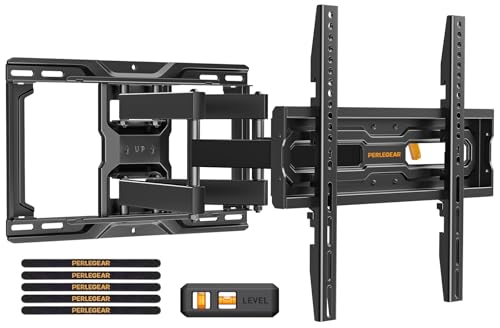
Perlegear Full Motion TV Wall Mount for 26-74 inch TVs, Height Adjustable TV Mount, Pre-Assembled Wall Mount TV Bracket with Tool-Free Tilt, Swivel, Fits 16” Studs, 99 lbs, Max VESA 400x400mm, PGMF21
Check price on AmazonSwivel vs. Fixed vs. Tilt: Which Mount Is Right for You?
Understanding the differences between mount types helps you make an informed decision. A fixed mount is the most affordable and low-profile option, keeping your TV as close to the wall as possible. A tilting mount adds vertical adjustment to reduce glare, while a swivel (full-motion) mount offers the greatest flexibility with horizontal rotation and extension.
For a 55-inch TV in a living room with multiple seating areas, a swivel bracket is almost always the best choice. However, if your TV is positioned at eye level directly in front of your sofa, a tilting mount may suffice. If you are designing a dedicated media room, you might also explore automated retractable TV ceiling mount solutions for a dramatic, space-saving effect.
Common Mistakes to Avoid When Buying a Swivel Bracket
Even experienced DIYers can overlook critical details. Avoid these common pitfalls:
- Ignoring VESA: Buying a mount that does not match your TV's hole pattern.
- Underestimating Weight: Choosing a mount with a weight capacity too close to your TV's actual weight.
- Skipping Studs: Mounting into drywall only, which can cause the TV to fall.
- Overlooking Swivel Clearance: Not accounting for the space needed for the TV to rotate without hitting walls or furniture.
- Cheap Hardware: Using low-quality bolts that may strip or break under load.
- Forgetting Cable Management: Leaving cables dangling, which can interfere with swivel movement.
If your wall cannot accommodate a heavy swivel mount, consider a furniture-based alternative such as a small TV stand for 55 inch flat screen or a TV stand for 55 inch TV with fireplace that provides a stable base without wall drilling.
Frequently Asked Questions
Can I mount a 55-inch TV on a swivel bracket without studs?
It is not recommended. A 55-inch TV and mount can weigh 50–80 lbs combined. Always anchor into at least two wood studs or use appropriate concrete anchors. Drywall anchors alone are insufficient for a full-motion mount.
How far can a swivel bracket extend from the wall?
Most full-motion mounts for 55-inch TVs extend between 2 and 20 inches. Longer extensions provide greater swivel range but may require a sturdier wall anchor and more clearance.
Will a swivel mount fit my TV if it has a curved screen?
Yes, as long as the VESA pattern and weight are compatible. Curved TVs use the same mounting holes as flat models. However, ensure the mount's brackets do not put pressure on the curved edges.
How do I know if my wall is strong enough for a swivel mount?
Wood stud walls are ideal. Brick or concrete walls require masonry anchors. If you are unsure, consult a professional installer. You can also use a floor-to-ceiling tension pole TV mount as a no-drill alternative.
Can I use a swivel mount in a corner?
Yes, swivel mounts are excellent for corners because they can angle the TV toward the center of the room. Just ensure the mount's arms do not collide with adjacent walls when fully extended.
Ready to Upgrade Your Viewing Experience?
Browse our top-rated swivel TV brackets for 55-inch TVs and enjoy the freedom of full-motion viewing. Installation is easier than you think with the right mount.
View Recommended MountsFinal Thoughts
A wall mounted TV bracket with swivel for a 55-inch TV is one of the most impactful upgrades you can make to your home entertainment setup. It combines the sleek look of wall mounting with the flexibility of a freestanding stand, giving you the best of both worlds. By understanding VESA patterns, weight limits, swivel ranges, and installation best practices, you can choose a mount that will serve you reliably for years.
Whether you are creating a cozy bedroom retreat or a lively living room hub, the right swivel bracket ensures everyone gets a great view. Take your time, measure twice, and enjoy the transformation.