
55 Inch TV Wall Mount with 90 Degree Swivel: The Complete Guide
Discover how a full-motion mount with 90-degree swivel can transform your viewing experience, maximize room flexibility, and eliminate glare. Everything you need to choose and install the perfect mount for your 55-inch TV.
START READINGWhy a 90-Degree Swivel Mount Changes Everything
A 55 inch TV wall mount with 90 degree swivel is not just a accessory—it is a viewing revolution. Unlike fixed mounts that lock your TV into a single position, a full-motion swivel mount lets you rotate the screen up to 90 degrees left or right. This means you can watch from the kitchen, the dining area, or even a nearby hallway without moving a single piece of furniture. For homeowners dealing with awkward room layouts, glare from windows, or multi-purpose living spaces, this flexibility is invaluable. In this guide, we will walk you through everything you need to know: from understanding swivel mechanics and weight capacity to installation tips and the best use cases for your 55-inch television.
Key Benefits of a 90-Degree Swivel TV Mount
🎯 Eliminate Glare Instantly
Windows and light sources can ruin your viewing experience. With a 90-degree swivel, you can angle your TV away from glare without closing the curtains or rearranging your entire room.
🛋️ Multi-Room Viewing
Perfect for open-concept living. Swivel the TV toward the kitchen while cooking, then rotate it back to the sofa for movie night—all with a gentle push.
📐 Optimal Viewing Angles
Whether you are sitting directly in front or off to the side, a full-motion mount ensures you always have the best seat in the house. No more straining your neck.
🧹 Easy Cable Access
Swiveling the TV away from the wall gives you convenient access to ports, HDMI connections, and cable management systems for quick adjustments.
What to Look For in a 55-Inch Swivel Mount
Not all wall mounts are created equal. When shopping for a 55 inch TV wall mount with 90 degree swivel, pay close attention to these critical specifications:
| Specification | Recommended Range | Why It Matters |
|---|---|---|
| VESA Compatibility | 200x200mm to 400x400mm | Must match your TV's mounting holes. Most 55-inch TVs use 400x400mm. |
| Weight Capacity | At least 60–80 lbs (27–36 kg) | Your 55-inch TV likely weighs 30–50 lbs. Always exceed the minimum for safety. |
| Swivel Range | Up to 90 degrees left/right | Determines how far you can rotate the screen. 90 degrees is ideal for multi-room viewing. |
| Tilt Range | +5° to -15° | Helps reduce glare and adjust viewing angle when mounted higher on the wall. |
| Extension | 2 to 20 inches | How far the TV extends from the wall. More extension means more swivel flexibility. |
| Wall Type | Wood stud, concrete, or brick | Ensure the mount supports your wall type. Most include hardware for wood studs. |
Always check your TV's VESA pattern before buying. You can find this in your TV manual or by measuring the distance between the four mounting holes on the back of your TV. A mismatch means the mount simply won't fit.
Step-by-Step Installation Guide
Installing a swivel mount is a rewarding DIY project that takes about 45–60 minutes. Follow these steps for a secure and professional result:
-
Gather Your Tools and Materials
You will need a stud finder, drill, level, measuring tape, socket wrench set, screwdriver, and a pencil. Most mounts include the necessary bolts and brackets, but check your kit first.
-
Locate the Studs
Use a stud finder to locate the wood studs behind your drywall. Mark them clearly. For a 55-inch TV, you will typically need to hit two studs for proper weight distribution.
-
Mark and Drill Pilot Holes
Hold the wall plate against the wall, level it, and mark the hole positions. Drill pilot holes using a bit slightly smaller than your lag bolts.
-
Attach the Wall Plate
Secure the wall plate to the studs using the provided lag bolts and washers. Tighten them firmly, but do not overtighten to avoid stripping the wood.
-
Attach the TV Brackets
Bolt the mounting brackets to the back of your 55-inch TV using the correct screws from your kit. Make sure they are snug and secure.
-
Hang the TV
With a helper, lift the TV and hook the brackets onto the wall plate. You should hear a click or feel a secure lock. Test the swivel motion gently before releasing.
-
Test and Adjust
Swivel the TV through its full 90-degree range to ensure smooth movement. Adjust tension screws if the motion feels too loose or too stiff. Secure any cable management clips.
Best Use Cases for a 55-Inch Swivel Mount
A 55 inch TV wall mount with 90 degree swivel shines in specific scenarios. Here are the most common and impactful use cases:
🏠 Open-Concept Living Rooms
When your living room, dining area, and kitchen share one space, a swivel mount lets you direct the TV to wherever you are. It is the ultimate multi-tasking companion.
🛏️ Bedrooms with Corner Placement
If your TV is mounted in a corner, a swivel mount lets you angle it toward the bed or the seating area. No more awkward neck angles. For bedroom-specific setups, consider a TV stand for bedroom as an alternative, but a swivel mount is often the cleaner solution.
🍳 Kitchens and Dining Areas
Mount your TV on a wall between the kitchen and living room. Swivel it toward the counter while cooking, then back to the sofa for meals. Perfect for recipe videos or morning news.
🎮 Gaming and Sports Viewing
For gamers and sports fans, being able to adjust the screen angle means less glare and more immersion. Swivel it to face your gaming chair or the center of the room.
Swivel vs. Fixed vs. Tilt Mounts: Which Is Right for You?
Understanding the differences between mount types helps you make an informed decision. Here is a quick comparison:
| Mount Type | Movement | Best For | Price Range |
|---|---|---|---|
| Fixed | None | Minimalist look, single viewing position | $30–$60 |
| Tilt | Up/down tilt only | Reducing glare, higher mounting positions | $40–$80 |
| Full-Motion (Swivel) | Swivel, tilt, extend | Multi-room viewing, glare elimination, flexibility | $80–$250 |
If you only ever watch TV from one spot, a fixed mount is sufficient. But if you value flexibility, a 55 inch TV wall mount with 90 degree swivel is worth the investment. For those who prefer a furniture-based solution, a wall mount for a 55 inch TV can be paired with a stylish wood TV stand for 55 inch TV for a hybrid approach.
Frequently Asked Questions
It depends on the mount's extension range and your TV's width. A 55-inch TV is approximately 48–49 inches wide. To swivel 90 degrees, the mount needs to extend far enough so the TV clears the wall. Look for mounts with at least 15–20 inches of extension for full 90-degree swivel without obstruction. Always check the product specifications for the swivel radius.
Most 55-inch TVs use a VESA pattern of 400x400mm or 200x200mm. However, this can vary by brand and model. Always check your TV's manual or measure the distance between the four mounting holes on the back of your TV to confirm.
No. You must mount a TV wall mount into wood studs, concrete, or brick. Drywall alone cannot support the weight of a 55-inch TV and mount. Use a stud finder to locate the studs, or consider a full motion TV wall mount model PISF1 that includes hardware for various wall types.
Prices vary based on brand, build quality, and features. Budget-friendly options start around $80, while premium full-motion mounts with heavy-duty construction and smooth swivel mechanisms can cost $250 or more. For a reliable 55-inch TV, expect to spend $100–$180 for a quality swivel mount.
Yes, installation is a straightforward DIY project if you have basic tools and can locate studs. However, due to the weight and size of a 55-inch TV, it is highly recommended to have a helper for lifting and positioning the TV onto the mount. If you are unsure about your wall type or stud placement, consider hiring a professional installer.
Recommended 55 Inch TV Wall Mounts with 90 Degree Swivel
⚠️ AFFILIATE DISCLOSURE: This website contains affiliate links. As an affiliate Associate, we earn from qualifying purchases. If you make a purchase through these links, we may receive a small commission at no additional cost to you. Read our full affiliate policy.

Perlegear Corner TV Wall Mount Long Arm TV Mount Bracket for 37-75 Inch TVs | Full Motion Wall Mount with 32.37” Extension & Swivel Articulating Arm & Tilt, MAX VESA 600x400mm, Holds up to 100 lbs
Check price on Amazon
HCMOUNTING Long Arm Corner TV Wall Mount for 26–70 Inch TVs up to 132 lbs | Full Motion Corner TV Mount with 30.2" Long Extension, Swivel ±90° /Tilt /Level for Multi-angle Viewing, Max VESA 400x400mm
Check price on Amazon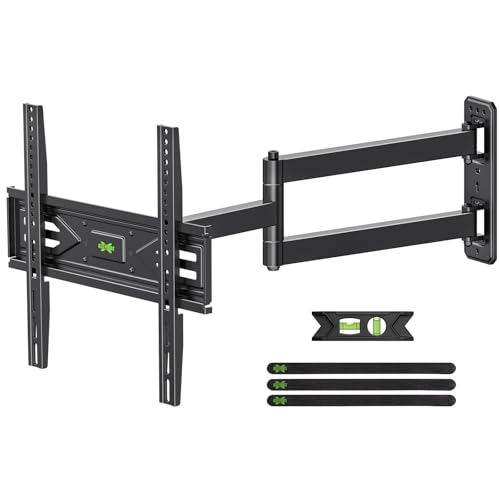
USX MOUNT Corner TV Wall Mount with 31.22" Long Arm for 26-65 Inch TVs up to 80 lbs, Full Motion TV Wall Mount Bracket with Swivel and Tilt, Max VESA 400x400mm fit Most 32 40 42 43 50 55 60 65 TVs
Check price on Amazon
PERLESMITH Long Arm Full Motion TV Wall Mount for 42–90 inch TVs | 42.72″ extension, swivel, tilt, level, 150 lbs max load, fits 16″/18″/24″ wood studs, max VESA 800x400mm
Check price on Amazon
Perlegear Long Arm Full Motion TV Wall Mount for 42–97 Inch TVs up to 150 lbs, Pre-Assembled TV Mount with Full Swivel, Tilt and Extension, Fits 8″/12″/16″/24″ Wood Studs, Max VESA 800x400mm, PGXLF02
Check price on Amazon
Perlegear Long Arm TV Wall Mount for 32-65″ TVs, 37.4” Long Extension | Max VESA 400x400mm, Corner TV Mount with Articulating Arms, Full Motion Wall Bracket with Swivel and Tilt, Holds to 110 lbs
Check price on Amazon
BEISHI Long Arm TV Wall Mount,Corner TV Wall Mount for 37-75 Inch TVs | 180°Swivel and Tilt +5/-20° Level Adjustment,Rotates 90° Long Extension 36.4" Max,Hold up 132LBS,Max VESA 600x400mm
Check price on Amazon
USX MOUNT Swivel TV Wall Mount for 26-60 Inch TVs up to 80 lbs, Single Articulating Arm, Full Motion TV Wall Mount Bracket with Swivel and Tilt, Max VESA 400x400mm
Check price on AmazonFinal Thoughts: Is a 90-Degree Swivel Mount Right for You?
If you value flexibility, hate glare, or live in an open-concept space, a 55 inch TV wall mount with 90 degree swivel is one of the best investments you can make for your home entertainment setup. It transforms a static screen into a dynamic viewing experience that adapts to your lifestyle. Just remember to check your VESA pattern, confirm weight capacity, and mount into studs for safety. With the right mount, your 55-inch TV will deliver the best possible picture from every corner of the room. For more inspiration on designing your entertainment space, explore our guides on TV wall design and media wall ideas to create a setup that is both functional and beautiful.