
TV Wall Mount for 60 Inch TV: The Complete Buying Guide
Everything you need to know before buying a wall mount for your 60-inch television. Learn about VESA patterns, weight capacities, mount types, and installation essentials to make the right choice.
Why Choose a Wall Mount for Your 60-Inch TV?
Wall mounting a 60-inch TV is one of the most effective ways to transform your living room or home theater. It eliminates the need for a bulky TV stand, frees up floor space, and creates a sleek, modern look that elevates any room's aesthetic. More importantly, a wall mount allows you to position your TV at the optimal viewing height and angle, reducing neck strain and improving your overall viewing experience.
However, a 60-inch TV is a significant investment, and choosing the wrong mount can lead to frustration, safety hazards, or even damage to your television. Unlike smaller TVs, 60-inch models require mounts with higher weight capacities and specific VESA compatibility. This guide will walk you through every critical factor you need to consider, from understanding VESA patterns to selecting between tilt, fixed, and full-motion mounts.
If you're still exploring furniture-based solutions, you might also consider a sturdy TV stand to hold a 65-inch TV as an alternative, but for a truly clean, minimalist setup, a wall mount is often the superior choice.
Understanding VESA Patterns for 60-Inch TVs
The Video Electronics Standards Association (VESA) defines a standardized mounting interface for flat-panel TVs and monitors. The VESA pattern is the distance, in millimeters, between the four mounting holes on the back of your TV. This is the single most important specification to check before purchasing any wall mount.
For most 60-inch TVs, the VESA pattern typically falls within the range of 200x200mm to 600x400mm. However, this is not universal. Brands like Samsung, LG, Sony, and TCL each have their own specifications, and even within the same brand, different models can vary significantly.
How to Find Your TV's VESA Pattern
- Check the manual: The user manual for your TV will list the VESA pattern in the specifications section.
- Look at the back of the TV: If you already have the TV, measure the horizontal and vertical distance between the four threaded holes. For example, if the holes are 400mm apart horizontally and 400mm apart vertically, your VESA pattern is 400x400.
- Search online: Search for your TV's model number followed by "VESA pattern" to find the specification quickly.
Once you know your VESA pattern, look for a mount that explicitly supports it. Many mounts come with adjustable brackets that can accommodate a range of VESA sizes, which offers more flexibility. If you're also planning to mount a different TV in another room, you might check our guide on a wall bracket for a 65-inch TV to compare specifications.
Weight Capacity: The Critical Safety Factor
A 60-inch TV can weigh anywhere from 40 to 70 pounds (18 to 32 kg) without the stand. When you add the weight of the mount itself and the leverage exerted when the TV is extended or tilted, the actual load on your wall can be significantly higher. Therefore, the weight capacity of your chosen mount is non-negotiable.
Rule of thumb: Choose a mount that is rated for at least 1.5 to 2 times the weight of your TV. If your TV weighs 50 pounds, look for a mount with a minimum capacity of 75 to 100 pounds. This provides a crucial safety margin.
All reputable mounts list their weight capacity clearly. Never exceed this limit. If you're unsure about the weight of your TV, check the specifications online or in the manual. A mount that is insufficient for your TV's weight can fail, causing catastrophic damage to your TV and potentially injuring anyone nearby.
For those considering a full-motion mount, remember that the further the TV extends from the wall, the more stress is placed on the mount and the wall anchors. In these cases, an even higher weight capacity rating is advisable.
Types of Wall Mounts for 60-Inch TVs
There are three primary types of TV wall mounts, each offering different benefits. Your choice depends on your viewing habits and room layout.
1. Fixed TV Wall Mounts
Fixed mounts are the simplest and most affordable option. They hold your TV flat against the wall, offering a clean, low-profile look. They are ideal for rooms where the seating position is directly in front of the TV and you don't need to adjust the angle.
- Pros: Most affordable, lowest profile (as little as 1 inch from the wall), very secure.
- Cons: No adjustability for viewing angle or glare reduction.
- Best for: Dedicated home theaters with fixed seating.
2. Tilting TV Wall Mounts
Tilting mounts allow you to tilt the TV up or down. This is particularly useful if you need to mount the TV higher than eye level, such as above a fireplace, or if you want to reduce glare from windows or lights.
- Pros: Helps reduce glare, provides some flexibility for higher mounting positions, still relatively low-profile.
- Cons: Limited adjustability compared to full-motion mounts.
- Best for: Rooms with potential glare issues or TVs mounted slightly higher than ideal.
A tilting mount is a great compromise if you need some flexibility without the bulk of a full-motion mount. For more information on optimizing your viewing angle, see our guide on optimal height for a 65-inch TV on the wall, which shares similar principles.
3. Full-Motion (Articulating) TV Wall Mounts
Full-motion mounts offer the ultimate flexibility. They allow you to extend the TV from the wall, swivel it left or right, and tilt it up or down. This is perfect for open-concept living spaces, corner installations, or rooms where you want to watch TV from different seating areas.
- Pros: Maximum flexibility, ideal for corners or multiple viewing positions, can be pulled out for easier cable access.
- Cons: Most expensive, bulkier profile, requires a more robust wall installation, and the extension puts more stress on the wall.
- Best for: Open-plan rooms, corner mounts, or households with varied viewing habits.
If you have a larger TV, you might also be interested in a full-motion wall mount for a 70-inch TV to see how the requirements scale up.
Mount Type Comparison at a Glance
To help you decide, here's a quick comparison of the three main mount types for a 60-inch TV.
| Feature | Fixed Mount | Tilting Mount | Full-Motion Mount |
|---|---|---|---|
| Price Range | $25 – $60 | $40 – $100 | $80 – $250+ |
| Adjustability | None | Tilt only | Tilt, swivel, extend |
| Profile from Wall | 0.5" – 1.5" | 1.5" – 3" | 3" – 20"+ (when extended) |
| Glare Reduction | No | Yes | Yes |
| Installation Difficulty | Easy | Moderate | Moderate to Advanced |
| Best For | Fixed seating, clean look | High mounting, glare issues | Corners, open spaces, flexibility |
Installation Considerations for a 60-Inch TV Wall Mount
Installing a wall mount for a 60-inch TV is a two-person job and requires careful planning. Here are the key factors to consider:
Wall Type
The type of wall you have will determine the hardware you need. Most mounts are designed for wood studs, which provide the strongest anchoring. If you have metal studs or a brick/concrete wall, you will need specialized anchors or a different mounting approach.
- Wood Studs: Use lag bolts to secure the mount directly into the center of the studs. Use a stud finder to locate them.
- Concrete/Brick: Use concrete anchors or sleeve anchors. A hammer drill may be required.
- Metal Studs: Use heavy-duty toggle bolts or snap toggles. Consult a professional if unsure.
- Drywall Only: Never mount a TV directly into drywall alone. It will not hold the weight.
If you are mounting on a wall where a traditional stand isn't possible, you might consider a wall shelf for a TV to sit on as an alternative, though this is less secure for a 60-inch TV.
Cable Management
A clean installation requires hiding the cables. Plan for in-wall cable management or use a cable raceway kit. Many full-motion mounts have integrated cable management channels to keep things tidy.
Tools You Will Need
- Stud finder
- Drill with appropriate bits
- Level
- Measuring tape
- Pencil
- Socket wrench set
- Screwdriver
- Assistant (for lifting the TV)
Recommended TV Wall Mount for 60 Inch TV
⚠️ AFFILIATE DISCLOSURE: This website contains affiliate links. As an affiliate Associate, we earn from qualifying purchases. If you make a purchase through these links, we may receive a small commission at no additional cost to you. Read our full affiliate policy.

Mounting Dream Full Motion TV Wall Mount for 32-70 Inch TVs up to 110lbs | Mount Bracket with Swivel and Tilt, TV Bracket with Articulating Dual Arms, Fits 16” Studs, Max VESA 400X400 mm, MD2380
Check price on Amazon
USX MOUNT Full Motion TV Wall Mount for Most 32-70 inch TVs up to 99 lbs, Wall Mount Bracket with Dual Articulating Arms, Swivel, Tilt, Max VESA 400x400mm, TV Mount Fits 12”/16” Wood Studs
Check price on Amazon
Mounting Dream Tilting TV Wall Mount for Most 37-90 Inch TVs up to 132lbs | Low Profile TV Mount Fits 16", 18", 24" Studs, Max VESA 600x400mm, Wall Mount TV Bracket with Quick Lock & Release, MD2268-LK
Check price on Amazon
ELIVED Full Motion TV Wall Mount for 26-60" TVs, Max VESA 400x400, 77 lbs. | Swivel & tilt articulating arms, single stud center mount, compatible with corner installation for home flat TVs
Check price on Amazon
Full Motion TV Wall Mount for Most 37"-84" Flat Screen TV, Swivel or Tilt TV Wall Bracket with Dual Articulating Arms, for 12"-16" Wood Studs, Max VESA 600x400mm, Load 120 lbs by USX MOUNT
Check price on Amazon
PERLESMITH Tilting TV Wall Mount for 23–60 inch TVs up to 115 lbs | Fits 16" Wood Stud, 1.2 inch Low Profile for Space Saving, Pull-Cord Release for Easy TV Removal, Max VESA 400x400mm
Check price on Amazon
Perlegear Corner TV Wall Mount Long Arm TV Mount Bracket for 37-75 Inch TVs | Full Motion Wall Mount with 32.37” Extension & Swivel Articulating Arm & Tilt, MAX VESA 600x400mm, Holds up to 100 lbs
Check price on Amazon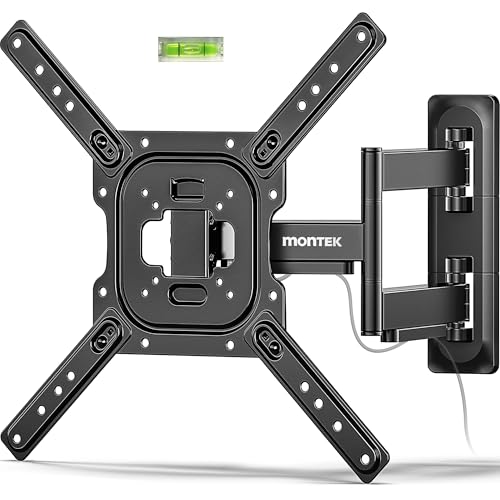
monTEK Full Motion TV Wall Mount Bracket for 23-65 Inch TVs up to 77 lb | Single-Stud Articulating Arm Extends 17 in, Corner Mount, Swivel, Tilt, Retracts to 2.08 in, 4X Load Tested, VESA 400x400 mm
Check price on AmazonFrequently Asked Questions
What size wall mount do I need for a 60-inch TV?
You need a mount that supports your TV's specific VESA pattern and weight. Most 60-inch TVs have a VESA pattern between 200x200mm and 600x400mm and weigh between 40 and 70 pounds. Always check your TV's manual for exact specifications and choose a mount rated for at least 1.5 times that weight.
Can I mount a 60-inch TV on drywall without studs?
No. Mounting a 60-inch TV directly into drywall is extremely dangerous and will likely result in the TV falling. You must anchor the mount into wall studs, concrete, or use heavy-duty toggle bolts designed for metal studs. If you cannot find studs, consult a professional.
What is the best height to mount a 60-inch TV?
The ideal height is when the center of the TV screen is at eye level from your primary seating position. For most people, this means the bottom of the TV is about 42 to 48 inches from the floor. If you're mounting above a fireplace or furniture, you may need a tilting mount to angle the TV down.
Is a full-motion mount worth it for a 60-inch TV?
It depends on your room layout. If you have a corner installation, an open-concept space, or want to watch TV from different areas, a full-motion mount is absolutely worth it. If your seating is fixed and directly in front of the TV, a fixed or tilting mount is a more cost-effective and lower-profile solution.
Can I install a TV wall mount myself?
Yes, if you are comfortable using a drill and have basic DIY skills. However, mounting a 60-inch TV is a two-person job due to the weight. Always follow the manufacturer's instructions carefully, and if you are unsure about your wall type or the installation process, hire a professional.
Final Thoughts on Choosing a TV Wall Mount for Your 60-Inch TV
Selecting the right wall mount for your 60-inch TV is a decision that balances safety, functionality, and aesthetics. By understanding your TV's VESA pattern and weight, and by choosing the right type of mount for your viewing habits and room layout, you can create a stunning, space-saving entertainment setup that you'll enjoy for years to come.
Remember to always prioritize safety by using the correct hardware for your wall type and by choosing a mount with a generous weight capacity. If you're still in the planning stages and comparing wall mounting to other options, you might also explore our guides on wall mounts for 85-inch TVs or wall mounts for a 75-inch TV to see how requirements change with screen size.
Ready to mount your 60-inch TV? Check out our top-recommended wall mounts above and enjoy a cleaner, more immersive viewing experience today.