
Wall Bracket for a 65 Inch TV: The Complete Buying Guide
A 65-inch television is the sweet spot for most living rooms — immersive without overwhelming the space. But to unlock its full potential, you need the right wall bracket. This guide walks you through VESA patterns, weight ratings, mount types, and installation so you can buy with total confidence.
SEE TOP PICKSWhy the Right Wall Bracket Matters for a 65 Inch TV
Mounting a 65-inch TV is a different job than hanging a smaller set. A television of this size typically weighs between 40 and 70 pounds without its stand, and the panel itself is large enough that even a small mounting error becomes very visible. A bracket that is under-rated, poorly anchored, or simply the wrong style can leave your screen tilted, sagging, or — worst case — falling.
The good news is that the market for 65-inch TV mounts is mature and affordable. You can find a reliable, safety-certified bracket for anywhere from $30 to $150, depending on the features you want. Full-motion articulating arms sit at the higher end, while low-profile fixed mounts start near the bottom. The key is matching the bracket to your wall, your viewing habits, and your TV's specific specifications.
If you are still deciding between mounting on the wall or placing your TV on furniture, it also helps to understand the trade-offs of a traditional TV stand for 65 inch TV in store versus a wall installation. Many homeowners eventually combine both approaches, using a TV stand for a 65 inch TV with wall mount configuration to hide cables and add storage below the screen.
VESA Pattern and Weight: The Two Numbers You Must Know
Before you buy any bracket, check the back of your TV for two things: its VESA mounting pattern and its weight. The VESA pattern is the horizontal and vertical distance, in millimeters, between the four threaded holes on the back of the panel. For the vast majority of 65-inch televisions, that pattern is either 400 x 400 mm or 600 x 400 mm. Some models use 300 x 300 mm or 400 x 200 mm, so always verify rather than assume.
Weight matters just as much. A bracket rated for 50 pounds should never be used with a 60-pound television, even briefly. Reputable manufacturers publish a maximum load capacity, and you should leave a safety margin of at least 20 percent. In other words, if your TV weighs 55 pounds, look for a mount rated for 75 pounds or more.
| Specification | Typical Range for 65" TVs | What to Look For |
|---|---|---|
| VESA Pattern | 400 x 400 mm, 600 x 400 mm | Bracket must support your exact pattern |
| TV Weight (no stand) | 40 – 70 lbs | Mount rated at least 20% higher |
| Screen Diagonal | 65 inches | Confirm bracket lists 65" compatibility |
| Depth from Wall | 0.5" (fixed) – 20" (full motion) | Match to your room layout |
Pro Tip: The model number on the back of your TV leads directly to a specification sheet online. That sheet lists the exact VESA pattern and weight — far more reliable than a measuring tape. If you cannot find the panel, a 65 inch TV wall mount in store purchase lets you bring the measurements and compare brackets in person before buying.
Types of Wall Brackets for a 65 Inch TV
There is no single "best" mount — only the best mount for your room. Each style solves a different problem, and the right choice depends on where you sit, how many people watch, and how often you need to reach behind the screen.
Fixed Wall Mounts
A fixed bracket holds the TV flat against the wall, usually leaving only one to two inches of clearance. It is the most affordable option, the most stable, and the cleanest-looking. If your seating is directly in front of the TV and you never need to adjust the angle, a fixed mount is the smartest buy. It also places the least stress on your wall anchors because the TV's weight hangs straight down.
Tilting Wall Mounts
A tilting bracket adds a hinge that lets you angle the screen downward by roughly 10 to 15 degrees. This is ideal when the TV is mounted slightly higher than eye level, such as above a fireplace or in a bedroom where you watch from bed. Reducing glare and improving the viewing angle makes a meaningful difference on a large panel. For a classic example of this setup, see how a TV stand with fireplace pairs with a tilted mount to keep the screen comfortable to watch.
Full-Motion Articulating Mounts
A full-motion bracket, sometimes called an articulating arm, extends outward, swivels left and right, and tilts up and down. It is the most flexible option and the most expensive. It shines in open-plan rooms where the TV needs to face a kitchen, a dining table, and a sofa at different times. Keep in mind that a full-motion arm places more leverage on the wall, so proper anchoring is even more critical. If you are comparing articulated arms, this overview of a full motion mount for 65 inch TV covers how extension length and swivel range affect real-world use.
Corner and Specialty Brackets
Not every wall is a flat, unobstructed surface. A corner bracket uses a dual-arm design to angle the TV across a room, which is useful in apartments and awkward layouts. For rooms where the wall studs are inconveniently placed, a no stud wall mount for 65 inch TV uses heavy-duty toggle anchors rated for the load. Some homeowners also consider ceiling solutions — a flip down ceiling TV mount for 65 inch is a niche but effective choice for watching from bed.
Recommended Wall Brackets for a 65 Inch TV
⚠️ AFFILIATE DISCLOSURE: This website contains affiliate links. As an affiliate Associate, we earn from qualifying purchases. If you make a purchase through these links, we may receive a small commission at no additional cost to you. Read our full affiliate policy.

Mounting Dream Full Motion TV Wall Mount for 32-70 Inch TVs up to 110lbs | Mount Bracket with Swivel and Tilt, TV Bracket with Articulating Dual Arms, Fits 16” Studs, Max VESA 400X400 mm, MD2380
Check price on Amazon
Mounting Dream Tilting TV Wall Mount for Most 37-90 Inch TVs up to 132lbs | Low Profile TV Mount Fits 16", 18", 24" Studs, Max VESA 600x400mm, Wall Mount TV Bracket with Quick Lock & Release, MD2268-LK
Check price on Amazon
IWORKBOARD 55 65 75 85 inch Tilting TV Wall Mount for 32-90 '' TVs, Low Profile TV Mount Bracket, Safe Lock & Quick Release,Max VESA 600x400mm, 24 inch Studs,132 lbs, Fit Most 55+ 75+ 85+ 86 TVs
Check price on Amazon
Full Motion TV Wall Mount for Most 37"-84" Flat Screen TV, Swivel or Tilt TV Wall Bracket with Dual Articulating Arms, for 12"-16" Wood Studs, Max VESA 600x400mm, Load 120 lbs by USX MOUNT
Check price on Amazon
USX MOUNT UL Listed Full Motion TV Mount, Swivel Articulating Tilt TV Wall Mount for 26-65 Inch LED, 4K, Wall Mount Bracket with VESA 400x400mm Up to 77lbs, Perfect Center Design -XMM006-1
Check price on Amazon
USX Mount Full Motion TV Wall Mount for 42-90 inch TV Holds up to 132lbs | TV Mount Bracket Dual Swivel Articulating Tilt 6 Arms, Max 16" Wood Studs, VESA 600x400mm, Fits 55/65/75/85/86"
Check price on Amazon
IWORKBOARD 50 55 65 inch Full Motion TV Wall Mount for 32-70 inch TV Bracket,Dual articulating Arms Mount, Tilt Swivel Extension Level, Max VESA 400x400mm, 16" Studs, 110 lbs,Fit Most 40 43 50+ TVs
Check price on Amazon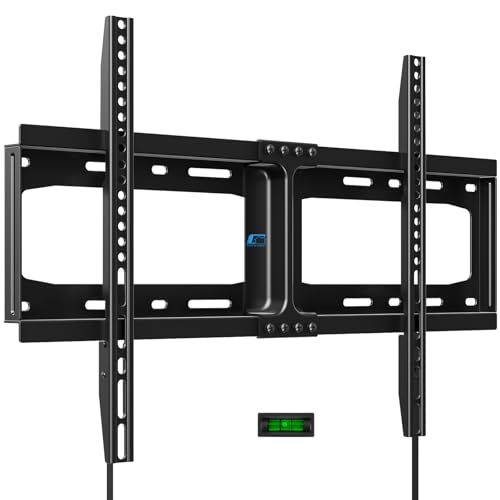
HOME VISION Heavy Duty Fixed TV Wall Mount for 32-86 Inch Flat Screen | Max VESA 600x400mm, Holds up to 165 lbs, Fits 8-24" Wood Studs, Universal Low Profile TV Bracket, Space Saving HV8601
Check price on AmazonHow to Install a Wall Bracket for a 65 Inch TV
Installation is a two-person job once the TV is involved, but the bracket itself can be mounted solo. The order of operations matters far more than raw strength.
- Locate the studs. Use a stud finder and mark the center of each stud. For a 65-inch TV, you want the bracket to span at least two studs, ideally three.
- Confirm the height. The center of the screen should sit at or slightly above seated eye level — roughly 40 to 42 inches from the floor for most sofas.
- Attach the wall plate. Lag bolts go into studs, never drywall alone. If studs are unavailable, use rated toggle anchors designed for the load.
- Install the TV brackets. Bolt the two vertical arms to the back of the TV using the correct M6 or M8 screws and spacers from the hardware kit.
- Lift and lock. With a helper, hang the TV on the wall plate, then tighten the safety screws so the panel cannot be lifted off accidentally.
- Manage cables. Route HDMI and power through a wall plate or in-wall channel before final tightening for a clean finish.
If the wall you have chosen is above a fireplace or a media unit, the mounting logic changes slightly. A setup like an entertainment center with TV mount 65 inch can hide components below while the bracket handles the screen above. And if your living room already centers on a hearth, the layout advice in these living room layouts with fireplace and TV will help you avoid the classic "TV too high" mistake.
Matching the Bracket to Your Setup
A 65-inch TV rarely lives in isolation. The bracket interacts with the furniture, the wall material, and the viewing distance, and each of these can push you toward a different style of mount.
If you have a stand you love but want the screen on the wall, a hybrid approach works well: pair the mount with a white TV stand for 65 inch TVs or a TV stand with storage for living room so components and remotes have a home below. In smaller apartments, a small TV stand for a 65 inch TV keeps the footprint tight while the bracket frees up the surface. And in rooms with a distinctive palette, a blue TV stand for a 65 inch TV or a black and gold TV stand can anchor the design so the wall-mounted screen feels intentional rather than floating.
Safety is the thread that ties all of this together. Once the TV is up, protect the finish and the wall with a TV stand protector if furniture sits nearby, and keep the area around the mounting zone clear of anything that could be knocked into the screen. For households with pets or children, choosing a mount with a locking mechanism adds peace of mind that a simple hook-on design cannot match.
Remember: VESA pattern, weight rating, and stud placement decide whether a bracket is safe. Everything else — color, brand, articulation — is preference. Get the first three right and your 65-inch TV will stay exactly where you put it for years.
Frequently Asked Questions
What VESA pattern does a 65 inch TV use?
Most 65-inch televisions use a 400 x 400 mm or 600 x 400 mm VESA pattern, though a minority use 300 x 300 mm or 400 x 200 mm. Always check your specific model's specification sheet, because the pattern is not standardized across brands or even across model years.
How much weight can a wall bracket for a 65 inch TV hold?
Quality brackets for this size are typically rated between 100 and 165 pounds, which provides a generous safety margin over the 40 to 70 pounds a 65-inch TV usually weighs. Choose a mount rated at least 20 percent above your TV's actual weight.
Do I need a full-motion mount for a 65 inch TV?
Only if you need to change the viewing angle. If your seating is fixed and directly in front of the screen, a fixed or tilting mount is more stable and significantly cheaper. Full-motion arms are best for open-plan rooms or multiple seating zones.
Can I mount a 65 inch TV on drywall without studs?
Not with standard screws. If studs are not available where you need them, use heavy-duty toggle anchors rated for the load, or choose a mount designed specifically for no-stud installation. Never rely on plastic wall plugs for a screen this size.
How high should a 65 inch TV be mounted?
For a typical sofa, the center of the screen should sit about 40 to 42 inches above the floor, roughly at seated eye level. If the TV must go above a fireplace or in a bedroom, add a tilting mount to reduce glare and neck strain.
How much should I expect to pay for a 65 inch TV wall bracket?
Fixed mounts start around $30, tilting mounts generally run $40 to $80, and full-motion articulating arms range from $70 to $150 or more. Expect to pay a premium for heavier-duty construction, longer extension, and certified safety ratings.