
TV Stand Legs for 65 Inch TV: The Complete Guide
Everything you need to know about finding, fitting, and replacing the perfect legs for your 65-inch television. Ensure stability, safety, and style.
START THE GUIDEWhy Focus on TV Stand Legs? The legs of your TV stand are more than just a base—they are the critical foundation that supports a heavy, expensive, and delicate piece of electronics. For a 65-inch TV, which can weigh anywhere from 40 to 70 pounds (18 to 32 kg) without the stand, choosing the right legs is essential for safety, stability, and aesthetics. This guide will walk you through every consideration, from VESA patterns to weight distribution, helping you make an informed purchase.
Why the Right Legs Are Critical for a 65-Inch TV
A 65-inch TV is a significant investment and a major focal point in any living room. The stand legs you choose—whether as a replacement for lost or damaged originals, or as an upgrade for better stability—directly impact:
- Safety: A 65-inch TV is top-heavy. Flimsy or ill-fitting legs can lead to tipping, especially in homes with children or pets. Proper legs distribute weight evenly and provide a wide, secure base.
- Stability: The legs must be able to support the TV's weight without wobbling. This is crucial for picture quality (a wobbly TV can be distracting) and for the longevity of the TV's internal components.
- Aesthetics: The legs are a visible part of your entertainment setup. They can complement your decor, match your furniture, or be hidden entirely for a floating look.
- Ventilation: Some legs elevate the TV to improve airflow around the bottom vents, which helps prevent overheating.
- Compatibility: Not all legs fit all TVs. You need to match the mounting pattern (VESA) and the screw sizes to your specific TV model.
If you are replacing a lost or broken stand, or simply want to change the look of your setup, understanding these factors is key. For a broader overview of stand options, you might also explore our guide to the TV stand base for 65 inch TV.
Understanding VESA Patterns and Mounting for 65-Inch TVs
The most important specification when looking for replacement legs is the VESA mounting pattern. VESA (Video Electronics Standards Association) defines the standard hole pattern on the back of your TV where the stand or wall mount attaches.
What is the VESA Pattern for a 65-Inch TV?
Most 65-inch TVs use one of the following VESA patterns:
- 200mm x 200mm: Common on some smaller or older 65-inch models.
- 300mm x 300mm: A very common pattern for mid-range 65-inch TVs.
- 400mm x 400mm: The most common pattern for larger, premium 65-inch and larger TVs.
- 600mm x 400mm: Found on some ultra-wide or high-end models.
You can find your TV's exact VESA pattern in the user manual or by measuring the distance between the four screw holes on the back of the TV (horizontal and vertical distance in millimeters).
Matching Legs to Your VESA Pattern
When buying replacement legs, you must ensure they are compatible with your TV's VESA pattern. Many universal TV stand legs are designed to fit a range of VESA patterns, often adjustable from 200x200 up to 800x400 or more. Always check the product specifications to confirm compatibility.
Pro Tip: If you are unsure about your TV's VESA pattern, you can often find it by searching your TV's model number online. Alternatively, a universal stand with adjustable width and height brackets will almost always fit.
If you are considering a wall-mounted solution instead, our guide on wall bracket for a 65 inch TV provides detailed information on matching brackets to your TV.
Types of TV Stand Legs for 65-Inch TVs
Replacement legs come in several styles, each with its own advantages. Here’s a breakdown of the most common types:
| Type | Description | Best For | Price Range |
|---|---|---|---|
| OEM/Original Legs | Exact replacement legs from the TV manufacturer. | Restoring the TV to its original condition, guaranteed fit. | $30–$80 |
| Universal Replacement Legs | Adjustable legs that fit a wide range of VESA patterns and TV sizes. | Budget-friendly replacements, flexibility for multiple TVs. | $20–$50 |
| Pedestal Stands | A central base with a single column, often swiveling. | Modern look, easy placement, swivel functionality. | $40–$120 |
| Tabletop TV Legs | Two separate feet that attach to the bottom of the TV. | Minimalist setups, soundbars placement, small spaces. | $15–$40 |
| Wall-Mount Style Legs | Legs that mimic the look of a wall mount but sit on furniture. | Floating aesthetic without drilling into walls. | $50–$150 |
For those who prefer a sleek, space-saving design, a slim TV stand for 65 inch TV often incorporates minimalist legs that are both stylish and functional.
Key Factors to Consider Before Buying
1. Weight Capacity
Your 65-inch TV likely weighs between 40 and 70 pounds (18–32 kg) without the stand. The legs you choose must be rated to support at least this weight, plus a safety margin. Most replacement legs list a weight capacity; look for one that exceeds your TV's weight by at least 20%.
2. Screw Size and Length
TV mounting screws are typically M4, M5, M6, or M8. The correct size depends on your TV's mounting holes. Most universal leg kits include a variety of screw sizes and spacers. Using the wrong screw size can damage the TV's threads or result in an insecure fit. Always hand-tighten screws and avoid over-tightening.
3. Material and Build Quality
Legs are commonly made from metal (steel, aluminum) or high-quality plastic. Metal legs are generally more durable and can support more weight. Look for legs with a solid base and non-slip rubber pads to protect your furniture and prevent sliding.
4. Stability and Base Width
A wider base provides better stability, especially for a large TV. If you have a narrow TV cabinet, ensure the legs' footprint fits within the surface. Some legs are adjustable in width, which is ideal for different furniture sizes.
5. Aesthetic and Finish
Legs come in various finishes: black, silver, brushed metal, wood grain, and more. Choose a finish that complements your TV and living room decor. For a cohesive look, you might consider a wood TV stand for 65 inch TV that matches the legs' tone.
6. Cable Management
Some legs feature integrated cable management channels to hide wires. This is a great feature for maintaining a clean, organized entertainment area.
Step-by-Step: How to Replace TV Stand Legs
Replacing the legs on your 65-inch TV is a straightforward process, but it requires care due to the TV's size and weight. Always ask for help—a 65-inch TV is too large and heavy to handle alone.
- Prepare a Soft, Flat Surface: Lay a thick blanket or towel on a large table or the floor. Place the TV face-down on the soft surface.
- Remove the Old Legs: Unscrew the existing legs. Keep the screws in a safe place if you plan to reuse them.
- Identify the Mounting Holes: Locate the VESA mounting holes on the back of the TV. These are usually arranged in a square or rectangular pattern.
- Attach the New Legs: Align the new legs with the mounting holes. Insert the appropriate screws (as per the leg kit instructions) and tighten them by hand until snug. Do not over-tighten.
- Check Stability: With help, lift the TV upright and place it on your furniture. Gently push the top corners to check for wobbling. Adjust the legs if necessary.
- Secure Cables: Route cables through any cable management channels and connect them to your devices.
If you are also considering adjusting the height of your TV for optimal viewing, our guide on height for 65 inch TV on wall offers principles that also apply to tabletop stands.
Safety First: Never attempt to install or replace legs while the TV is upright. Always work on a stable, padded surface to avoid damage to the screen.
Common Problems with TV Stand Legs (and How to Fix Them)
1. Wobbly TV
Cause: Uneven legs, loose screws, or a base that is too narrow for the TV's weight.
Solution: Tighten all screws. Check if the legs are adjustable and level them. If the wobble persists, consider a stand with a wider base or a TV stand base for 65 inch TV that offers more stability.
2. Lost or Missing Screws
Cause: Misplaced during a move or assembly.
Solution: Most hardware stores carry metric screws (M4, M5, M6, M8). Alternatively, purchase a universal TV stand screw kit online. For a complete replacement, you might need an entirely new set of legs, which can be found in our recommended products below.
3. Legs Don't Fit the VESA Pattern
Cause: The legs are designed for a different VESA size.
Solution: Return the incompatible legs and purchase a universal set with adjustable brackets. These are designed to fit a wide range of VESA patterns.
4. TV Overheating
Cause: Legs that are too short and block the TV's ventilation vents.
Solution: Choose legs that provide at least 2-3 inches of clearance between the bottom of the TV and the furniture surface. A high TV stand for 55 inch TV (or 65-inch) can also improve airflow.
When Replacement Legs Aren't Enough
Sometimes, replacing just the legs isn't the best solution. If your TV cabinet is too small, or if you want a completely different look, you might consider a full TV stand replacement. For a 65-inch TV, you'll need a stand that is at least 55-60 inches wide for proper support. You can explore options like a low TV stand for 65 inch TV for a modern, sleek look, or a gray TV stand for 65 inch TV to match your color scheme.
If you are short on floor space, a corner TV stand can be an excellent choice, as it utilizes otherwise wasted space. For a truly custom look, a wood TV stand for 65 inch TV offers warmth and durability.
And if you are still in the research phase for a complete setup, our comprehensive guide on TV stand to hold 65 inch TV provides a great starting point.
Frequently Asked Questions
What is the standard VESA pattern for a 65-inch TV?
Most 65-inch TVs use a 300x300 or 400x400 VESA pattern, but it varies by brand and model. Always check your TV's manual or measure the mounting holes.
Can I use any replacement legs on my 65-inch TV?
No. You must ensure the legs are compatible with your TV's VESA pattern and can support its weight. Universal legs with adjustable brackets are a safe bet.
Where can I buy replacement legs for a 65-inch TV?
You can find them on Amazon, eBay, and specialty electronics retailers. Manufacturer websites also sell original replacement parts. See our recommended products below.
How much do replacement TV legs cost?
Prices vary. Basic universal legs start around $20, while OEM or premium pedestal stands can cost $80–$150. See the table above for a detailed breakdown.
Do I need a specific screwdriver to install TV legs?
Most TV legs require a Phillips-head screwdriver. Some may require a hex key (Allen wrench), which is often included with the leg kit.
Ready to Find the Perfect Legs for Your 65-Inch TV?
Browse our top recommended products below, selected for compatibility, stability, and value.
VIEW RECOMMENDATIONSRecommended TV Stand Legs for 65 Inch TV
⚠️ AFFILIATE DISCLOSURE: This website contains affiliate links. As an affiliate Associate, we earn from qualifying purchases. If you make a purchase through these links, we may receive a small commission at no additional cost to you. Read our full affiliate policy.

Universal TV Stand, Metal TV Legs for 20-65 inch LCD/LED/OLED/Plasma Flat&Curved Screen TV Height Adjustment with VESA 75x75mm to 800x500mm Max ML1760
Check price on Amazon
HOLMAXD Universal TV Stand for 19-75 Inch LCD LED TVs Hold up to 110 lbs | Height Adjustable TV Legs Replacement, Table Top TV Stand Base, Max VESA 800X600mm
Check price on Amazon
PERLESMITH Universal TV Stand Legs for 37-78 inch TVs to 99lbs with Mount | -/+30° swivel, 9 Height adjustable, Tempered glass base, Max VESA 600x400mm, Livingroom & Bedroom, PSTVS13
Check price on Amazon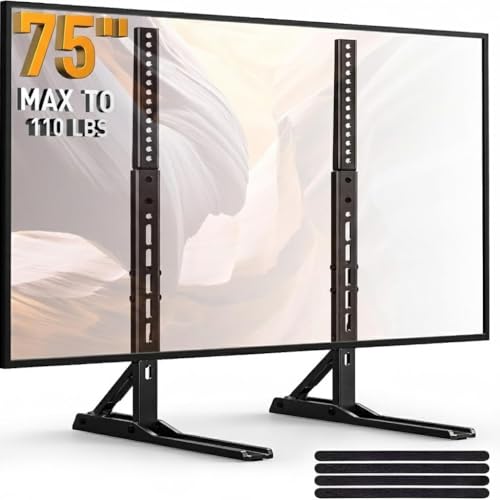
PERLESMITH Universal TV Stand Legs for 20–75 Inch TVs up to 110 lbs | 3 Height Adjustment, Steel TV Legs Replacement, Cable Management, Max VESA 800x600mm, TV Base for Living Room & Bedroom
Check price on Amazon
TV Stand Legs for LG TV Legs 60 65 in 65UQ7950 65UJ6300 65UJ6320 65UJ6540 65UK6200 65UK6500 65UK6500PLA 65UM7300 65UN7300 60UJ6200 60UJ6300 60UK6200 60UM6950 60UN7300 for LG Television Stand wr Screw
Check price on Amazon
Perlegear Universal TV Stand Legs for 37–90 inch TVs up to 150 lbs | 8 Height Adjustable, TV Legs Replacement Suitable for Soundbar, Max VESA 800 x 500mm,Livingroom & Bedroom, PGTVS20
Check price on Amazon