
32 Inch Smart TV with Middle Stand: The Complete Guide
Everything you need to know about choosing, setting up, and styling a 32-inch smart TV with a center or middle stand for your home.
View Top PicksWhy a 32-inch smart TV with a middle stand? This compact combination is perfect for bedrooms, kitchens, dorms, and small apartments. The central stand offers stability, easy placement on narrow furniture, and a clean, minimalist look that fits virtually any decor. Whether you're upgrading a guest room or creating a cozy viewing nook, understanding the nuances of stand types, VESA compatibility, and space planning will help you make the right choice.
Why Choose a 32-Inch Smart TV with a Middle Stand?
The 32-inch TV size remains one of the most popular for secondary rooms. It's large enough for comfortable viewing from 4–6 feet away, yet small enough to fit on a dresser, kitchen counter, or dedicated universal TV stand for 32-inch TV. The "middle stand" — also called a center stand or pedestal stand — is the most common mounting solution for this size. Unlike wide-legged stands that require a broad surface, a central pedestal concentrates the TV's weight in one spot, making it compatible with narrower furniture pieces.
Modern 32-inch smart TVs from brands like Samsung, LG, TCL, and Vizio typically include a center stand in the box. However, the stand's footprint, height, and swivel capability vary significantly between models. Some stands are simple fixed pedestals, while others offer tilt or swivel functionality. Understanding these differences is crucial before you buy.
Key Benefits of a Middle Stand
- Space Efficiency: Requires less surface depth than wide-set legs.
- Stability: Weight is centered, reducing tipping risk on flat surfaces.
- Aesthetic: Clean, uncluttered look that complements modern decor.
- Flexibility: Easy to reposition on a desk, dresser, or counter.
- Cable Management: Many center stands include integrated cable routing.
Potential Limitations
- Surface Requirements: Needs a flat, stable surface at least as wide as the stand base.
- Limited Swivel: Not all center stands swivel; check before buying.
- Height Constraints: Fixed height may not suit all viewing angles.
- VESA Mounting: If you want to wall-mount later, you'll need a separate bracket.
- Soundbar Placement: A center stand may leave little room for a soundbar directly in front.
Types of Middle Stands for 32-Inch Smart TVs
Not all middle stands are created equal. Here's a breakdown of the most common designs you'll encounter:
| Stand Type | Description | Best For |
|---|---|---|
| Fixed Pedestal | A simple, non-adjustable base that supports the TV from the center. | Permanent placements where the viewing angle is already ideal. |
| Swivel Stand | Allows the TV to rotate left and right, typically 20–30 degrees. | Rooms with multiple seating areas or where glare is an issue. |
| Tilt Stand | Offers slight upward or downward tilt adjustment. | Elevated placements like kitchen counters or tall dressers. |
| Screen-Only Stand | A minimal base that holds the panel upright with a small footprint. | Ultra-compact spaces where every inch counts. |
When shopping, pay attention to the stand's base dimensions. A typical 32-inch TV center stand has a base measuring roughly 10–14 inches wide and 6–8 inches deep. Ensure your furniture surface can accommodate this footprint with a few inches of clearance on all sides for safety. If you're considering a wall-mounted setup later, explore options like a full motion TV wall mount 32 inch to free up surface space entirely.
VESA Compatibility and Mounting Options
Most 32-inch smart TVs use a VESA mounting pattern of 100x100mm or 200x200mm. This is important if you plan to replace the included stand with a third-party mount or wall bracket. The VESA pattern is the set of four holes on the back of the TV. Before purchasing any alternative stand or mount, verify your TV's VESA size in the manual or product specifications.
If you're renting and can't drill into walls, a center stand is your best friend. But if you own your home and want a cleaner look, a wall mount with a cable box holder can hide wires and free up your furniture entirely. For those who want the flexibility of both, a stand to put under wall mounted TV can house components while the TV stays on the wall.
Where to Place Your 32-Inch TV with Middle Stand
The beauty of a 32-inch TV with a center stand is its versatility. Here are some placement ideas to inspire you:
- Bedroom Dresser: A classic setup. Ensure the dresser is at least as wide as the TV and stable enough to support the weight (typically 8–12 lbs for a 32-inch TV).
- Kitchen Counter: Perfect for following recipes or watching morning news. Use a tilt stand to angle the screen downward for better viewing.
- Dorm Room Desk: Space is at a premium. A center stand minimizes the footprint, leaving room for textbooks and a laptop.
- Home Office: Use the TV as a secondary monitor or for background news. A swivel stand lets you switch between work and leisure angles.
- Guest Room: Provide entertainment without overwhelming the space. Pair with a dresser as TV stand for a cohesive look.
Recommended 32 Inch Smart TV with Middle Stand
⚠️ AFFILIATE DISCLOSURE: This website contains affiliate links. As an affiliate Associate, we earn from qualifying purchases. If you make a purchase through these links, we may receive a small commission at no additional cost to you. Read our full affiliate policy.

Samsung 32-Inch Class HD H5000F Smart TV (2025 Model) HDR, Object Tracking Sound Lite, Knox Security, One UI Tizen
Check price on Amazon
Rfiver Universal Swivel Tabletop TV Stand for Flat Screens 23-43 Inch | Heavy Duty Center Pedestal Stand Replacement with Black Tempered Glass Base & Height Adjustable Mount for 24 32 43 Inch
Check price on Amazon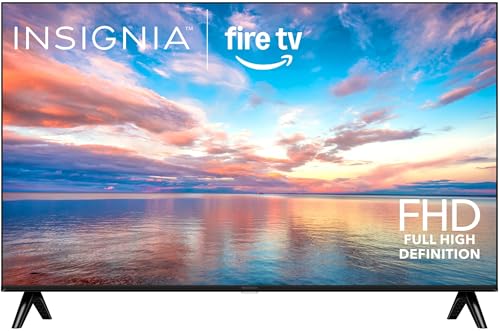
INSIGNIA 32" Class FE Series LED Full HD Smart Fire TV, Voice Remote with Alexa, Stream Live TV Without Cable
Check price on Amazon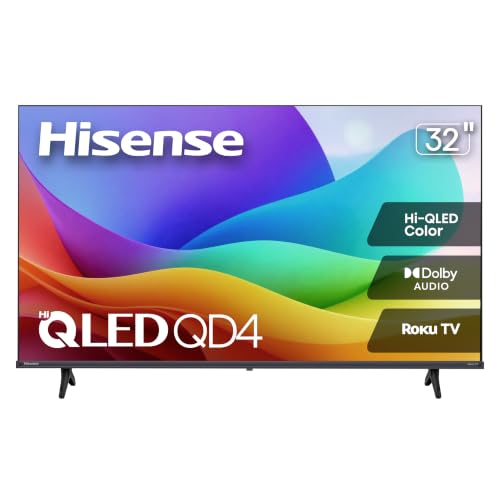
Hisense 32-Inch Class QD4SR Series Hi-QLED HD Smart Roku TV (32QD4HSR, 2026 Model) – Hi-QLED Color, Dolby Audio, Compatible with Alexa, Full Array LED, Slim Bezel Design
Check price on Amazon
Universal Swivel TV/Table Top TV Stand for 19 to 43 inch TVs with 90 Degree Swivel, 4 Level Height Adjustable, Heavy Duty Tempered Glass Base, Holds up to 99LBS HT02B-001
Check price on Amazon
Hisense 32-Inch S5 DécoTV Series Hi-QLED FHD Smart Fire TV (32S5QF) - Versatile Fit, Hi-QLED Color, Art-Inspired Design, Fluid Central Stand, DTS Virtual: X, Stream Live TV Without Cable
Check price on Amazon
HORION 32" Portable Smart TV , Movable TV, No Battery, Non-Touchscreen | Play Store,Chromecast,Voice Remote Control,Easy Set Up,Rolling Smart TV
Check price on Amazon
Samsung 32-Inch M5 (M50F) Series FHD Smart Monitor with Streaming TV, Speakers, HDR10, Gaming Hub, Multiple Ports, Workout Tracker, Vision Accessibility Tools, Black, LS32FM502ENXZA
Check price on AmazonSetup and Safety Tips
Proper setup ensures your TV stays safe and performs optimally. Follow these guidelines:
Do's
- Place the TV on a stable, flat surface that can support at least twice the TV's weight.
- Leave at least 2 inches of clearance around the stand base for ventilation.
- Use the included screws and washers — don't mix and match hardware.
- Route cables through the stand's cable management channel if available.
- Consider a security strap or anti-tip kit if you have pets or children.
Don'ts
- Don't place the TV near the edge of a surface where it could be knocked off.
- Don't use a stand that wasn't designed for your TV's weight and VESA pattern.
- Don't overtighten screws — this can damage the TV's back panel.
- Don't block ventilation slots on the back of the TV.
- Don't assume all center stands are swivel — check the specs.
Frequently Asked Questions
What is the difference between a middle stand and a center stand?
There is no functional difference. "Middle stand" and "center stand" are used interchangeably to describe a pedestal-style base that supports the TV from the middle. Some manufacturers prefer one term over the other, but they refer to the same design.
Can I replace the middle stand with a wall mount?
Yes, provided your TV has a VESA mounting pattern (most 32-inch smart TVs do). You'll need a wall mount compatible with your TV's VESA size (typically 100x100mm or 200x200mm) and weight. A full motion TV wall mount 32 inch offers the most flexibility.
Do all 32-inch smart TVs come with a middle stand?
Most do, but not all. Some budget models or commercial displays are sold as "screen only" and require a separate stand or mount. Always check the product description or box contents before purchasing. If you need a stand separately, look for a universal TV stand for 32-inch TV.
How much weight can a middle stand support?
A typical 32-inch TV weighs between 8 and 15 pounds (3.6–6.8 kg). The included middle stand is designed to support that weight plus a safety margin. However, if you add a soundbar or other accessories, check the stand's weight limit. Most stands support up to 20–25 pounds.
Can I use a 32-inch TV with a middle stand in a corner?
Yes, but you may need a corner-friendly stand or a swivel base to angle the screen toward your seating area. Alternatively, consider a TV stand in corner of living room designed specifically for corner placement.
What if my furniture is too narrow for the middle stand?
If your dresser or table is narrower than the stand base, you have a few options: use a smaller stand (some models have compact bases), place a sturdy board underneath to distribute the weight, or switch to a wall mount. A table to put under wall mounted TV can also work as a dedicated media surface.
Ready to Find Your Perfect 32-Inch Smart TV?
Browse our curated selection of top-rated 32-inch smart TVs with middle stands. Compare features, read reviews, and find the best deal for your space.
Shop Top Picks