
TV Wall Mounts for 32 Inch Flat Screen: The Complete Guide to Choosing and Installing
If you own a 32-inch flat-screen TV, you already know it's one of the most versatile sizes on the market. It's perfect for bedrooms, kitchens, dorm rooms, small apartments, and offices. But to get the most out of it—and to free up valuable floor space—a wall mount is often the smartest upgrade you can make. However, not all mounts are created equal, and a mount designed for a 65-inch TV is overkill (and potentially unsafe) for a 32-inch screen.
This guide is designed for homeowners and renters who are in the research phase. You know you want to mount your 32-inch TV, but you need clear, trustworthy information to make the right purchase. We'll walk you through VESA patterns, weight limits, mount types, and installation considerations so you can buy with confidence.
Why Wall Mounting a 32-Inch TV Makes Sense
Before diving into the technical details, it's worth understanding the benefits. A wall mount isn't just about aesthetics—it's about function and safety.
- Space Savings: In a small bedroom or kitchen, a TV stand can consume precious square footage. Mounting your TV on the wall eliminates the need for furniture, creating a cleaner, more open feel. If you're working with a compact space, you might also consider a small entertainment center for bedroom to organize other media devices.
- Improved Viewing Angles: A full-motion mount lets you tilt, swivel, and extend the TV for the perfect viewing angle, whether you're sitting at a desk or lying in bed.
- Safety: Wall-mounted TVs are far less likely to be knocked over by children or pets. This is especially important in households with young kids.
- Aesthetic Appeal: A floating TV looks modern and uncluttered, instantly upgrading the look of any room.
Understanding VESA Patterns for 32-Inch TVs
The most critical specification to check before buying any wall mount is the VESA pattern. VESA (Video Electronics Standards Association) defines the standard distance between the four mounting holes on the back of your TV.
For almost all 32-inch flat-screen TVs, the VESA pattern is either 100mm x 100mm or 200mm x 200mm. Some older or unusual models may use 75mm x 75mm, but this is rare for this size. You can find your TV's VESA pattern in the user manual or by measuring the horizontal and vertical distance between the holes on the back of your TV.
Pro Tip: If you're unsure about your TV's VESA pattern, check the manufacturer's website or the specifications sticker on the back of the TV. Most mounts support a range of VESA patterns, so as long as your TV falls within that range, you're good to go. For a detailed breakdown of the most common standard, see our guide to the VESA wall mount standard 100mm x 100mm.
Weight Capacity: The Safety Factor
Your 32-inch TV likely weighs between 8 and 15 pounds (3.6 to 6.8 kg) without the stand. However, you should always check your TV's exact weight in the manual. When choosing a mount, look for one with a weight capacity that exceeds your TV's weight by a comfortable margin. A mount rated for 50 pounds or more is more than sufficient for a 32-inch TV and provides a safety buffer.
Never choose a mount that is rated for less than your TV's weight. Doing so risks a catastrophic failure that could damage your TV and injure someone.
Types of TV Wall Mounts for 32-Inch Screens
There are three main types of wall mounts, each offering different levels of adjustability. Your choice depends on your viewing habits and room layout.
1. Fixed TV Wall Mounts
A fixed mount holds your TV flat against the wall with no movement. It's the most affordable, low-profile option. If you always watch TV from the same spot and don't need to adjust the angle, a fixed mount is a clean, minimalist choice. However, it offers no flexibility for reducing glare or accessing ports on the back of the TV.
2. Tilting TV Wall Mounts
A tilting mount allows you to tilt the TV up or down (usually 5 to 15 degrees). This is ideal for reducing glare from windows or lights, or if you need to mount the TV slightly higher than eye level. It's a great middle-ground option that's still relatively low-profile.
If you're mounting your TV above a fireplace or a tall piece of furniture, a tilting mount is often essential. For inspiration on integrating a TV with a fireplace, explore our great room ideas with fireplace and TV.
3. Full-Motion (Articulating) TV Wall Mounts
A full-motion mount is the most versatile. It allows you to tilt, swivel, and extend the TV away from the wall. This is perfect for corner placement, rooms with multiple viewing areas, or when you need to access the back of the TV frequently.
For a 32-inch TV, a full-motion mount is often the best choice for bedrooms, where you might want to angle the TV toward a bed or a desk. If you're considering a swivel mount for a larger TV, you can see how the technology scales with our guide to the 65-inch TV wall mount 90 degree swivel.
Mount Type Comparison at a Glance
| Mount Type | Adjustability | Profile | Best For | Typical Price |
|---|---|---|---|---|
| Fixed | None | Ultra-low (0.5–1 inch) | Minimalist setups, single viewing position | $15–$30 |
| Tilting | Tilt only | Low (1–2 inches) | Glare reduction, higher mounting | $20–$45 |
| Full-Motion | Tilt, swivel, extend | Medium (2–4 inches) | Corners, multiple viewing angles, bedrooms | $30–$70 |
Installation Considerations for a 32-Inch TV Mount
Installing a wall mount for a 32-inch TV is a manageable DIY project for most homeowners, but there are a few critical steps to get right.
Finding the Right Wall Location
First, decide where you want the TV. For optimal viewing, the center of the screen should be at eye level when you're seated. If you're mounting it in a bedroom, you might want it slightly higher. Use a stud finder to locate the wooden studs in your wall. Always mount into studs whenever possible. If you can't hit a stud, you'll need heavy-duty toggle bolts or a specialized drywall mount, but this is a last resort.
Gathering Your Tools
You'll typically need a drill, a stud finder, a level, a pencil, a measuring tape, and a screwdriver. Most mounts come with the necessary hardware (lag bolts, washers, etc.) for wood stud installation.
Step-by-Step Installation Overview
- Attach the mounting plate to the TV: Use the screws provided with your mount. Most mounts include a variety of screw sizes to fit different TV brands.
- Mark the wall: Hold the wall plate against the wall, use a level to ensure it's straight, and mark the hole locations.
- Drill pilot holes: Drill holes into the studs at the marked locations.
- Secure the wall plate: Use lag bolts to attach the plate to the wall. Tighten them securely.
- Hang the TV: With a helper, lift the TV and hook it onto the wall plate. Tighten any safety screws.
If you're not comfortable with DIY, hiring a professional installer is a wise investment, especially if you're mounting into brick or concrete.
Additional Features to Look For
- Built-in Level: Some mounts include a bubble level to help you get a perfectly straight installation.
- Cable Management: Look for mounts with channels or hooks to route cables neatly. This is a small feature that makes a big difference in aesthetics.
- Safety Lock: A locking mechanism prevents the TV from being accidentally knocked off the mount.
- Low Profile: If you want a flush look, check the distance the mount holds the TV from the wall.
Ready to find the perfect mount for your 32-inch TV? Our curated selection of top-rated wall mounts is based on real user reviews and expert testing.
View Recommended MountsCommon Mistakes to Avoid When Buying a 32-Inch TV Mount
- Ignoring the VESA Pattern: Always double-check that the mount supports your TV's VESA pattern.
- Underestimating Weight: Choose a mount with a weight capacity well above your TV's weight.
- Skipping the Studs: Mounting into drywall alone is risky. Always aim for studs.
- Buying a Mount for a Larger TV: While a larger mount might work, it can be bulky and unnecessary. A mount designed for 32-inch TVs is usually more appropriate and cost-effective.
- Forgetting Cable Management: Plan how you'll hide or route cables before you mount the TV.
Final Thoughts: Choosing the Best TV Wall Mount for Your 32-Inch Flat Screen
Mounting your 32-inch TV is a smart, space-saving upgrade that can transform a room. The key is to match the mount to your specific needs: a fixed mount for a clean look, a tilting mount for glare reduction, or a full-motion mount for maximum flexibility. By paying attention to VESA patterns, weight limits, and installation best practices, you can enjoy a safe, secure, and stylish setup.
If you're still deciding on the perfect entertainment setup for your space, you might also explore options like a small TV stand for 55 inch flat screen for a different room, or consider how a media console for TV and record player can complement your wall-mounted TV.
Recommended TV Wall Mounts for 32-Inch Flat Screens
⚠️ AFFILIATE DISCLOSURE: This website contains affiliate links. As an affiliate Associate, we earn from qualifying purchases. If you make a purchase through these links, we may receive a small commission at no additional cost to you. Read our full affiliate policy.

GLWIXY Fixed TV Wall Mount for 14-42" TVs Low Profile Wall Mount TV Bracket
Check price on Amazon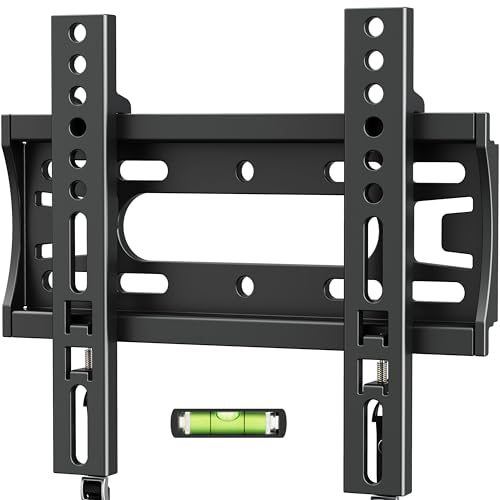
IWORBOARD 24 32 40 42 inch Fixed TV Monitor Wall Mount for 14-42 inch LED LCD Screen,Low Profile Small RV TV Mount, Easy Slim Flat Wall Bracket, Max VESA 200x200mm, 66lbs, Single Stud
Check price on Amazon
USX MOUNT TV Wall Mount for 32-74 inch Flat Screen/LED/4K up to 110lbs, Full Motion TV Mount Bracket with Swivel & Tilt Articulating Dual Arms, Max VESA 400x400mm, Fits 12/16" Wood Studs
Check price on Amazon
Mount-It! Small TV Wall Mount 19-32 in, Fits 24 in TVs, Tilt Swivel, 44 lb
Check price on Amazon
PERLESMITH Tilting TV Wall Mount for 23–60 inch TVs up to 115 lbs
Check price on Amazon
WALI TV Wall Mount Full Motion for 13-32 inch Monitor (1330LM), Black
Check price on Amazon