
TV Wall Mount with Extra Long Extension Arm
The ultimate solution for tricky viewing angles, deep furniture, and corner placements. Learn how to choose, install, and get the most from your extended reach TV mount.
VIEW TOP PICKSWhy You Need an Extra Long Extension Arm TV Mount
Standard TV wall mounts typically extend only 2 to 6 inches from the wall. While that's fine for straightforward setups, it falls short in many real-world living spaces. If you've ever struggled to get a clear view from the kitchen, dealt with a TV recessed into a deep cabinet, or tried to mount a television in a corner, you already understand the problem.
A TV wall mount with extra long extension arm solves these challenges by offering an articulation range that can reach 12, 24, even 30 inches or more from the wall. This extended reach transforms how you position your TV, giving you the flexibility to angle it toward any seat in the room. Whether you're upgrading a 55-inch wall mount setup or designing a complex TV wall design, understanding long-arm mounts is essential for a functional, enjoyable viewing experience.
Quick Definition: A TV wall mount with an extra long extension arm is a full-motion (articulating) bracket with an arm length significantly longer than standard—typically 15 to 30+ inches—allowing the TV to be pulled far from the wall, swiveled, tilted, and positioned with maximum flexibility.
When Should You Choose a Long Arm TV Mount?
Not every installation requires an extra long extension arm. But in certain scenarios, it's not just helpful—it's the only practical solution. Here are the most common situations where a long-arm mount outperforms a standard one:
1. Deep Entertainment Centers or Cabinets
If your TV sits inside a deep TV wall entertainment center or a cabinet with a back panel, a standard mount won't let you pull the screen forward enough to clear the sides. A long extension arm lets the TV move forward past the cabinet frame, giving you an unobstructed view without removing the furniture. This is particularly relevant for entertainment centers designed for under-wall-mounted TVs, where the mount must bridge the gap between the wall and the front of the unit.
2. Corner Placements
Corners are notoriously difficult for TV placement. A long-arm mount allows you to anchor the bracket to one wall while extending the TV diagonally into the room, effectively turning a dead corner into prime viewing real estate. Pair this with a corner TV stand or a corner TV stand with fireplace, and you've created a functional focal point where none seemed possible.
3. Multi-Room or Open-Concept Viewing
In open-concept living spaces, the TV often needs to serve multiple zones—the sofa, the dining area, the kitchen island. A long extension arm lets you swivel the screen toward whichever area is in use, eliminating the need for a second television. This flexibility is a game-changer for floating entertainment centers and media wall ideas where sightlines vary throughout the day.
4. Angled or Offset Seating
Sometimes the best wall for mounting isn't directly opposite the primary seating. A long-arm mount compensates for off-center placement by extending and angling the TV toward the viewer. This works exceptionally well with accent chairs or a sofa table arrangement where the main couch sits at an angle to the wall.
Key Features to Look for in a Long Extension Arm TV Mount
Not all long-arm mounts are created equal. When shopping, prioritize these features to ensure a safe, functional, and long-lasting installation.
Extension Range and Articulation
The defining feature is, of course, the extension length. Look for a mount that extends at least 15 inches, with premium options reaching 24 to 30+ inches. Also check the swivel range—many long-arm mounts offer 180 degrees or more, allowing the TV to fold flat against the wall or swing out dramatically. Tilt range (typically +5 to -15 degrees) helps reduce glare from windows or overhead lighting.
Weight Capacity and VESA Compatibility
A longer arm creates more leverage, which means the mount must be built to handle greater stress. Check that the weight capacity exceeds your TV's weight by at least 20–30%. VESA compatibility (the mounting hole pattern on the back of your TV) is equally critical. Most long-arm mounts support VESA patterns from 200x200 up to 600x400 or larger, accommodating screens from 42 to 85 inches and beyond.
Build Quality and Materials
Heavy-duty steel is the standard for long-arm mounts. Look for powder-coated finishes to resist rust and scratches. The joints and pivot points should be robust, with smooth articulation that doesn't sag over time. Cheaper mounts may use thinner metal or plastic components that wear out quickly under the stress of frequent movement.
Cable Management
With a long arm, cables can become a tangled mess if not managed properly. Many quality mounts include integrated cable management channels or clips along the arm. This keeps HDMI, power, and optical cables organized and protected as the TV moves. If your mount lacks this feature, consider adding adhesive cable clips or a cable sleeve.
Installation Hardware and Wall Type
Long-arm mounts are heavier and exert more force on the wall. Ensure the mount includes lag bolts appropriate for wood studs or concrete. For drywall without studs, you'll need heavy-duty toggle bolts or a mounting plate—but be aware that long-arm mounts are generally not recommended for drywall-only installations. Always mount into studs, concrete, or brick for safety.
| Feature | Minimum Recommendation | Ideal Specification |
|---|---|---|
| Extension Range | 15 inches | 24–30+ inches |
| Weight Capacity | TV weight + 20% | TV weight + 50% |
| Swivel Range | 90 degrees | 180 degrees |
| Tilt Range | +5 to -10 degrees | +5 to -15 degrees |
| VESA Compatibility | 200x200 to 400x400 | 200x200 to 600x400+ |
| Material | Steel | Heavy-gauge powder-coated steel |
Recommended TV Wall Mount with Extra Long Extension Arm
⚠️ AFFILIATE DISCLOSURE: This website contains affiliate links. As an affiliate Associate, we earn from qualifying purchases. If you make a purchase through these links, we may receive a small commission at no additional cost to you. Read our full affiliate policy.

Perlegear Corner TV Wall Mount Long Arm TV Mount Bracket for 37-75 Inch TVs | Full Motion Wall Mount with 32.37” Extension & Swivel Articulating Arm & Tilt, MAX VESA 600x400mm, Holds up to 100 lbs
Check price on Amazon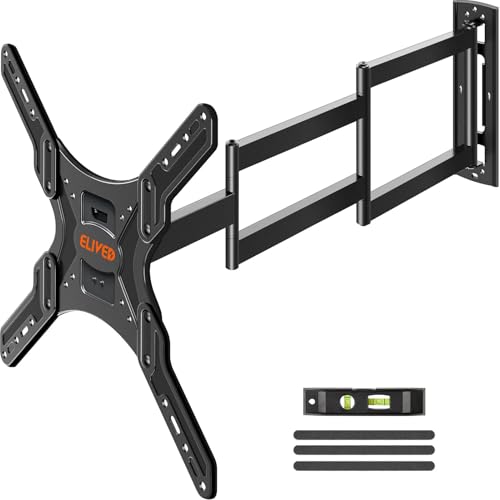
ELIVED Long Arm TV Mount for 26‑65" TVs, 37.4" Extension, Max VESA 400x400 | Full motion swivel & tilt, durable corner‑friendly TV mount bracket, holds up to 77 lbs for household flat‑screen TVs
Check price on Amazon
XINLEI Long Arm TV Wall Mount for Most 32-84 Inch TVs, 40” Extension Full Motion TV Bracket with Swivel Articulating Extension Tilt Arm, Max Support 132lbs, VESA 600x400mm, Max 16" Wood Stud, MA1079L
Check price on Amazon
HCMOUNTING Extra Long Arm Full Motion TV Wall Mount For 42–80” TVs | 43” Extra Long Extension, Swivel ±90° & Tilt ±10°, Leveling ±3°, Holds Up To 110 Lbs, Max Vesa 600x400mm, Fits 16”,18” Studs
Check price on Amazon
Perlegear Long Arm TV Wall Mount for 32-65″ TVs, 37.4” Long Extension | Max VESA 400x400mm, Corner TV Mount with Articulating Arms, Full Motion Wall Bracket with Swivel and Tilt, Holds to 110 lbs
Check price on Amazon
Perlegear Long Arm Full Motion TV Wall Mount for 42–97 Inch TVs up to 150 lbs, Pre-Assembled TV Mount with Full Swivel, Tilt and Extension, Fits 8″/12″/16″/24″ Wood Studs, Max VESA 800x400mm, PGXLF02
Check price on Amazon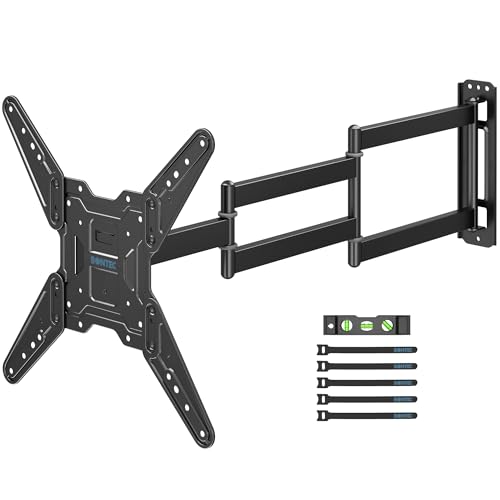
BONTEC Long Arm TV Wall Mount, Full Motion, 37.4" Extension for 26–65" TVs | Full Motion Corner Mount, Heavy Duty Bracket, ±90° Swivel, +5°/–10° Tilt, ±4° Leveling, Max VESA 400x400mm, Holds 77 lbs
Check price on Amazon
BONTEC Corner TV Wall Mount with Extra Long 40.9” Extension Arm,Tilt Swivel | Full Motion Dual Arm TV Bracket for 32–75 Inch TVs, Holds Up to 132 lbs, Level Adjustment, Max VESA 600×400mm
Check price on AmazonInstallation Guide: Mounting a Long Extension Arm TV Bracket
Installing a long-arm TV mount is similar to installing a standard full-motion mount, but with a few extra considerations due to the added weight and leverage. Follow these steps for a safe and secure installation.
Step 1: Choose the Right Wall Location
Locate the studs in your wall using a stud finder. For long-arm mounts, it's critical to anchor into at least two studs, preferably more. Avoid mounting solely into drywall—the leverage of a long arm can pull the mount out of the wall over time. If you're mounting above a fireplace, ensure the wall is structurally sound and check clearance for the TV's full range of motion.
Step 2: Verify TV Compatibility
Check your TV's VESA pattern and weight. Most TVs have this information in the manual or on the back panel. Ensure the mount's VESA range and weight capacity match your TV. If you're mounting a larger TV, such as a 75-inch TV or a 75-inch wall-mounted entertainment center, double-check that the mount supports the size and weight.
Step 3: Assemble the Mount
Lay out all parts and follow the manufacturer's instructions to assemble the wall plate and TV brackets. Attach the TV brackets to the back of your TV using the appropriate screws and spacers. For TVs with recessed mounting holes or curved backs, use the included spacers to ensure a secure fit.
Step 4: Mount the Wall Plate
With the help of a friend, hold the wall plate against the wall, level it, and mark the hole positions. Drill pilot holes and secure the plate using lag bolts. For concrete or brick walls, use masonry anchors. Tighten all bolts firmly but avoid over-tightening, which can strip the threads.
Step 5: Hang the TV and Adjust
Lift the TV onto the mount arm and secure it according to the instructions. Once mounted, test the full range of motion—extend, swivel, and tilt the TV to ensure smooth operation. Adjust the tension on the joints if needed. Many mounts have adjustable tension screws for this purpose.
Step 6: Manage Cables and Finalize
Route cables along the arm using the integrated cable management system. Leave enough slack for the TV to move freely without straining the cables. Once everything is in place, step back and enjoy your new flexible viewing setup.
Pro Tip: If you're mounting a TV in a corner, consider using a mount with a longer arm (24+ inches) to ensure the TV can clear the corner angle and face the seating area directly. Pair it with a small corner electric fireplace or a corner TV stand with fireplace for a complete corner entertainment solution.
Pros and Cons of Extra Long Extension Arm TV Mounts
Like any product, long-arm TV mounts have trade-offs. Understanding them helps you decide if this is the right solution for your space.
Advantages
- Maximum flexibility for viewing angles
- Ideal for corner and deep cabinet installations
- Can serve multiple rooms or seating areas
- Reduces glare by allowing precise angle adjustment
- Eliminates the need for multiple TVs in open spaces
- Often includes cable management for a clean look
Considerations
- Heavier and bulkier than standard mounts
- Requires sturdy wall anchoring (studs or concrete)
- More expensive than basic fixed or tilt mounts
- Can sag over time if low-quality or overloaded
- Extended position may protrude into walking space
- Installation is more complex and may require two people
For many homeowners, the benefits far outweigh the drawbacks—especially in challenging spaces. If you're dealing with a deep entertainment center for TV and record player or a long entertainment center with storage, a long-arm mount is often the only way to achieve a comfortable viewing angle without rearranging the entire room.
Complementary Furniture and Accessories
A long-arm TV mount is just one piece of a well-designed entertainment space. Consider these complementary pieces to complete the setup:
- Media Consoles and TV Stands: A TV stand with storage for living room or a black TV stand console provides a base for components and keeps the area organized. For larger setups, a tall TV console for 65-inch TV offers ample storage without overwhelming the space.
- Fireplace Entertainment Centers: Pair your mount with a fireplace entertainment center with TV mount or a floating wall TV stand with fireplace for a cozy, integrated look. Options like a white TV stand with fireplace for 65-inch TV or a dark brown entertainment center with fireplace add warmth and ambiance.
- Corner Solutions: If you're working with a corner, a corner electric fireplace entertainment center or a solid wood corner TV stand with fireplace maximizes the space while providing a natural focal point.
- Wall Units and Cabinets: For a built-in look, consider a TV wall unit or a media unit. A wall-mounted floating entertainment center keeps the floor clear and adds a modern touch.
- Accessories: Protect your furniture with TV stand protectors and prevent fading with sun damage prevention strategies. Add storage bins for entertainment center to keep clutter at bay, and a dimmable floor lamp for living room to create the perfect viewing ambiance.
Frequently Asked Questions
How far can a TV wall mount with extra long extension arm reach?
Extension ranges vary by model. Standard full-motion mounts extend 2–6 inches. Long-arm mounts typically extend 15–30 inches, with some heavy-duty models reaching 40 inches or more. The right reach depends on your specific installation—measure the depth of your cabinet or the distance from the wall to your ideal viewing position.
Can I use a long-arm TV mount on drywall without studs?
No. Long-arm mounts are not safe for drywall-only installations. The leverage created by the extended arm can pull the mount out of the wall, causing the TV to fall. Always anchor into wood studs, concrete, or brick. If studs aren't available in the desired location, consider a different wall or use a floor stand.
Will a long-arm mount sag over time?
Quality long-arm mounts are designed to resist sagging, but cheaper models with thin metal or weak joints may sag under the weight of a large TV. Choose a mount with a weight capacity well above your TV's weight and look for reinforced joints and heavy-gauge steel construction.
What size TV can a long-arm mount support?
Most long-arm mounts support TVs from 42 to 85 inches, with some models accommodating up to 90 inches or more. Always check the mount's weight capacity and VESA compatibility. For very large TVs, such as a 75-inch TV or larger, choose a heavy-duty mount specifically rated for the size and weight.
Is a long-arm TV mount good for corner installations?
Yes—it's one of the best solutions for corners. A long-arm mount allows you to anchor to one wall and extend the TV diagonally into the room, turning an awkward corner into a comfortable viewing area. Pair it with a corner TV stand or a corner TV stand with fireplace for a complete setup.
Can I mount a TV above a fireplace with a long-arm mount?
Yes, but with caveats. Above-fireplace installations require careful consideration of heat, height, and viewing angle. A long-arm mount can help by allowing you to pull the TV down and forward for a more comfortable viewing angle. However, ensure the wall above the fireplace is structurally sound and check the fireplace manufacturer's clearance requirements. For a fully integrated look, consider a fireplace entertainment center with TV mount or a electric fireplace TV stand with barn doors.
Final Thoughts: Is a Long Extension Arm TV Mount Right for You?
A TV wall mount with extra long extension arm is a specialized solution that shines in challenging installations. If you're dealing with a deep cabinet, a corner, an open-concept space, or an awkward seating arrangement, the extended reach and articulation can transform your viewing experience. It's not the right choice for every room—standard mounts are simpler, cheaper, and less obtrusive—but when you need the flexibility, nothing else compares.
Before you buy, measure carefully, check your wall structure, and verify your TV's VESA pattern and weight. Choose a mount from a reputable brand with a weight capacity that exceeds your TV's weight, and don't skimp on quality—the leverage of a long arm demands robust construction. With the right mount, you'll enjoy years of comfortable, flexible viewing from virtually any seat in the room.
Ready to explore your options? Check out our top recommendations above, and browse our related guides on TV wall design, media wall ideas, and TV wall units to complete your entertainment space.