
TV Stand for Multiple Game Consoles: The Complete Guide
Everything you need to know about choosing the perfect TV stand for your PS5, Xbox Series X, Nintendo Switch, and retro consoles. Ventilation, storage, cable management, and style — all covered.
VIEW RECOMMENDED STANDSWhy a Dedicated Gaming TV Stand Matters: Modern game consoles like the PS5 and Xbox Series X generate significant heat and require proper airflow. A standard TV stand with enclosed cabinets can cause overheating, performance throttling, and even hardware damage. This guide will help you choose a stand that keeps your consoles cool, organized, and ready for action.
Why Multiple Game Consoles Need a Specialized TV Stand
If you own more than one gaming console, you already know the struggle: tangled cables, insufficient ventilation, and a cluttered entertainment area. A TV stand designed for multiple game consoles solves these problems with dedicated compartments, open shelving for airflow, and smart cable management systems.
Unlike a standard TV stand for a 55-inch TV wall mount, a gaming-focused stand prioritizes accessibility and thermal management. You need quick access to disc drives, USB ports, and power buttons without dismantling your entire setup.
According to gaming hardware experts, consoles like the PS5 and Xbox Series X should have at least 4–6 inches of clearance on all sides. Enclosed cabinets without ventilation can cause temperatures to rise 15–20°F above ambient, leading to performance issues during extended gaming sessions.
Key Features to Look For in a Multi-Console TV Stand
Open Back Panel & Ventilation
Open-back designs allow heat to escape naturally. Look for stands with slatted or perforated back panels, or completely open backs for maximum airflow.
Adjustable Shelving
Different consoles have different heights. Adjustable shelves let you customize spacing for tall consoles like the PS5 while keeping smaller retro consoles accessible.
Cable Management System
With 3–5 consoles, you'll have dozens of cables. Look for built-in cable channels, grommets, or velcro straps to keep everything organized and tangle-free.
Controller Storage
Dedicated drawers or hooks for controllers, headsets, and accessories keep your gaming area tidy and ready for impromptu sessions.
Wide Surface Area
You need enough width to accommodate your TV plus space for at least 2–3 consoles side by side. Minimum 60 inches is recommended for most setups.
Sturdy Construction
Multiple consoles add significant weight. Ensure your stand is made from solid wood or heavy-duty metal with a weight capacity of at least 150–200 lbs.
⚠️ Important Safety Note: Never place multiple consoles in a completely enclosed cabinet without ventilation. Overheating is the #1 cause of console hardware failure. Always prioritize airflow over aesthetics. If your stand has glass doors, consider removing them or installing aftermarket cooling fans.
TV Stand Types Compared for Multi-Console Gaming
Not all TV stands are created equal when it comes to gaming. Here's how the most popular styles compare for multi-console setups:
| Stand Type | Ventilation | Storage Capacity | Cable Management | Best For | Price Range |
|---|---|---|---|---|---|
| Open Shelf TV Stand | Excellent | Moderate | Basic | 2–3 consoles | $150–$400 |
| Entertainment Center with Open Back | Excellent | High | Good | 3–5 consoles | $300–$800 |
| Media Console with Adjustable Shelves | Good | High | Excellent | 3–4 consoles + accessories | $250–$600 |
| Corner TV Stand | Moderate | Moderate | Basic | 2–3 consoles in small spaces | $120–$350 |
| Floating TV Stand | Good (with open design) | Low–Moderate | Hidden | 2 consoles, minimalist setups | $200–$500 |
For most multi-console gamers, an entertainment center with an open back or an adjustable media console offers the best balance of ventilation, storage, and cable management.
Console Dimensions: What You Need to Know
Before buying any TV stand, measure your consoles. Here are the approximate dimensions of the most popular gaming consoles:
| Console | Dimensions (W × H × D) | Weight | Clearance Needed |
|---|---|---|---|
| PlayStation 5 (Disc) | 15.4" × 4.1" × 10.2" | 9.9 lbs | 4" all sides |
| PlayStation 5 (Digital) | 15.4" × 3.6" × 10.2" | 8.6 lbs | 4" all sides |
| Xbox Series X | 5.9" × 11.9" × 5.9" | 9.8 lbs | 4" top, 2" sides |
| Xbox Series S | 10.9" × 2.6" × 5.9" | 4.3 lbs | 2" all sides |
| Nintendo Switch (Docked) | 9.4" × 4.1" × 5.5" | 1.6 lbs | 2" all sides |
| Nintendo Switch 2 (Docked) | 10.5" × 4.5" × 6.0" | 2.1 lbs | 2" all sides |
Pro Tip: The PS5 and Xbox Series X are the largest consoles. If your stand can accommodate both with proper clearance, it can handle almost anything. For compact setups, consider a small floating entertainment center with open shelving.
📋 Multi-Console TV Stand Buying Checklist
- Measure your largest console — PS5 and Xbox Series X need at least 4 inches of clearance on all sides
- Count your consoles and accessories — Include controllers, headsets, charging docks, and VR equipment
- Verify weight capacity — Aim for at least 150 lbs total, including your TV
- Check ventilation design — Open back or slatted panels are essential; avoid sealed cabinets
- Plan your cable management — Look for grommets, channels, or velcro straps
- Consider adjustable shelves — Heights vary between console generations
- Measure your space — Allow at least 2–3 inches between the stand and walls for airflow
- Think about future purchases — Leave room for one additional console or accessory
- Match your room's style — A mid-century modern black TV stand or farmhouse-style stand can complement your gaming setup
- Check assembly requirements — Some stands require two people and 1–2 hours to assemble
Open vs. Enclosed TV Stands for Gaming
✓ Open TV Stands
- Superior airflow and heat dissipation
- Easy access to ports and disc drives
- Simple cable routing
- Usually more affordable
- Controllers can be stored on shelves
- Better for consoles that run hot
✗ Enclosed TV Stands
- Conceals cables and clutter
- Protects consoles from dust
- Cleaner, more polished look
- Requires active cooling solutions
- Harder to access ports and drives
- Risk of overheating without ventilation
For multi-console gaming, we recommend open or semi-open designs with at least one enclosed drawer for accessories. If you prefer an enclosed cabinet, look for models with built-in ventilation fans or perforated back panels. A black TV stand console with an open design can look sleek while keeping your consoles cool.
Recommended TV Stands for Multiple Game Consoles
⚠️ AFFILIATE DISCLOSURE: This website contains affiliate links. As an affiliate Associate, we earn from qualifying purchases. If you make a purchase through these links, we may receive a small commission at no additional cost to you. Read our full affiliate policy.

X-cosrack 16.5" Game Console Shelf, Small 4-Tier Video Gaming Consoles Stand with Outlet, Narrow Stereo Cabinet AV Media Stand, Corner Audio Rack for PS5,Xbox,Game Console,TV Box,WiFi Router
Check price on Amazon
WLIVE Modern TV Stand for 75 Inch TV, 2 Tier Entertainment Center with RGB LED Lights & Storage Cabinets, Media TV Console Gaming Television Stands for Living Room, Bedroom, Black
Check price on Amazon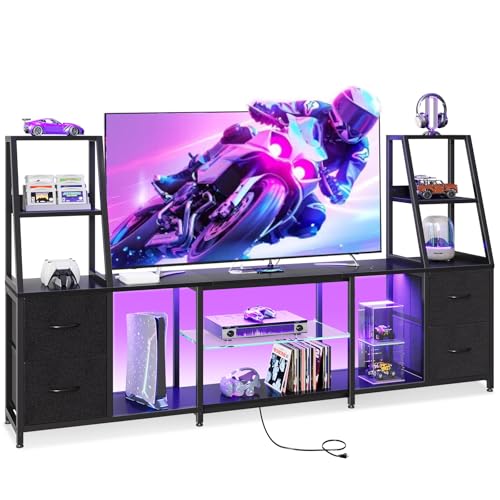
Casaottima LED TV Stand for 55/65 Inch TVs, Entertainment Center with Power Outlets and Storage Drawers
Check price on Amazon
HOOBRO Game Console Shelf, 4-Tier Video Gaming Consoles Stand with Outlet & RGB Light, Audio Rack Tower for Turntable, Stereo Equipment, Wooden Entertainment Storage Stand, Black BB38UDCJ01
Check price on Amazon
Furologee TV Stand, Entertainment Center with Open Shelves, Rustic Brown | TV Table with Storage Shelves, 4 Hooks, TV Console Up for 55 Inch TVs, TV Stands for Living Room, Bedroom
Check price on Amazon
VPSMAT 4-Tier Game Console Stand, Media Table with Open Storage, Small Entertainment Stand for Living Room Bedroom, Holds TV up to 32"
Check price on Amazon
X-cosrack 16.5" Small 4-Tier AV Media Stand,Narrow Version Wooden Corner Shelves Stereo Cabinet Audio Rack Stand Tower Perfect for Small DVD Players Game Console TV Box Cable Box WiFi Router
Check price on Amazon
Suptek Glass Floating Shelves, TV Wall Mount with Shelf for DVD Player / PS4 / Cable Boxes/Game Consoles/Sky Box/TV Accessories, Flat Black 2-Tier Wall Mount Bracket
Check price on AmazonCable Management for Multi-Console Setups
With three or more consoles, you'll be dealing with power cables, HDMI cables, Ethernet cables, controller charging cables, and headset cables. Here's how to keep them organized:
1. Label everything. Use cable labels or colored tape to identify which cable belongs to which console. This saves hours when troubleshooting.
2. Use cable management channels. Many modern TV stands include built-in channels. If yours doesn't, adhesive cable clips or velcro straps work well.
3. Invest in a quality surge protector. With multiple consoles, you need a surge protector with enough outlets and a high joule rating. Mount it inside the stand or behind it.
4. Consider a cable management box. These hide power strips and excess cable slack, keeping your living room table and TV stand set looking clean.
5. Use short HDMI cables. Excess cable length creates clutter. Right-sized cables reduce tangles and improve airflow.
Ventilation Solutions for Enclosed Stands
If you have an enclosed TV stand or cabinet, you need active ventilation to keep your consoles safe. Here are the best solutions:
Cooling fans: Aftermarket cabinet fans are affordable ($20–$50) and can be installed on the back panel. Look for USB-powered models with quiet operation.
Perforated back panels: If your stand has a solid back panel, consider replacing it with a perforated or slatted version. This simple modification can dramatically improve airflow.
Leave doors open during gameplay: This is the simplest solution, but not the most aesthetic. If you do this, ensure no pets or children can access the cables.
Elevate consoles: Use small risers or feet to lift consoles off the shelf surface, allowing air to circulate underneath.
For a more stylish solution, consider a fireplace TV stand with open shelving that combines warmth and functionality without compromising airflow.
Style Recommendations for Gaming TV Stands
Your gaming setup doesn't have to look like a teenager's bedroom. Modern TV stands can be both functional and stylish. Here are some popular styles for multi-console gamers:
Industrial: Metal and wood combinations with open shelving. An all-black TV stand with metal accents looks sleek and modern.
Mid-Century Modern: Clean lines, tapered legs, and warm wood tones. A mid-century modern TV stand adds sophistication to any gaming space.
Farmhouse: Distressed wood and open shelving. A distressed white farmhouse TV stand brings warmth and character.
Minimalist: Floating designs and clean surfaces. A matte black floating TV stand keeps things modern and uncluttered.
Rustic: Reclaimed wood and iron accents. For a cozy gaming den, a black farmhouse TV stand blends rustic charm with modern function.
Size Guide: How Wide Should Your TV Stand Be?
For multi-console gaming, your TV stand should be wider than your TV by at least 6–12 inches. This gives you space for consoles on either side. Here's a quick guide:
| TV Size | Minimum Stand Width | Recommended Stand Width | Console Capacity |
|---|---|---|---|
| 43–50 inches | 50 inches | 55–60 inches | 2–3 consoles |
| 55–60 inches | 60 inches | 65–70 inches | 3–4 consoles |
| 65–70 inches | 70 inches | 75–80 inches | 4–5 consoles |
| 75–85 inches | 80 inches | 85–90 inches | 5+ consoles |
If you have a 70-inch TV with mount, you'll need a stand at least 70 inches wide to accommodate multiple consoles comfortably. For smaller setups, a TV stand for a 60-inch flat screen with open shelving can work well for 2–3 consoles.
Ready to Upgrade Your Gaming Setup?
Browse our recommended TV stands specifically designed for multiple game consoles. With proper ventilation, storage, and cable management, you can create a gaming space that's both functional and stylish.
SHOP RECOMMENDED STANDSFrequently Asked Questions
Yes, but with caution. Both consoles generate significant heat. If placing them on the same shelf, ensure there's at least 4–6 inches of space between them and that the shelf is at least 30 inches wide. Better yet, use separate shelves if possible, or place one on the top surface and one on a lower shelf to maximize airflow.
Most quality TV stands have a total weight capacity of 100–200 lbs. A large TV (50–80 lbs) plus 3–4 consoles (30–40 lbs total) and accessories (5–10 lbs) typically totals 85–130 lbs. Always check your stand's specific weight rating. Solid wood and metal stands generally hold more than particle board models.
If your stand is open or has a perforated back panel, you likely don't need a fan. If you have an enclosed cabinet, a cooling fan is highly recommended. USB-powered cabinet fans are affordable and easy to install. They can reduce internal temperatures by 10–15°F, significantly extending your console's lifespan.
For small spaces, consider a corner TV stand or a floating TV stand. A corner TV stand with mount saves floor space, while a small floating entertainment center keeps the floor clear. Both options can accommodate 2–3 consoles with proper ventilation.
Use a combination of cable management techniques: adhesive cable clips, velcro straps, cable sleeves, and a cable management box for your surge protector. Many modern TV stands include built-in cable channels. Route cables along the back of the stand and secure them with clips or straps. Label both ends of each cable for easy troubleshooting.
Yes, a dresser as a TV stand can work, but you must address ventilation. Dressers typically have enclosed drawers, which trap heat. If using a dresser, remove the back panel or install ventilation fans. Also, ensure the dresser's top surface is wide enough to accommodate your TV and at least one console on top.
Final Thoughts
Choosing the right TV stand for multiple game consoles is about balancing ventilation, storage, cable management, and style. Prioritize airflow above all else — your consoles will run cooler, last longer, and perform better. Look for stands with open backs, adjustable shelves, and dedicated cable management features.
Whether you prefer a black 80-inch TV stand for a massive gaming setup or a small white TV stand with fireplace for a cozy corner, there's a perfect option for every space and style. Measure your consoles, plan your layout, and invest in a stand that will keep your gaming rig organized and cool for years to come.
Ready to find your perfect gaming TV stand? Check out our recommended products above and level up your gaming setup today.