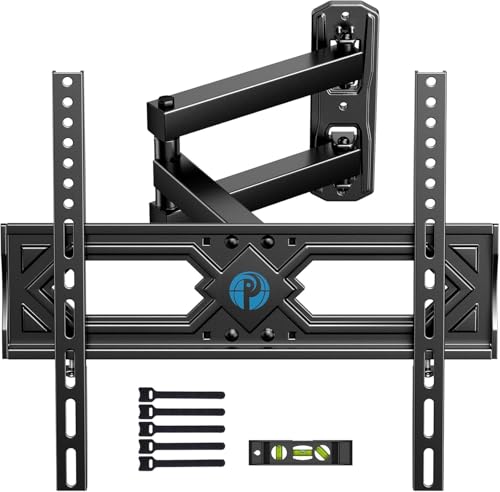
Corner TV Mount 65 Inch – Full-Motion Bracket Guide
Maximize your space with a corner TV mount built for 65-inch screens. Tilt, swivel, and extend for the perfect viewing angle from any seat.
See Top-Rated Mounts ↓Why choose a corner TV mount for your 65-inch TV? Corner mounting frees up wall space, reduces glare, and creates a natural focal point in your living room or media room. Unlike fixed wall mounts, a corner TV mount 65 inch with full-motion articulation lets you pull the screen forward, tilt it downward, and swivel left or right – so you always get the best picture, even in bright daylight.
In this guide, we break down everything you need to know: VESA patterns, weight capacity, arm reach, installation tips, and the top-rated models for 65‑inch TVs. Whether you're upgrading a home theater or furnishing a cozy apartment, this page will help you choose the right corner bracket with confidence.
What to Look for in a Corner TV Mount (65″)
VESA 400×400
Most 65″ TVs use VESA 400×400 or 400×200. Ensure your mount includes compatible brackets.
Weight Capacity
65″ TVs typically weigh 50–80 lbs. Choose a mount rated for at least 100 lbs for safety.
Full-Motion Arm
Extend, tilt (+15°/-5°), and swivel (up to 45°) to eliminate glare and optimize viewing angles.
Corner Wall Design
Dual-stud mounting plates and a double‑arm construction provide stability in corner installations.
Corner Mount vs. Traditional Stand
A corner TV mount 65 inch offers distinct advantages over a traditional TV stand or credenza. First, it lifts the screen to an ergonomic eye level, which reduces neck strain during long movie marathons. Second, it saves valuable floor space – perfect for small living rooms or apartments where a bulky entertainment center cabinet might feel cramped. Third, the swivel feature lets you adjust the screen toward a kitchen, dining area, or adjacent room, making it ideal for open‑concept homes.
If you already have a corner TV mount but need a compact storage solution underneath, consider pairing it with a small entertainment cabinet or a low TV table for media components. For those who prefer a more permanent fixture, a wall-mounted media cabinet can be installed below the TV to keep the area clean and clutter‑free.
Popular Corner TV Mounts for 65″ Screens
| Model | VESA | Weight Capacity | Arm Reach | Price Range |
|---|---|---|---|---|
| Mount-Pro Corner Arm | 400×400 | 110 lbs | 24″ | $45–$60 |
| FlexiView Full-Motion | 400×200 | 100 lbs | 26″ | $65–$85 |
| CornerMaster Heavy-Duty | 400×400 | 130 lbs | 28″ | $90–$120 |
| SpaceSaver Tilt & Swivel | 400×300 | 95 lbs | 20″ | $50–$70 |
* Prices are approximate and may vary by retailer. Always verify compatibility with your specific TV model.
Installation Tips for Corner TV Mounts
1. Find the Wall Studs
Corner mounts require secure attachment to at least two wall studs. Use a stud finder to locate the studs in the corner. If the studs are unevenly spaced, use a metal mounting plate or toggle bolts (for drywall) as a backup.
2. Check the VESA Pattern
Most 65″ TVs have VESA 400×400 or 400×200. Double-check your TV’s manual before purchasing. If your TV has an extra tall TV stand or non‑standard pattern, you may need an adapter plate.
3. Use a Level
Even a slight tilt can make the TV look crooked. Use a laser level or a bubble level to ensure the mount is perfectly horizontal before tightening all bolts.
4. Manage Cables
Corner installations often have cables running along the wall. Use cable covers or in‑wall cable management kits to keep the area tidy. For a clean look, consider combining the mount with a floating TV wall mount style that conceals wiring behind the wall.
Safety Note: Always follow the manufacturer’s weight and size guidelines. If you’re unsure about the installation, hire a professional installer – it’s a small investment for peace of mind.
Pairing Your Corner Mount with Furniture
A corner TV mount doesn’t mean you have to forgo storage. Many homeowners place a corner TV mount above a low media console or a TV unit with drawers to store gaming consoles, streaming devices, and remote controls. For a rustic vibe, a rustic corner TV stand or farmhouse corner TV stand adds warmth while keeping the area functional.
If you have a larger living room, you might want to create an entire entertainment wall. In that case, consider a entertainment wall unit with fireplace or a TV wall unit with fireplace – but ensure the corner mount is installed high enough to clear the mantel or fireplace surround.
Frequently Asked Questions
Will a corner TV mount fit a 65-inch TV?
Yes – as long as the mount supports the VESA pattern (typically 400×400) and weight (usually 65″ TVs weigh 50‑80 lbs). Always check the product specifications.
Can I use a corner mount on drywall without studs?
For a 65″ TV, we strongly recommend mounting into wall studs. Drywall anchors alone are not strong enough to support the weight. If studs are not available, use a heavy‑duty metal plate that spans multiple studs or consider a TV floor mount as an alternative.
What’s the best height for a corner TV mount?
Eye level from your primary seating position is ideal. For most sofas, the center of the screen should be around 42‑48 inches from the floor. Adjust the tilt angle to reduce glare from windows or lights.
Do corner mounts work with 65-inch curved TVs?
Yes, most full‑motion corner mounts are compatible with curved TVs. However, verify that the mount’s VESA plate fits the curvature of your TV (some curved TVs have a non‑standard VESA pattern).
Best Corner TV Mounts for 65″ Screens
⚠️ AFFILIATE DISCLOSURE: This website contains affiliate links. As an affiliate Associate, we earn from qualifying purchases. If you make a purchase through these links, we may receive a small commission at no additional cost to you. Read our full affiliate policy.

Perlegear Corner TV Wall Mount Long Arm TV Mount Bracket for 37-75 Inch TVs | Full Motion Wall Mount with 32.37” Extension & Swivel Articulating Arm & Tilt, MAX VESA 600x400mm, Holds up to 100 lbs
Check price on Amazon
MOUNTUP 37.2" Long Arm TV Wall Mount for Most 42-75 Inch TVs, Full Motion Corner Wall Mount TV Bracket with Extension & Tilt & Swivel & Level Articulating Arm, Max VESA 600x400mm, Holds up to 99 lbs
Check price on Amazon
PERLESMITH Corner TV Wall Mount for 37–70 inch TVs up to 99 lbs | Corner TV Mount Wall Bracket with Extension, Swivel, Tilt, Dual Articulating Arms Fits Different Corners, Max VESA 600x400mm
Check price on Amazon
VIVO Corner TV Wall Mount for 37-70 in Screens, Max VESA 600x400mm | Black, Sturdy Steel Dual Arm Design, Full Motion TV Mount for LCD LED Plasma Flat & Curved Screens, Holds 99 lbs, MOUNT-CR70C
Check price on Amazon
USX STAR Corner TV Wall Mount Long Arm Full Motion for 55 65 70 75 inch TVs | UL Listed, Fit 37-84" TV, Hold 100lbs, Swivel 180°, Tilt +5/-15°, Level +/-4°, 32" Arm Extension, VESA600x400mm, Single Stud
Check price on Amazon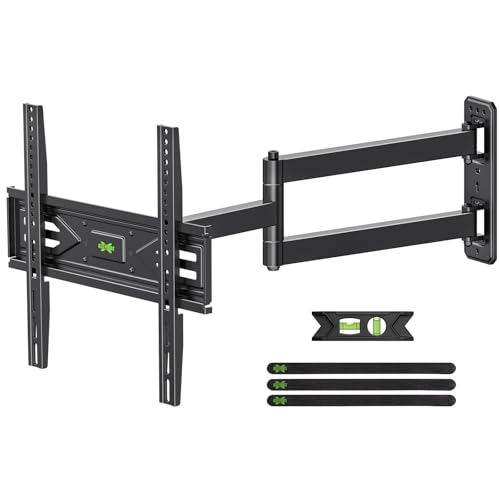
USX MOUNT Corner TV Wall Mount with 31.22" Long Arm for 26-65 Inch TVs up to 80 lbs, Full Motion TV Wall Mount Bracket with Swivel and Tilt, Max VESA 400x400mm fit Most 32 40 42 43 50 55 60 65 TVs
Check price on Amazon
Pipishell Full Motion TV Wall Mount for Most 26-65 inch Flat & Curved TVs | Max VESA 400x400mm, Corner TV Mount with Single Articulating Arm, Adjustable Height, Extension, Swivel, Tilt, up to 88 lbs
Check price on Amazon