
Corner TV Mount Guide: Maximize Space & Viewing Comfort
Discover the best corner TV mount for your home. Learn about different mount types, weight capacities, installation tips, and how to choose the perfect corner bracket for any room size.
Shop Corner TV MountsWhy choose a corner TV mount? A corner TV mount is the ultimate space-saving solution for rooms where wall space is limited or you want to create a cozy entertainment nook. By positioning your TV in the corner, you free up valuable wall area, improve viewing angles, and make your room feel more open and inviting.
Types of Corner TV Mounts
Fixed Corner Mount
Holds your TV flat against the corner wall. Offers a sleek, low-profile look with the most stability. Ideal for rooms where viewing angle doesn't need adjustment.
Tilt Corner Mount
Allows you to angle the TV up or down, reducing glare from windows or lights. Perfect for TVs mounted higher on the wall or rooms with bright ambient light.
Full-Motion Corner Mount
Provides the ultimate flexibility with swivel, tilt, and extension capabilities. Pull the TV away from the corner and rotate it toward any seating area. Best for larger rooms or multi-purpose spaces.
Dual-Arm Corner Mount
Features two heavy-duty arms that extend and retract smoothly. Great for larger TVs (55" and up) and provides excellent stability even when fully extended.
Key Benefits of a Corner TV Mount
- Space Optimization: Perfect for small apartments, bedrooms, or any room where wall space is at a premium.
- Improved Viewing Angles: Position your TV at the ideal angle for multiple seating areas, reducing neck strain and enhancing comfort.
- Reduced Glare: Tilt and swivel features help you avoid reflections from windows and overhead lights.
- Enhanced Room Flow: A corner-mounted TV opens up the room, making it feel larger and more organized.
- Versatile Placement: Works well in living rooms, home theaters, gaming rooms, and even reading nooks with a small TV for background viewing.
How to Choose the Right Corner TV Mount
Selecting the perfect corner TV mount depends on several factors. Consider the following when making your decision:
TV Size & Weight
Check your TV's VESA pattern and weight. Most corner mounts support TVs up to 55–75 inches. Always choose a mount rated for at least 20% more than your TV's actual weight for safety.
Wall Type
Corner mounts work on drywall, brick, or concrete, but require different hardware. For drywall, you'll need a sturdy stud finder and lag bolts. Use a stud finder to locate corner studs for secure installation.
Viewing Distance & Angle
Measure the distance from your main seating area to the corner. A full-motion mount gives you the most flexibility to adjust the angle for optimal viewing from home theater seating or a relaxation zone.
Installation Ease
Look for mounts with clear instructions, included hardware, and a level. Some advanced mounts feature bubble levels for perfect alignment. Watch installation tutorials online or hire a professional if unsure.
Corner TV Mount Price Guide
Corner TV mounts are available at various price points to suit every budget. Below is a typical price range based on mount type and features:
| Mount Type | Best For | Price Range |
|---|---|---|
| Fixed Corner Mount | Small to medium TVs (32"–55") | $30 – $60 |
| Tilt Corner Mount | Medium TVs (40"–65") | $40 – $90 |
| Full-Motion Corner Mount | Large TVs (55"–75") | $60 – $150 |
| Heavy-Duty Dual-Arm Mount | Extra-large TVs (75"–85") | $100 – $250 |
* Prices are approximate and may vary by brand, features, and retailer.
Corner TV Mount Installation Tips
Pro Tip: Before drilling, use a stud finder to locate the studs in your corner. Most corner mounts require two studs (one on each wall) for secure installation. Always use a level and tighten bolts gradually to ensure the mount is straight and secure.
- Gather Tools: You'll need a stud finder, level, drill, socket wrench, and measuring tape.
- Locate Studs: Corner studs are typically 16 inches apart on center. Mark each stud clearly.
- Attach Mounting Plate: Secure the wall plate to the studs using the included lag bolts and washers.
- Attach TV Brackets: Fasten the VESA brackets to the back of your TV using the correct screws and spacers.
- Hang & Adjust: With help, hang the TV onto the mount. Adjust the angle and tighten all safety screws or locks.
- Check Stability: Gently push and pull the TV to ensure it's securely mounted before releasing.
For safety, always follow the manufacturer's instructions. If you're unsure, check our TV safety tips or hire a professional installer.
Creative Ways to Use a Corner TV Mount
A corner TV mount isn't just for living rooms. Here are some inspiring ideas:
- Home Theater: Create an immersive home theater setup by placing the TV in the corner and arranging seating around it.
- Gaming Room: A corner mount saves floor space for gaming chairs and consoles. Perfect for gaming room decor.
- Bedroom: Mount a TV in the corner to enjoy movies from bed without taking up dresser or closet space.
- Office/Study: Keep a TV or monitor in the corner for video calls or background entertainment while working.
- Kitchen/Dining: Add a small corner TV for cooking shows or news while you eat or prepare meals.
Safety & Maintenance
Proper care and safety practices ensure your corner TV mount remains secure and functional for years. Follow these simple guidelines:
- Regular Checks: Periodically tighten all bolts and screws. Vibrations from moving the TV can loosen connections over time.
- Weight Limits: Never exceed the manufacturer's weight limit. Overloading the mount can cause it to fail.
- Cable Management: Use cable ties or raceways to keep wires tidy and prevent tripping hazards. For more tips, visit our pet-proof TV furniture guide.
- Safety First: Keep the TV away from high-traffic areas and secure it to prevent tipping. Review our TV safety tips for more information.
Essential Accessories for Your Corner TV Mount
Enhance your corner TV experience with these useful accessories:
- Cable Management Kit: Hide wires for a clean, professional look.
- Corner TV Stand: Pair your mount with a corner TV stand or corner TV cabinet for additional storage.
- Soundbar Mount: Attach a soundbar beneath the TV for better audio.
- Surge Protector: Protect your TV and connected devices from power surges.
- TV Cover: Keep dust off your screen when not in use.
Frequently Asked Questions
Can any TV be mounted in a corner?
Most modern flat-screen TVs can be mounted in a corner as long as they have VESA mounting holes. Check your TV's VESA pattern and weight to find a compatible mount.
How much weight can a corner TV mount hold?
Corner mounts typically hold between 50 and 150 pounds, depending on the model. Always check the mount's specifications and never exceed its rated capacity.
Can I install a corner mount myself?
Yes, many DIYers install corner mounts successfully. However, if you're not comfortable drilling into studs, hire a professional to ensure safety and proper alignment.
What's the best corner mount for a 65-inch TV?
A full-motion or dual-arm corner mount with a weight capacity of at least 80 lbs and a VESA pattern of 400x400mm is recommended for 65-inch TVs.
Ready to transform your space? A corner TV mount is a smart investment that maximizes floor space, improves viewing comfort, and adds a modern touch to any room. Whether you're setting up a home theater, a gaming room, or simply want to make the most of your living area, the right corner mount makes all the difference. Choose a mount that fits your TV size, room layout, and viewing habits, and enjoy a clutter-free, stylish entertainment space.
Top-Rated Corner TV Mounts
⚠️ AFFILIATE DISCLOSURE: This website contains affiliate links. As an affiliate Associate, we earn from qualifying purchases. If you make a purchase through these links, we may receive a small commission at no additional cost to you. Read our full affiliate policy.
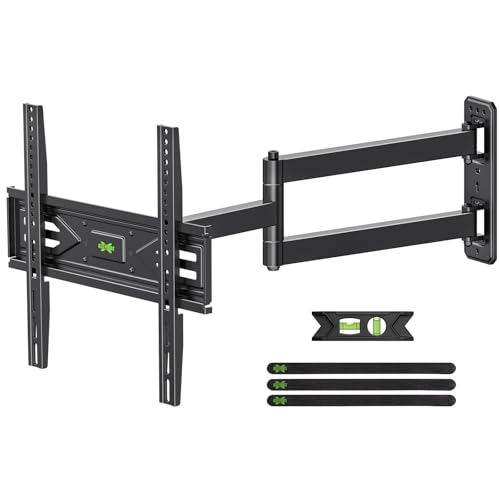
USX MOUNT Corner TV Wall Mount with 31.22" Long Arm for 26-65 Inch TVs up to 80 lbs, Full Motion TV Wall Mount Bracket with Swivel and Tilt, Max VESA 400x400mm fit Most 32 40 42 43 50 55 60 65 TVs
Check price on Amazon
Perlegear Corner TV Wall Mount Long Arm TV Mount Bracket for 37-75 Inch TVs | Full Motion Wall Mount with 32.37” Extension & Swivel Articulating Arm & Tilt, MAX VESA 600x400mm, Holds up to 100 lbs
Check price on Amazon
Pipishell Full Motion TV Wall Mount for Most 26-65 inch Flat & Curved TVs | Max VESA 400x400mm, Corner TV Mount with Single Articulating Arm, Adjustable Height, Extension, Swivel, Tilt, up to 88 lbs
Check price on Amazon
Amazon Basics Full Motion Articulating TV Wall Mount, with Swivel and Tilt, for 26" to 55" TVs and Flat Panels up to 80 Lbs, VESA Compatible, Single Stud, Black
Check price on Amazon
VIVO Corner TV Wall Mount for 37-70 in Screens, Max VESA 600x400mm | Black, Sturdy Steel Dual Arm Design, Full Motion TV Mount for LCD LED Plasma Flat & Curved Screens, Holds 99 lbs, MOUNT-CR70C
Check price on Amazon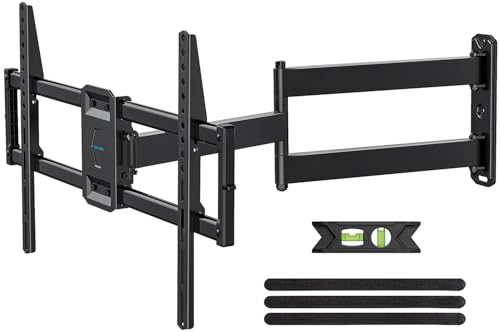
USX STAR Corner TV Wall Mount Long Arm Full Motion for 55 65 70 75 inch TVs | UL Listed, Fit 37-84" TV, Hold 100lbs, Swivel 180°, Tilt +5/-15°, Level +/-4°, 32" Arm Extension, VESA600x400mm, Single Stud
Check price on Amazon
PERLESMITH Corner TV Wall Mount for 37–70 inch TVs up to 99 lbs | Corner TV Mount Wall Bracket with Extension, Swivel, Tilt, Dual Articulating Arms Fits Different Corners, Max VESA 600x400mm
Check price on Amazon